
If you're a creator in 2026, an AI video generator for YouTube Shorts isn't just a nice-to-have tool—it's your secret weapon. These platforms automate the entire video creation process, helping you feed the YouTube algorithm with the consistent, high-quality content it craves. Whether you're making faceless narration videos or slick e-commerce ads, AI is what will give you an edge, letting you scale your output and hit monetization goals faster than ever.
Why an AI Video Generator for Shorts is Non-Negotiable in 2026
The content treadmill on YouTube is spinning faster than ever, with Shorts leading the charge. As a creator, you know the drill: the old way of spending hours, or even days, editing a single video just doesn't cut it anymore. To stay relevant, you need a daily stream of engaging content, which is a surefire recipe for burnout.
This is where an AI video generator for YouTube Shorts completely changes the game. Tools like Aicut are no longer just a luxury; they're a fundamental part of a smart creator's workflow. They handle the heavy lifting—from scripting and voiceovers to generating all the visuals—freeing you up to focus on the creative side.
To see just how big the difference is, let's look at a quick comparison.
Manual vs AI-Powered Shorts Creation
| Metric | Manual Video Creation | AI Video Generation (with Aicut) |
|---|---|---|
| Time Investment | 2-5 hours per Short | 5-15 minutes per Short |
| Cost | High (software, stock footage, voice talent) | Low (affordable subscription) |
| Output Volume | 1-2 Shorts per day (max) | 10+ Shorts per day (easily) |
| Skill Required | Video editing, audio recording, design skills | Basic prompting and idea generation |
The table makes it pretty clear. AI tools don't just save a little time; they fundamentally change what's possible for a solo creator or a small team.
Outpace the Competition with AI
Think about those popular faceless channels that tell historical stories or narrate Reddit threads. Manually, a single one-minute Short could easily eat up your afternoon with sourcing footage, recording and editing audio, and syncing everything perfectly. With an AI tool, you could knock out an entire week's worth of content in that same amount of time.
This isn't just about speed; it's a massive strategic advantage. You can test more ideas, jump on trends the moment they pop, and build a huge library of content that consistently gets pushed by the YouTube algorithm.
The market numbers back this up. The AI video generation space ballooned from $614.8 million in 2024 and is on track to hit a staggering $2,562.9 million by 2032. Even more telling, the amount of AI-generated video content exploded by 840% between January 2024 and January 2026, driven almost entirely by short-form clips.
Tap Into Next-Generation AI Models
Today's top AI generators are powered by incredible models like Sora 2 and Veo 3.1. These can produce photorealistic clips that are often impossible to distinguish from actual camera footage. This means you can create stunning, scroll-stopping visuals without needing a camera, a crew, or a stock video subscription.
Think of an AI video generator not as a replacement for your creativity, but as a massive amplifier for it. It strips away all the technical roadblocks, letting you pour all your energy into the ideas and stories that make your channel stand out.
For e-commerce brands, this is a goldmine. You can generate an endless supply of product videos and user-generated content (UGC) style ads without a single expensive photoshoot. For individual creators, it's the fastest path I've seen to hitting those monetization requirements.
With new tools popping up all the time, it can be tough to know where to start. If you're trying to figure out which platform is right for you, checking out a solid roundup of the best AI video generators can help you compare features and find your fit. In the end, getting on board with this technology isn't about just keeping up—it's about getting ahead.
Alright, enough theory. Let's actually build a YouTube Short with real viral potential using an ai video generator for youtube shorts like Aicut. I'm going to show you my exact process for turning a simple idea into a finished video in just a few minutes—a task that used to take hours.
The fastest way to get views is to tap into what's already working. Don't try to invent a brand new format from scratch. Instead, lean on the proven winners. Aicut makes this easy with its "Viral Niche Templates."
These aren't just generic presets. They're frameworks built on video styles that consistently pull in millions of views. You know the ones—the videos that make you stop scrolling. They usually fall into a few key categories.
Choosing Your Viral Template
Once you're in Aicut, the first thing you should do is check out the template library. This is your shortcut to creating content that feels like it belongs on the Shorts shelf. You'll find a ton of options designed for specific types of stories.
- Reddit Narrations: These are absolute gold. The AI grabs an interesting story from a place like r/askreddit, then narrates it over engaging background clips. People get hooked on the drama.
- Text Stories: This style looks like a text message conversation unfolding on screen. It’s a brilliant way to build suspense and keep people watching until the final reveal.
- Historical Facts: Quick, fascinating history lessons perform surprisingly well. These templates help you structure a short narrative about an event or person, complete with AI-generated visuals from that time period.
For this walkthrough, we'll go with the Reddit Narration template. It's a super reliable format that's quick to make and already has a huge built-in audience. By selecting it, Aicut automatically sets up the right pacing and on-screen text style for us.
Generating a Script with the Prompt Library
So we have our format. Now we need a story. This is where the AI really starts to flex. Instead of spending an hour digging through Reddit yourself, you can use Aicut’s Prompt Library, which is always updated with trending topics.
You could just search for "interesting Reddit stories," but I find you get much better results when you're specific.
Pro Tip: Don't be vague. A prompt like "Find a popular Reddit story from r/AmItheAsshole about a family dispute that has a surprising twist" will give you a much stronger script than just asking for a "good story."
The AI won't just dump the raw text on you. It gives you a clean, tight script edited specifically for a 60-second Short. All the fluff is gone, leaving only the parts that keep viewers glued to the screen.
Bringing Your Script to Life with Photorealistic Clips
Now for the fun part. With the script ready, Aicut will break it down sentence by sentence. This is where you get to use powerful AI models like Sora 2 or Kling right inside the editor. For each line of the script, the AI suggests a prompt to generate a matching video clip.
For our family dispute story, the prompts might look something like this:
- Scene 1: "A family sitting awkwardly at a dinner table, tension in the air."
- Scene 2: "Close-up shot of a young woman looking upset, a single tear on her cheek."
- Scene 3: "An older man pointing a finger angrily across the table, photorealistic."
Aicut generates these custom clips on the fly. You're no longer stuck trying to find stock footage that kinda-sorta fits. You get unique visuals that match your story perfectly, making the final video feel incredibly polished and immersive.
In just a few clicks, you’ve gone from a simple idea to a compelling, high-quality video. If you want to see a more detailed walkthrough, you can learn more about creating AI video from scratch right on our platform.
Alright, once you've got the hang of the basics, it's time to dive into the more advanced formats that are absolutely crushing it on YouTube Shorts. Moving past simple voiceovers is how you start creating stuff that’s genuinely immersive and stops people from scrolling. The best part? With an ai video generator for youtube shorts like Aicut, you can pull off these slick styles without a camera crew, actors, or a headache-inducing editing timeline.
These formats aren't just for looking cool; they're smart, strategic moves. A Point of View (POV) video, for instance, creates this incredible sense of being right there. It’s a killer strategy for faceless channels that want to build a real, personal connection with their viewers.
The whole idea is to take the friction out of the creative process, from figuring out your niche to getting the final video. It’s a simple, three-step workflow.
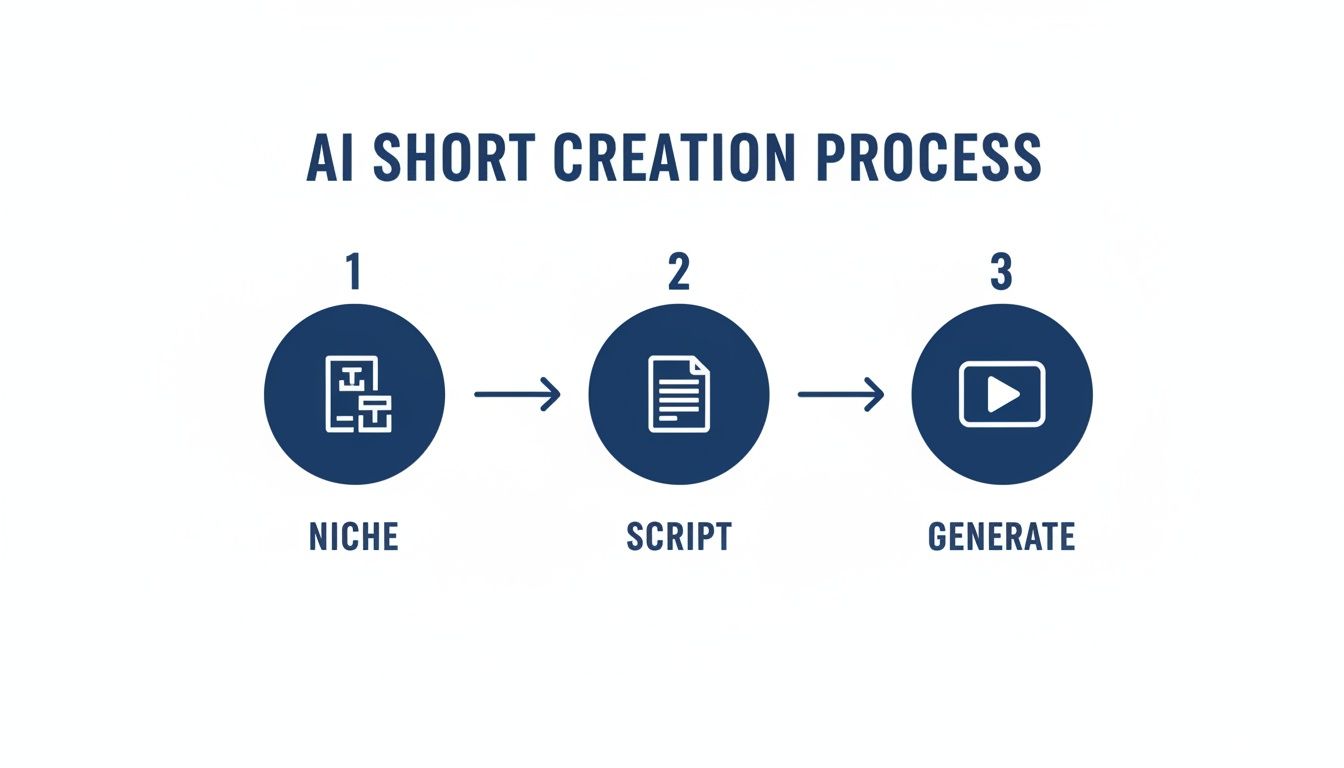
As you can see, the AI handles the heavy lifting so you can stay focused on the creative side of things.
Crafting Photorealistic POV Videos
Point of View videos are a goldmine on Shorts. Why? Because they literally drop your audience into the middle of a story. You could create a "day in the life" of a Roman gladiator or see the world through the eyes of a house cat—all without ever touching a camera. With Aicut, this is not just possible, it's surprisingly simple.
The secret is all in how you write your prompts. You're not describing a scene; you're describing what it feels like to be in the scene.
- A weak prompt might be: "A person walking through a forest."
- A much stronger POV prompt would be: "First-person perspective walking on a narrow dirt path through a dense, sun-dappled forest, hands occasionally coming into view, photorealistic, 4K."
See the difference? By adding phrases like "first-person perspective," "POV," or "looking through the eyes of," you’re giving the AI clear instructions. This format is perfect for storytelling, tutorials, or any "experience" video where you want to build an immediate, personal connection.
Animating Photos into Talking Characters
Here's another great trick: bringing a static image to life as a talking character. This is a go-to for commentary, educational content, or any story where you want a personality but don't want to be on camera yourself. Think about it—you could have a historical portrait, a cartoon character, or even your product's mascot deliver a script.
In Aicut, the process is dead simple:
- Upload an image: Just grab a clear, front-facing picture of your character.
- Add a script: Type or paste the text you want them to say. The AI handles the voiceover.
- Generate: The tool then syncs the audio to the image, animating the mouth and adding subtle movements to make it look natural.
This technique is a complete game-changer for channels built around history, mythology, or unique characters. It literally gives a voice to the voiceless and turns dry facts into a captivating performance.
You don't have to be an animator. The AI does all the technical wizardry, freeing you up to write a killer script. If you're just getting started and need some ideas, you can use AI video templates for inspiration.
Producing Authentic UGC-Style Product Reviews
Everyone knows that user-generated content (UGC) is trusted more than just about any other type of marketing. The problem? Getting a steady stream of it is tough. Using an ai video generator for youtube shorts, you can now create authentic-looking UGC-style reviews on demand with AI avatars.
These aren't clunky robots; they look and sound like real people giving a testimonial or unboxing a new gadget. The key to making it work is all in the details. You have to prompt the AI to create a natural, casual setting.
Here’s an example prompt for an AI avatar review: "A friendly-looking woman in her late 20s, sitting in a brightly lit living room, holding a smartphone and talking enthusiastically to the camera. Selfie-style shot, casual and authentic."
For e-commerce brands, this means you can churn out dozens of ad creatives without the massive cost of hiring influencers. For creators, it's a way to produce affiliate content that actually feels genuine and trustworthy.
The numbers back this up. Short-form AI videos can pull in 2.7x more engagement than a static image post. What's even wilder is that 89% of consumers watch them and have no idea they were made with AI. With Aicut's batching features, you can script, voice, and schedule a whole fleet of these videos, helping creators hit their monetization goals faster and brands slash their ad costs.
How to Optimize and Schedule Shorts for Virality
Getting a great-looking video from an ai video generator for youtube shorts feels like crossing the finish line, but it’s really just the halfway point. What you do after generating the video is what separates the duds from the viral hits. This is where we fine-tune everything for the algorithm and set it up for maximum impact.
First things first, let’s talk export settings. A fantastic video can die a quick death if it’s formatted incorrectly. Inside Aicut, you have to make sure your video is set up for the Shorts shelf. Lock in that 9:16 vertical aspect ratio and always choose the highest resolution available, like 1080p. A crisp, clean video just looks more professional, and YouTube’s algorithm rewards that quality.
Nail Your Title and Description
With your video file ready to go, it’s time to focus on your metadata. A great feature in Aicut is that you can write your title, description, and hashtags right there in the platform, which keeps everything organized.
Your title is your hook. It needs to be short, punchy, and make someone stop their scroll. Think about what gets you to pause—it’s usually a title that drops a weird fact or teases a wild outcome.
- Weak Title: "Interesting Historical Fact"
- Strong Title: "Why Romans Used Stale Urine as Mouthwash"
See the difference? That second one creates an immediate "wait, what?" feeling that practically begs for a click. Use the description to add a little more context and sprinkle in your target keywords. Just a sentence or two explaining the Short and adding 3-5 relevant hashtags is all you need to help YouTube figure out who to show it to.
Don’t just copy and paste trending hashtags. A better strategy is to use a mix of broad terms (like #history or #funfacts) and niche-specific ones (like #ancientrome). This helps you reach a wide audience while also attracting viewers who are super interested in your topic.
This one-two punch of a killer hook and smart keywords gives your Short a serious advantage right out of the gate.
Automate Your Content Calendar
If there’s one thing the YouTube algorithm loves, it’s consistency. Posting once in a blue moon sends a signal that you’re not a serious creator. But posting on a regular schedule? That trains the algorithm to expect your content and start pushing it for you.
This is where Aicut’s auto-posting and scheduling feature becomes a lifesaver.
Instead of remembering to upload a video every other day, you can sit down and schedule out your entire week or month in one go. I’d recommend aiming for 3-5 Shorts per week. That’s enough to show YouTube you’re active without burning yourself out. Even better, Aicut lets you cross-post to TikTok and Instagram Reels automatically, so you can triple your reach without any extra work.
Understand the New Rules of Virality
For years, the conventional wisdom was that the first three seconds of a Short decided its fate. While a good hook is still essential, the game has changed. The Shorts algorithm has gotten smarter, and its priorities have shifted.
The new king of virality is viewer retention and average view duration.
Recent data shows that for a Short to have a real shot at going viral, its average view duration needs to be at or even above the total length of the video. For a 25-second Short, this means people are not only watching to the end but often looping it. This is the metric the algorithm is obsessed with right now. You can learn more about how the algorithm works directly from YouTube to really get a feel for it.
This means your job isn't just to hook viewers, but to hold their attention until the very last frame. It's exactly why narrative-driven formats, like the text stories or Reddit posts you can make with an ai video generator for youtube shorts, perform so well—they’re designed to keep you watching for the final payoff.
Turning Your AI-Generated Views Into Revenue
It’s a great feeling to watch your view count tick up, but let’s get down to business: turning those views into actual income. Creating great content with an ai video generator for youtube shorts is how you get noticed. Monetizing that attention is how you build a business.
The most straightforward way to start earning is through the YouTube Partner Program (YPP).
To get in, you'll need to hit 1,000 subscribers and rack up 10 million valid public Shorts views within the last 90 days. Once you're accepted, you start earning a 45% share of the ad revenue that's collected from the Shorts feed. YouTube pools all this ad money and pays creators based on their slice of the total viewership.
Unlocking Your Earning Potential
Here's something a lot of new creators miss: not all views are created equal. The key metric to watch is your RPM, or Revenue Per Mille, which tells you how much you earn for every 1,000 views. This number can swing wildly depending on who is watching your content and what they're interested in.
Certain niches, like finance, tech, and business, are goldmines. Advertisers pay top dollar to reach these audiences, which means a bigger payout for you. The potential is real, especially since Shorts RPMs have been on the rise. With the 45% revenue share, pulling in 40-100 million monthly views in a high-value niche could realistically bring in over $5,000 a month.
This is where a tool like Aicut becomes so powerful. It lets you create photorealistic clips or those popular Reddit-style narrations that perform so well, all from a simple text prompt.
Think of it this way: a viral Short about a funny cat might get 10 million views but earn a low RPM. A Short explaining a complex investing strategy might get 1 million views but have an RPM that's ten times higher, making it far more profitable.
Using an ai video generator for youtube shorts like Aicut means you can consistently produce high-quality content for these profitable niches, even if you’re not a finance guru or a pro videographer. For a full breakdown of monetization, check out our guide on how to monetize YouTube Shorts.
Diversifying Your Income Streams
Ad revenue is a fantastic starting point, but don't put all your eggs in one basket. The most successful creators build multiple streams of income, and your AI-generated Shorts are the perfect way to feed traffic into these other channels.
Here are a few proven ways to earn money beyond the YPP:
- Affiliate Marketing: This is often the easiest to set up. Find products or services you genuinely believe in that your audience would find useful. You can create a UGC-style review video with Aicut, then drop your unique affiliate link in the comments or your channel bio. Every time someone makes a purchase through your link, you get a cut.
- Selling Your Own Products: Have an ebook, a digital course, or some cool merch? Your Shorts are your best marketing tool. You could create a series of quick-tip Shorts and then point viewers to your complete course for a deeper dive. Those fast, engaging clips are perfect for driving sales.
- Brand Deals and Sponsorships: Once your channel starts gaining traction, brands will take notice. A channel with a strong Shorts presence is incredibly attractive to sponsors who want quick, high-impact promotion. They might pay you for a dedicated Short or to feature their product in your content.
Stop thinking of your Shorts as just one-off videos. See them as part of a larger system. Every Short you post is a little engine that grows your audience, builds your brand, and funnels cash through different streams. An ai video generator for youtube shorts gives you the consistency to keep that system running, turning your creative side hustle into a real, profitable business.
Of course. Here is the rewritten section with a more natural, human-written tone.
Got Questions About AI Shorts? Let's Clear Things Up.
Jumping into the world of AI video generators for YouTube Shorts can feel a bit overwhelming. The tech is moving fast, and it’s smart to have a clear picture before you go all in. I hear a lot of the same questions from creators, so let’s walk through them.
A big one is always about the money. Can you actually earn a decent living from AI-generated Shorts? Absolutely, but it’s not a get-rich-quick scheme. Your income potential really boils down to your niche and the quality of your content.
Think about it this way: not all views are created equal. A Short about personal finance is going to have a much higher RPM (the revenue you earn per thousand views) than a random funny clip. This means 1 million views on a finance Short could earn you way more than the same number of views on a cat video. The real power of AI is its ability to help you consistently churn out quality content for these more profitable niches.
The Secret to Going Viral Isn't What You Think
We all know a good hook in the first few seconds is crucial, but that's old news. The YouTube algorithm has evolved, and now, the single most important factor for going viral is your Average View Duration (AVD), especially how it compares to your video’s total length.
Here’s a real-world example. If your Short is 30 seconds long and your AVD hits 35 seconds, you’ve struck gold. It tells YouTube that people aren't just watching to the end—they're hitting replay. That’s a massive signal that your content is engaging, and the algorithm will start pushing it out to a much wider audience. This is why formats like Reddit stories or text message conversations do so well; they create suspense that makes people stick around for the payoff and often rewatch to catch details.
The goal has shifted. It's no longer just about stopping the scroll; it’s about earning the rewatch. If you can craft a story with a satisfying or surprising ending, you're on the right track to boosting that AVD and getting the algorithm on your side.
This is where an ai video generator for youtube shorts becomes a strategic advantage. You can rapidly test out different story structures and hooks to see what keeps your audience glued to the screen.
How Often Should I Be Posting Shorts?
Consistency is everything on YouTube. The algorithm favors channels that post on a predictable schedule because it sees them as reliable content sources. But don't mistake consistency for burnout—posting multiple times a day isn't the answer.
For most channels, the sweet spot is posting 3-5 high-quality Shorts per week. This pace is frequent enough to build momentum with the algorithm and your audience, but not so demanding that you start sacrificing quality.
This schedule works because it:
- Builds a habit for your viewers, who start expecting your content.
- Feeds the algorithm enough data to figure out exactly who to show your videos to.
- Is actually sustainable, especially when you have an AI tool doing the heavy lifting.
This is where features like scheduling and auto-posting become your best friend. You can batch-create an entire week's worth of content, set it to go live automatically, and never worry about missing a post. Honestly, building this simple habit is one of the most powerful things you can do for long-term channel growth.
Ready to stop spending hours wrestling with video editors and start creating viral content in minutes? Aicut is built to help you generate engaging, high-quality YouTube Shorts with AI. Join over 500,000 creators who are already growing their channels the smart way. Try Aicut for free and see the difference for yourself.