
Your planner calls in sick. The schedule lives in a spreadsheet with color codes only one person understands. Sales wants a rush order pushed in. Production wants longer runs. Purchasing says one key material is late. By lunch, the plan has already changed three times.
That's a normal starting point for a lot of factories.
The fix usually isn't a more complicated spreadsheet. It's a better way to think about batch production scheduling so the schedule reflects how the plant works. Good scheduling doesn't remove every disruption. It gives the team a system for making trade-offs without creating chaos every day.
What Is Batch Production Scheduling
Batch production scheduling is what you use when the plant doesn't run one uninterrupted product forever, but it also isn't making every unit as a one-off custom job. You group similar items together, run them as a batch, then move that batch through the next operation.
According to NetSuite's explanation of batch scheduling, batch scheduling is a manufacturing method where a group of identical products is assembled simultaneously, with each production step applied to the entire group before the batch moves to the next stage. That same explanation notes that this lets manufacturers produce a specific quantity of one product type without changing the setup, which helps reduce cost per unit and minimize changeover time.
What it looks like on the floor
In plain terms, you're deciding things like:
- Which product runs first
- How much of it to make in one run
- Which machine and crew will run it
- When the batch moves to the next work center
- When to stop one run and switch to another
If you make sauces, tablets, paint, baked goods, chemicals, metal parts, or packaged consumer products, this is familiar. You don't want to clean down or reconfigure equipment every hour. You want enough repetition to be efficient, but not so much that you flood the floor with inventory nobody needs yet.
Why this matters more than people think
The biggest mistake new planners make is treating the schedule as an admin task. It isn't. It's an operations control system.
A weak schedule creates all the usual pain points at once. Material gets staged too early. Operators wait on the previous job. QA gets slammed at the end of the shift. Shipping starts asking what happened. None of those problems feel like “a scheduling issue” when they hit, but that's often where they started.
Practical rule: A batch schedule is only useful if operators can run it, materials can support it, and supervisors don't need to rewrite it every few hours.
What good batch scheduling actually does
A solid schedule gives the business a repeatable way to balance efficiency and responsiveness. It helps you:
- Group similar work so setup losses stay under control
- Use machines and labor intentionally instead of reacting to whoever shouts loudest
- Set realistic expectations for sales, customer service, and shipping
- Reduce avoidable disruption from unnecessary resequencing
- Protect margin by keeping runs stable and practical
That's why mastering batch production scheduling is such an important skill. In plants that don't run as a pure continuous flow operation, the schedule is where cost, service, capacity, and floor discipline all meet.
Deconstructing Your Production Environment
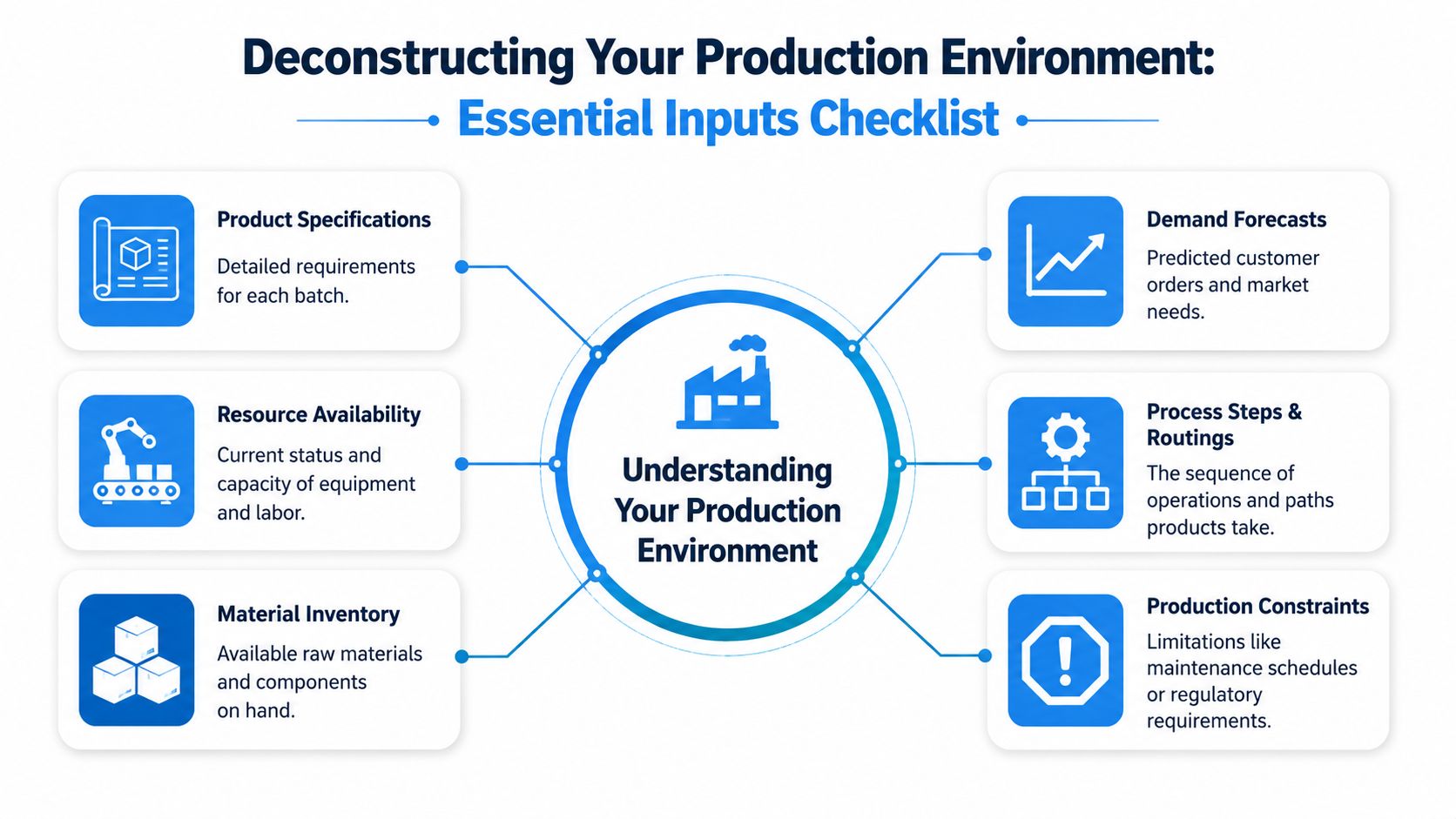
Before you schedule anything, you need to understand the environment you're scheduling into. Most bad schedules don't fail because the planner picked the wrong color in Excel. They fail because the inputs were incomplete, outdated, or unrealistic.
A useful reminder sits behind this. According to a NIST study cited by Deskera's write-up on batch flow production scheduling, inefficient production scheduling in batch manufacturing can waste up to 30% of total production capacity. That's not a small planning error. That's a plant-level loss.
Start with constraints
Most planners want to begin with demand. On the floor, constraints matter first.
If a mixer holds only a certain volume, if a packaging line is booked, if a skilled operator is out, or if a material lot hasn't been released, your “best” schedule is fiction. Capacity has to be real, not assumed.
A practical constraint check usually includes:
- Equipment limits like available hours, rated capacity, cleaning time, and maintenance windows
- Labor reality including shift coverage, cross-training gaps, and supervision availability
- Material readiness such as lot availability, substitutes, and release status
- Process restrictions like allergen sequencing, shelf life, cure time, hold time, or regulatory rules
Then define what winning means
Plants rarely have one perfect goal. A planner is usually balancing several.
Sometimes the top priority is due date performance. Sometimes it's throughput. Sometimes it's minimizing changeovers on a bottleneck line. You need to know which objective matters most before you sequence work, because different goals create different schedules.
Here's a simple way to frame it:
| Priority | What it pushes you to do | Common trade-off |
|---|---|---|
| Customer due dates | Pull urgent batches forward | More setup activity |
| Throughput | Protect bottleneck uptime | Lower flexibility |
| Lower inventory | Delay non-urgent production | More risk if demand shifts |
| Longer campaign runs | Group similar products together | Some orders may wait longer |
If the plant says “everything is priority one,” the planner doesn't have a priority problem. The planner has a leadership problem.
Build around clean data
You don't need perfect data to improve scheduling, but you do need honest data. That means actual setup times, actual run rates, actual yields, and real routings. If your spreadsheet says a changeover takes half an hour but the team consistently needs much longer, the schedule will miss before the shift starts.
The core inputs usually fall into three pillars:
Constraints
What can't be violated. Machine time, labor, materials, release status, sanitation windows.Objectives
What you're optimizing for. Service, throughput, lower inventory, fewer changeovers.Rules and data
Setup times, run times, batch sizes, routings, dependencies, and product-specific sequencing rules.
Most manual scheduling problems become easier once these three pillars are visible in one place. Until then, the planner is mostly reacting to surprises that were already there.
How to Build Your Batch Production Schedule
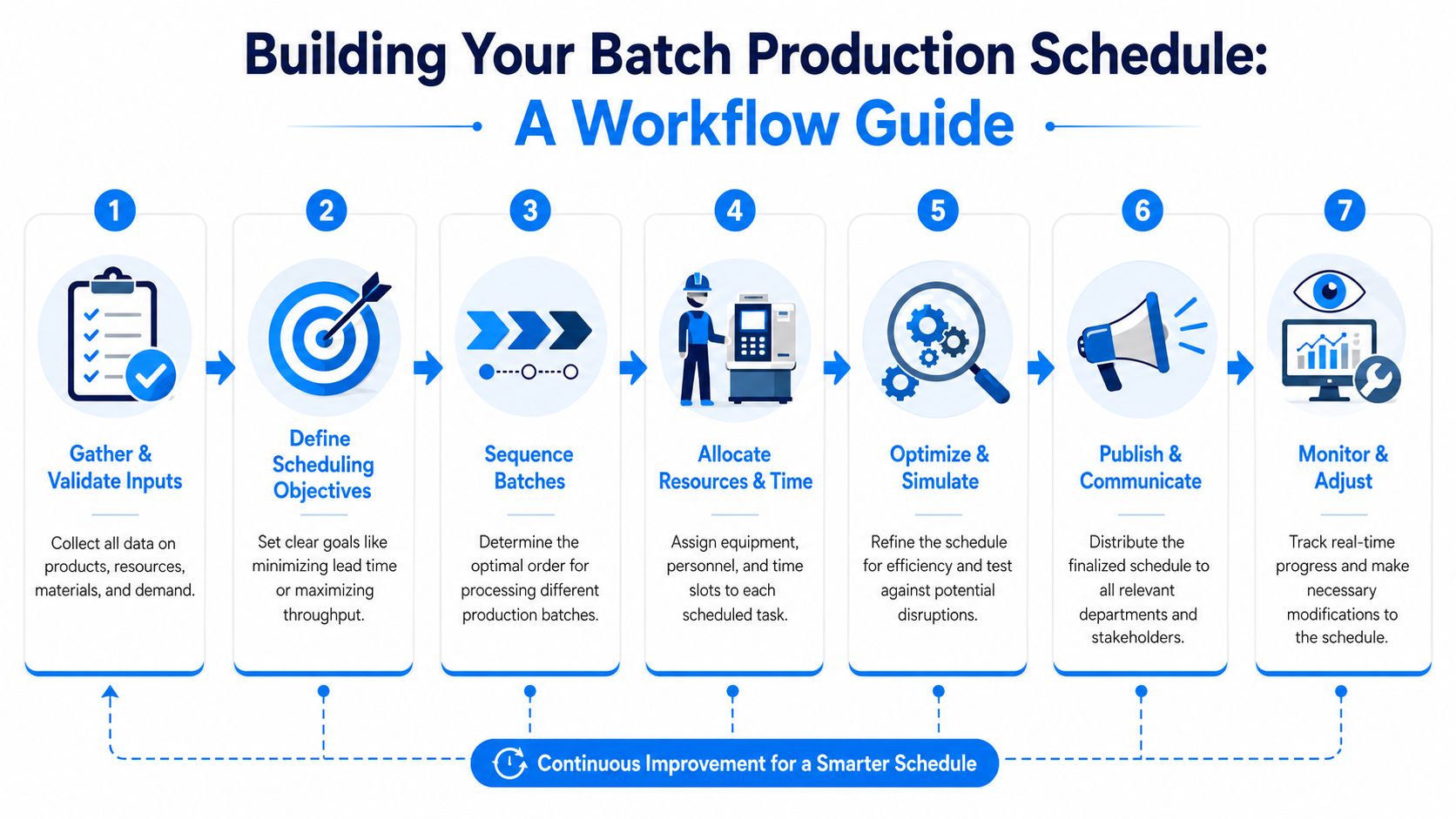
A workable schedule comes from a disciplined flow of decisions. Not from dropping orders into a calendar and hoping the plant absorbs the damage. The planner's job is to turn demand into a sequence the floor can execute without constant rewriting.
Set the batch size before you chase the sequence
Lot sizing comes first because it determines almost everything else. If the batch is too large, you tie up machines, create excess work-in-progress, and delay other jobs. If it's too small, you spend the day changing over equipment instead of producing.
A practical lot size decision usually balances:
- Equipment capacity
- Shelf life or hold time
- Material availability
- Order urgency
- Changeover burden
- Available downstream capacity
The best batch size on paper can still be wrong if the next operation can't absorb it. That's why schedulers need to think across the routing, not only at the first machine.
Use simple sequencing rules first
New planners often jump straight to complex optimization logic. That's usually too much, too soon. Start with a rule that people can understand and supervisors can defend.
Common starting points include:
- Shortest Processing Time when you want to keep work moving and reduce queue buildup
- Earliest Due Date when customer commitments are the main concern
- Family sequencing when you need to reduce cleaning, tool swaps, or setup changes between similar products
These aren't perfect. They are useful. The goal at this stage is to build a stable schedule that beats daily firefighting.
Good scheduling is often boring. If the line runs in the planned order and nobody needs an emergency meeting, that's success.
Make the schedule finite, not aspirational
Many spreadsheet systems break because they let planners stack work on a machine as if every job can start exactly when desired, with no overlap, no labor constraint, and no cleanup reality.
Finite capacity scheduling fixes that mindset. It forces each batch to fit within real machine time, labor availability, and sequence-dependent conditions. If a filler is already committed, the next batch waits. If the only trained operator is on another line, the schedule reflects that. That realism is what makes the plan usable.
Protect flexibility during scale-up
This gets harder when the plant moves from small batches into larger runs. A source on low-volume production notes a major gap here. Schedulers often struggle with the transition from small-batch production in the 10 to 10,000 unit range to larger-scale output, especially when trying to preserve flexible capacities and short setup times during scale-up, as described by Tacto's low-volume production overview.
On the floor, this usually shows up in familiar ways:
- The team keeps the old small-batch habits and loses efficiency
- Or the plant swings too far toward long runs and loses responsiveness
The middle ground is what works. Keep product families tight, standardize setup routines, and identify which resources must stay flexible even as volume rises.
A useful mental model comes from outside manufacturing. Content teams use batching for the same reason operations teams do. They group similar work to reduce switching cost and protect flow. If you want a simple parallel, these tips for content batching show the same logic in another context. Fewer unnecessary switches usually means smoother execution.
Publish only what the floor can act on
A schedule isn't finished when the planner saves the file. It's finished when production, materials, maintenance, and quality all know what's expected and what changed.
The cleanest schedules usually include:
| Schedule element | Why it matters |
|---|---|
| Batch ID or work order | Prevents confusion on the floor |
| Planned start and finish | Gives supervisors a target window |
| Assigned resource | Clarifies who and what should run it |
| Material status | Stops jobs from launching half-ready |
| Changeover notes | Helps crews prepare for the transition |
If the team can't read the schedule in a few minutes, it's too complicated.
A Practical Worked Example
Theory clicks faster when you can see the schedule built in front of you. Here's a simple fictional example for a small workshop with two machines and three products. The goal is to create a clean sequence that avoids overlap and keeps both machines fed as smoothly as possible.
Assume every product must go through Machine 1 first, then Machine 2. To keep the example practical, we'll use a simple Shortest Processing Time rule based on total processing time across both machines.
Input data
First, list the work.
| Product | Machine 1 Time (min) | Machine 2 Time (min) | Sequence | Start Time | End Time |
|---|---|---|---|---|---|
| Product B | 20 | 15 | 1 | 0 | 35 |
| Product C | 25 | 20 | 2 | 20 | 65 |
| Product A | 30 | 25 | 3 | 45 | 100 |
The total processing times are:
- Product B = 35 minutes
- Product C = 45 minutes
- Product A = 55 minutes
So the order becomes B, C, A.
Turn the order into a real machine schedule
Now apply finite thinking. Machine 2 can't start a product until Machine 1 has finished that same product. It also can't process two products at once.
That gives us this timeline:
| Machine | Product B | Product C | Product A |
|---|---|---|---|
| Machine 1 | 0 to 20 | 20 to 45 | 45 to 75 |
| Machine 2 | 20 to 35 | 45 to 65 | 75 to 100 |
A few things become obvious right away.
Machine 1 is busy from the start. Machine 2 sits idle until Product B arrives from Machine 1. Then it runs B, waits for C to be ready, runs C, waits again, and finishes with A. That's normal in a simple flow like this. The important point is that the schedule is feasible.
A feasible schedule beats an elegant fantasy every time.
What the planner should learn from this
This example is intentionally small, but it teaches the right habits.
First, sequence with a clear rule. Don't improvise every order. Second, check the schedule against real machine availability. Third, watch where idle time appears. In this case, Machine 2 has gaps because upstream release timing controls it.
If this were a live plant, the next improvement questions would be:
- Can setup be reduced on Machine 1?
- Can any batches be split differently?
- Is Machine 2 the right downstream path?
- Should due dates override the SPT rule for one product?
That's how batch production scheduling improves in practice. Not with one perfect formula, but by making a workable plan visible, then tightening the weak spots.
Optimizing Your Schedule with Heuristics
Once the schedule is stable, the next job is to make it better without making it fragile. Heuristics prove useful here. They aren't magic. They are fast decision rules that improve day-to-day planning when a full optimization model isn't practical.
Use heuristics that match the plant's pain
Two of the most useful starting rules are Shortest Processing Time and Earliest Due Date.
Shortest Processing Time works well when the floor is clogged and you need batches moving. It tends to reduce waiting in the queue and helps supervisors see progress. It's often a good choice for shared equipment with many small jobs competing for time.
Earliest Due Date is better when customer commitments drive the business. If late shipments create the biggest pain, this rule gives the planner a defensible way to sequence work around promised dates.
Neither rule should run the plant blindly. They are starting points. You still have to override them for material shortages, allergen order, tooling constraints, or a bottleneck resource that needs protection.
Don't let forecast noise run the factory
A more advanced improvement is to reduce what many planners endure every day. Forecast noise.
Forecast noise is what happens when the schedule gets rebuilt around every small change in item-level demand signals. One forecast shifts a little. Then another. Sales asks for a tweak. Planning reacts. The result is constant resequencing, more changeovers, and less confidence on the floor.
A stronger alternative is Demand-Driven Sequencing. A recent shift toward this approach replaces item-level guesswork with fixed, efficient production sequences. In a real laundry factory example, it led to a 40% reduction in inventory and eliminated daily schedule changes, as described in Qoblex's discussion of batch production technology.
What that means in practice
It's similar to a playlist. Instead of rebuilding the run order every day, you establish a stable sequence that makes operational sense. Then you replenish based on actual demand within that structure.
That approach works because it separates two decisions that often get tangled together:
Sequence stability
Keep the production order efficient and predictable.Replenishment response
Adjust quantities and release timing based on real consumption.
When planners stop chasing every forecast twitch, operators usually stop asking why the plan changed again.
This doesn't mean ignoring demand. It means handling demand with more discipline. For many plants, that's the difference between a schedule that survives contact with reality and one that gets rewritten before first break.
Key KPIs and Common Scheduling Pitfalls
A schedule without measurement is just a plan people hope will work. You need a short KPI set that tells you whether the schedule is improving execution or just moving problems around.

The KPIs that matter most
You don't need a dashboard packed with dozens of charts. Start with a few that show whether the schedule is realistic, stable, and useful.
On-time delivery
This tells you whether the schedule supports customer commitments. If this stays weak, sequencing may be fighting due dates.Schedule adherence Compare what the plant planned to run against what it ran. Poor adherence usually means bad inputs, too many last-minute changes, or a schedule that ignored real constraints.
Machine utilization
Watch key resources, especially bottlenecks. Low utilization on a constraint machine often points to material readiness issues, setup losses, or poor handoff timing.Work-in-progress level
If WIP keeps rising, the schedule may be releasing too much too early or starving downstream priorities.Changeover frequency
This shows whether the planner is protecting flow or constantly bouncing the line between products.
The common pitfalls that wreck schedules
According to MRPeasy's overview of batch production pitfalls, the most common issues include high work-in-progress inventory, increased idle time due to equipment reconfiguration, and the risk of high-cost errors where an entire batch can be lost if a single mistake occurs.
Those three problems show up differently, but the fixes are usually operational, not theoretical.
Too much WIP
If batches pile up between operations, the plant is likely launching work faster than downstream resources can absorb it.
Try this:
- Release fewer jobs at once so the floor isn't flooded
- Tie upstream starts to downstream readiness instead of pushing based on wishful timing
- Shrink batch sizes where practical when large lots are choking shared resources
Too much idle time
If machines are waiting because of changeovers, the sequence is probably too fragmented.
Use these corrections:
- Group similar products together to reduce reconfiguration
- Protect long setup assets with family sequencing or campaign runs
- Check whether rush orders are causing hidden churn and challenge them when needed
Batch-wide error risk
In batch environments, one bad setting, wrong material, or labeling mistake can affect the whole lot. That makes prevention more valuable than heroic recovery.
Focus on:
- Pre-run verification for materials, settings, and documents
- Clear handoff points between planning, production, and quality
- Simple schedule communication so crews know exactly what batch is next
The schedule should reduce the chance of error, not force operators to improvise around missing information.
If you see this, do that
A quick troubleshooting table helps more than abstract advice.
| If you see this | Look for this cause | Do this next |
|---|---|---|
| WIP building between steps | Too many early releases | Gate launches by downstream capacity |
| Frequent machine waiting | Poor sequence or late materials | Recheck family order and material readiness |
| Constant rescheduling | Forecast noise or weak priorities | Freeze part of the sequence and tighten change rules |
| Missed due dates | Wrong dispatch rule | Shift to due-date-driven sequencing where needed |
| Repeated quality holds | Weak batch handoff discipline | Add pre-run checks and clearer release control |
That's the ultimate test of batch production scheduling. Not whether the board looks clean at the planning desk, but whether the plant runs closer to plan with fewer avoidable disruptions.
Choosing the Right Scheduling Tools
Every factory starts somewhere. For many teams, that means Excel, Google Sheets, a whiteboard, and a lot of tribal knowledge. That setup can work for a simple operation with limited products, stable demand, and one person who knows the entire flow.
It breaks when complexity rises.
Where spreadsheets still earn their keep
Spreadsheets are useful because they're flexible, cheap, and familiar. You can build a rough dispatch list quickly. You can test sequencing ideas. You can expose bad master data faster than in a larger system.
They're still a reasonable option when:
- The product mix is limited
- Routing is simple
- Changeovers are straightforward
- The same planner can manually control the schedule each day
The problem isn't Excel itself. The problem is using it after the operation has outgrown it.
When dedicated systems start to make sense
ERP and APS tools become more valuable when the schedule depends on many moving parts at once. Multiple resources, shared constraints, finite capacity, material dependencies, and frequent replanning all push teams toward better software.
A dedicated tool can help when you need:
| Need | Spreadsheet approach | ERP or APS approach |
|---|---|---|
| Capacity checking | Manual and error-prone | Built into logic and resource calendars |
| Material visibility | Often separate from the schedule | Connected more directly to planning data |
| Version control | Hard to manage | Stronger change tracking |
| Team communication | Depends on file discipline | More structured publishing and access |
| Scenario testing | Slow for complex plants | Easier to compare options |
For teams exploring smarter workflows around planning knowledge, it also helps to organize SOPs and scheduling rules in a form software can use. If you're thinking that way, BuddyPro's guide on how to transform knowledge into AI is a useful reference for turning undocumented team know-how into something more repeatable.
Questions to ask before you buy anything
Don't start with vendor demos. Start with your own operation.
Ask:
- What decisions does the current tool fail to support well?
- Do we need finite capacity scheduling or just better visibility?
- How often do material issues force schedule changes?
- Can supervisors, planners, and purchasing all work from the same plan?
- Will the tool handle our real routing and setup logic, not a simplified version?
- How hard is it to maintain the master data?
- What happens when our volume, product count, or line count grows?
A good tool won't rescue poor process discipline. But once the plant has a stable scheduling method, the right software can make that method faster, clearer, and easier to scale.
If you create educational content for operators, planners, or manufacturing teams, Aicut can help you turn those ideas into short-form videos fast. It's a practical option for building faceless explainer content, repurposing shop-floor know-how, and publishing consistently across YouTube, TikTok, and Instagram without a heavy production workflow.