
You spent hours on a video. The edit looks clean, the captions are sharp, the visuals feel current, and then the post goes nowhere. Low views. Weak watch time. Barely any shares.
Most creators blame the wrong thing. They blame the algorithm, the edit, the thumbnail, the posting time. Sometimes those matter. More often, the actual problem started much earlier, in the script.
Knowing how to write video scripts isn't about sounding clever. It's about controlling attention, pacing, and payoff before you open your editor. That's even more important now that short-form creators are building faceless channels, AI UGC ads, and automated content pipelines. If the script is weak, better visuals only make the failure look more polished.
The good news is that scriptwriting for short-form doesn't need to be complicated. The strongest scripts are usually simple, fast, and brutally clear. They tell the viewer why to care, give them the payoff quickly, and move them to the next action without wasting a second.
Why Your Videos Aren't Performing (It's Probably the Script)
A bad script creates problems that editing can't fix.
If the first line is slow, people swipe. If the value takes too long to arrive, retention drops. If the message is fuzzy, the viewer may watch but still not remember anything. That's why two videos with similar visuals can perform very differently. One was built on a clear script. The other was assembled around loose ideas.
The script decides the outcome before production
A lot of creators treat scripting like a rough note. They collect a few talking points, hit record, and hope energy carries the rest. That can work for a naturally strong on-camera personality. It usually fails for faceless content, AI-generated videos, and brand content where every second has to do a job.
A useful script does three things:
- It controls attention: The first line gives the viewer a reason to stop.
- It controls flow: Each sentence earns the next one.
- It controls outcome: The viewer knows what to think, feel, or do after watching.
Practical rule: If your idea only becomes clear after the edit, the script was late.
A lot of short-form creators lose time. They try to solve structural problems in CapCut, Premiere, or Descript instead of solving them on the page first. The result is more cutting, more reworking, and weaker retention.
Great visuals don't rescue weak messaging
This matters even more with AI workflows. Tools can generate scenes, voices, captions, and variations fast. That speed is useful, but it also exposes weak thinking. If the script doesn't specify the message, pacing, and visual logic, the output gets generic fast.
For short-form, scriptwriting is less like writing an essay and more like designing a controlled reaction. You want a specific response at each moment. Stop. Keep watching. Understand this. Believe this. Click this.
That mindset changes everything. You're no longer writing to sound good. You're writing to convert attention into action.
The 3-Act Micro-Structure for Viral Videos
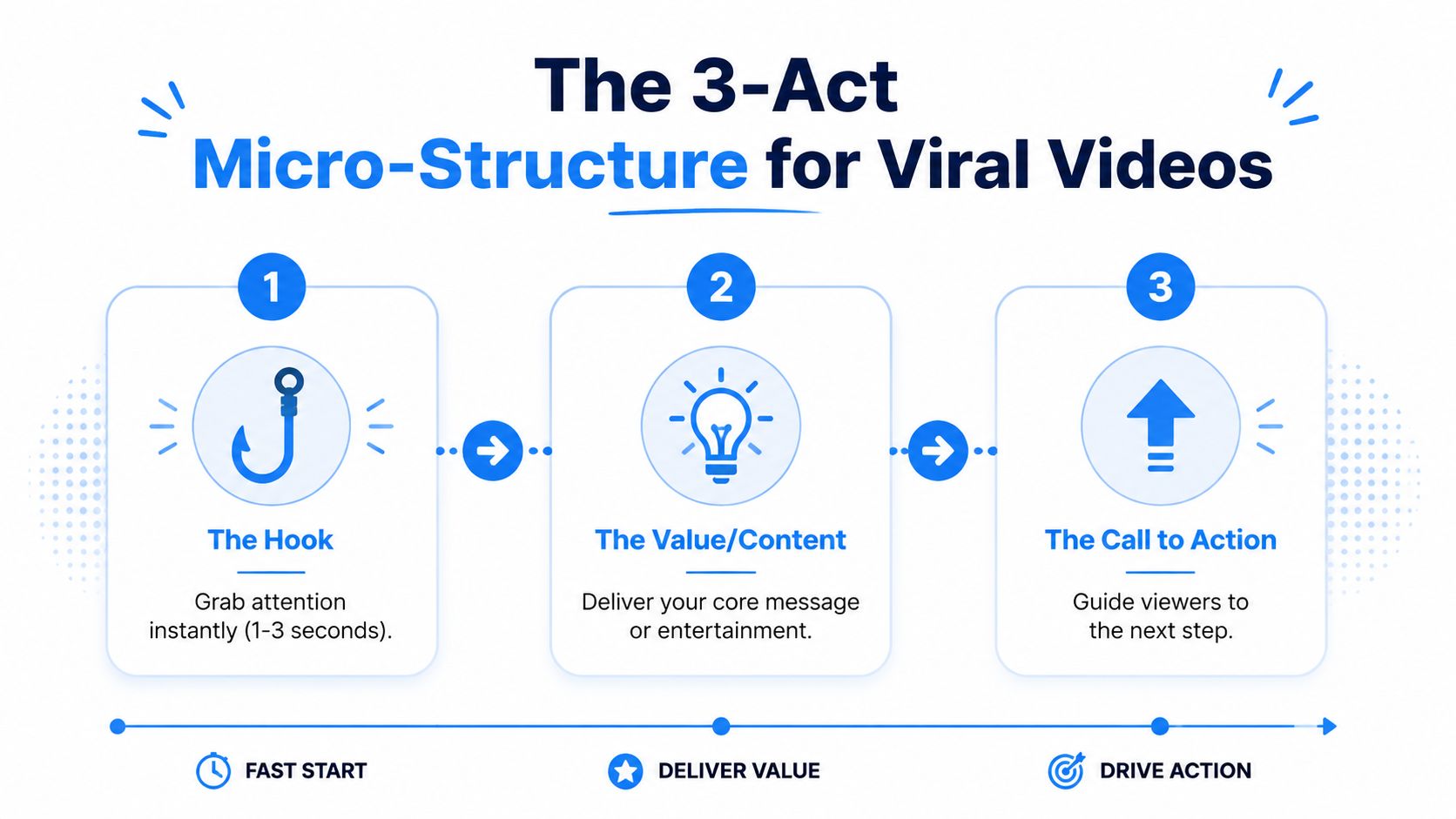
Short-form scripts don't need a complex story arc. They need a micro-structure that fits the speed of the feed. The cleanest version has three parts: Hook, Value, CTA.
Start with the shape below.
Act one is the stop
The hook has one job. Stop the scroll.
According to Epidemic Sound's video script guide, approximately 40% of viewers decide within the first 10 seconds whether to continue watching a video. That same guide notes the hook should be a short, punchy statement, and the introduction should cover who you are, what you're doing, how you're going to do it, and why the viewer should trust you.
That advice works well for many YouTube formats. In short-form, the principle still holds, but the execution needs to be tighter. Your opening line must create tension fast. Curiosity, surprise, contrast, speed, or direct relevance all work. Vague setup doesn't.
Good hook:
- “This ad failed because the first line sounded like an ad.”
Weak hook:
- “Hey guys, today I want to talk about scripting tips.”
The first line creates a gap the viewer wants closed. The second asks for patience before offering value.
A quick breakdown helps here.
- Good hooks start in motion: They begin with a claim, conflict, or result.
- Weak hooks start with permission-seeking: Introductions, greetings, and throat-clearing kill momentum.
- Best hooks imply payoff: The viewer senses there's something useful on the other side.
Later in the workflow, this video gives a helpful visual explanation of how structure affects performance:
Act two is the payoff
The value section delivers what the hook promised, but many scripts collapse because the creator keeps circling the point instead of landing it.
The easiest way to write this section is to answer one question: What is the single thing the viewer should get before they leave?
Then build only around that.
For a product video, value might be:
- The pain point.
- The mechanism.
- The visible result.
For an educational short, value might be:
- The myth.
- The correction.
- The useful takeaway.
The fastest scripts feel dense, not rushed. Every line moves the idea forward.
Act three is the direction
A call to action should feel like the natural next step, not a pasted-on sales line.
That can mean:
- Watch part two.
- Comment a keyword.
- Visit the product page.
- Follow for the next example.
- Save the post for later.
The mistake is stacking too many asks. If you tell the viewer to follow, comment, share, buy, and click bio, you've weakened all of them. Pick one.
The simplest way to write viral short-form is to think in this order: stop, satisfy, direct.
Crafting Irresistible Hooks That Stop the Scroll
Most creators don't need more hook ideas. They need better hook types.
A hook works when it creates immediate tension. That tension can come from disagreement, recognition, mystery, or a visual promise. Once you understand the category, writing variations gets easier.
The contrarian claim
This hook works because it challenges what the viewer assumes is true.
Examples:
- “Your script isn't too short. It's too polite.”
- “More editing won't save a boring first sentence.”
- “The problem with most AI ads isn't the visuals. It's the wording.”
This style fits e-commerce, creator education, SaaS explainers, and marketing content. It tells the viewer, “You may be doing this wrong,” which is hard to ignore.
The relatable question
Questions work when the viewer can answer instantly in their head.
Examples:
- “Why do your videos look good but still get skipped?”
- “Ever write a script that sounded smart on paper and dead out loud?”
- “Why do faceless videos lose trust so fast?”
For creators writing social-first content, this often beats a broad statement because it makes the viewer self-diagnose the problem.
If you're building social copy systems across formats, the 2026 viral framework for X is useful because it shows how compact hooks create curiosity before the main payload. The platform changes, but the psychology is similar.
The story teaser
This is the best option when you have a specific moment, mistake, or reveal.
Examples:
- “I rewrote one line in this product ad and the whole video finally made sense.”
- “This faceless channel script looked fine until the first three seconds exposed the problem.”
- “The AI generated beautiful footage. None of it matched the point.”
Story teasers work because they imply progression. The viewer expects to see what happened and why.
The visual promise
This hook tells the viewer what they'll see, not just what they'll hear.
Examples:
- “Watch this boring product shot turn into a scroll-stopper.”
- “I'm going to show you the exact line that kills retention.”
- “This is an AI-native script before it becomes a video.”
This is especially useful in faceless and AI-assisted content because visuals are doing part of the persuasion.
A strong hook doesn't explain the whole topic. It creates a reason to stay for the next sentence.
A practical way to build your own hook bank is to save openings by category, not by niche. Keep folders for contrarian lines, question-led hooks, story teasers, and visual opens. Then remix them around the idea you're scripting.
For more hook examples specific to vertical platforms, Aicut's article on the best hooks for TikTok and Instagram videos is a useful swipe file.
Scripting for AI and Faceless Content Channels
Traditional scripting advice assumes a human face is doing most of the trust-building. AI-native and faceless channels don't have that advantage.
That changes the job of the script. It isn't just dialogue anymore. It's also a visual instruction set.
Write for visual coherence, not just spoken flow
In AI video workflows, your script has to tell the model what the viewer should see at key moments. If it doesn't, the output often drifts. The scene may look polished, but it won't support the point you're making.
The scripting mistake is writing something like this:
“A lot of brands are wasting money on weak creatives.”
That's fine for a human presenter. It's weak for generative video because it doesn't define what the system should show. A better AI-native line bakes in visual intent:
“Show a bland mobile ad with generic stock footage, then cut to a version with bold headline text, tighter framing, and a product close-up.”
You're still scripting the message. You're also scripting the evidence.
Existing guides often treat AI as a post-production tool, but data from 2025 indicates that 68% of AI video creators struggle with visual hallucination because their scripts lack precise visual cueing. Traditional script advice doesn't really solve that because it was built for human delivery, not model guidance.
Trust has to be built with proxies
Faceless channels can't rely on eye contact, charisma, or personal presence. So the script has to insert trust proxies.
These can include:
- Specific framing: Show interfaces, product close-ups, on-screen steps, or before-and-after comparisons.
- Authority markers: Use clean labels, process visuals, and clear sequencing.
- Citation moments: If you mention a factual claim, support it on screen with source naming or visual context.
- Confident wording: Avoid fluffy intros and vague transitions.
The viewer doesn't need a face if the script and visuals signal control, clarity, and proof.
A lot of creators also need a pipeline, not just a one-off script. In those cases, tools like Aicut can turn prompt-based scripting into faceless video outputs with voiceover, templates, and publishing workflows. The point isn't automation for its own sake. It's reducing the lag between concept and test.
If you're comparing broader options in this space, this guide to AI image video tools is a decent overview of the current tool offerings.
Short-form retention works differently on faceless channels
Old advice breaks down fastest in this context. On faceless vertical content, long intros often hurt performance because the viewer already expects immediate utility.
According to the verified analytics provided for this topic, top faceless channels in 2025 found that scripts using mid-sentence cuts and immediate value stacking, without intros, outperformed traditional hook-intro-body structures by 45% in short-form verticals. That's a major shift in scripting logic.
What this looks like in practice:
- Start in the middle of the thought: “The reason this ad failed wasn't the offer.”
- Cut before the sentence fully settles: This creates forward pull.
- Stack value fast: Give insight, example, and implication in rapid sequence.
- Skip identity-heavy intros: The content itself has to earn trust.
This doesn't mean every intro is bad. It means faceless content should assume less patience from the viewer and write accordingly.
Timing Your Script and Using Templates
Timing isn't a guess. It's math.
A foundational rule in scriptwriting is that conversational speech averages 125 to 150 words per minute, and Swarmify's script writing guide notes that a 30-second short-form video should be capped around 75 words, while a 60-second video allows roughly 150 words. That same source explains that ignoring those thresholds often creates rushed delivery or videos that run too long.
Use word count before you record
The biggest scripting trap is writing a good message that's too long for the format. It reads fine on the page, then falls apart in the voiceover.
A simple way to avoid that:
- For a 30-second short: keep the script around the short-form cap and leave room for pauses.
- For a 60-second short: stay near the rough upper limit, but trim hard if the language feels dense.
- For any script: read it out loud once. If you need to speed up to fit, it's too long.
If the script only fits when you rush, it doesn't fit.
This is also where templates help. They reduce decision fatigue and keep the pacing under control. If you need a starting point for production formats, Aicut's library of AI video templates is useful for matching script structure to output style.
Short-form video script templates
| Template Type | Hook (1-3s) | Value (5-20s) | CTA (1-3s) |
|---|---|---|---|
| Problem / Agitate / Solve | “Your product video is losing people in the first line.” | Name the scripting mistake, show why it hurts clarity, present the improved line or structure. | “Use this format in your next ad.” |
| Myth vs. Fact | “Most creators think better edits fix weak retention.” | State the myth, correct it, show the script principle that actually improves the video. | “Follow for more script breakdowns.” |
| Demo with Commentary | “This is what an AI-native script looks like.” | Show the line, visual cue, and resulting scene. Explain why each part exists. | “Save this before your next video build.” |
Templates aren't meant to make every script sound the same. They give you a frame so you can spend your energy on the message, not on reinventing the sequence every time.
Your Pre-Publish Script Optimization Checklist
A script can look tight on the page and still fail in the feed. Final review matters, especially for faceless and AI-assisted content where tiny clarity gaps turn into weak visuals fast.
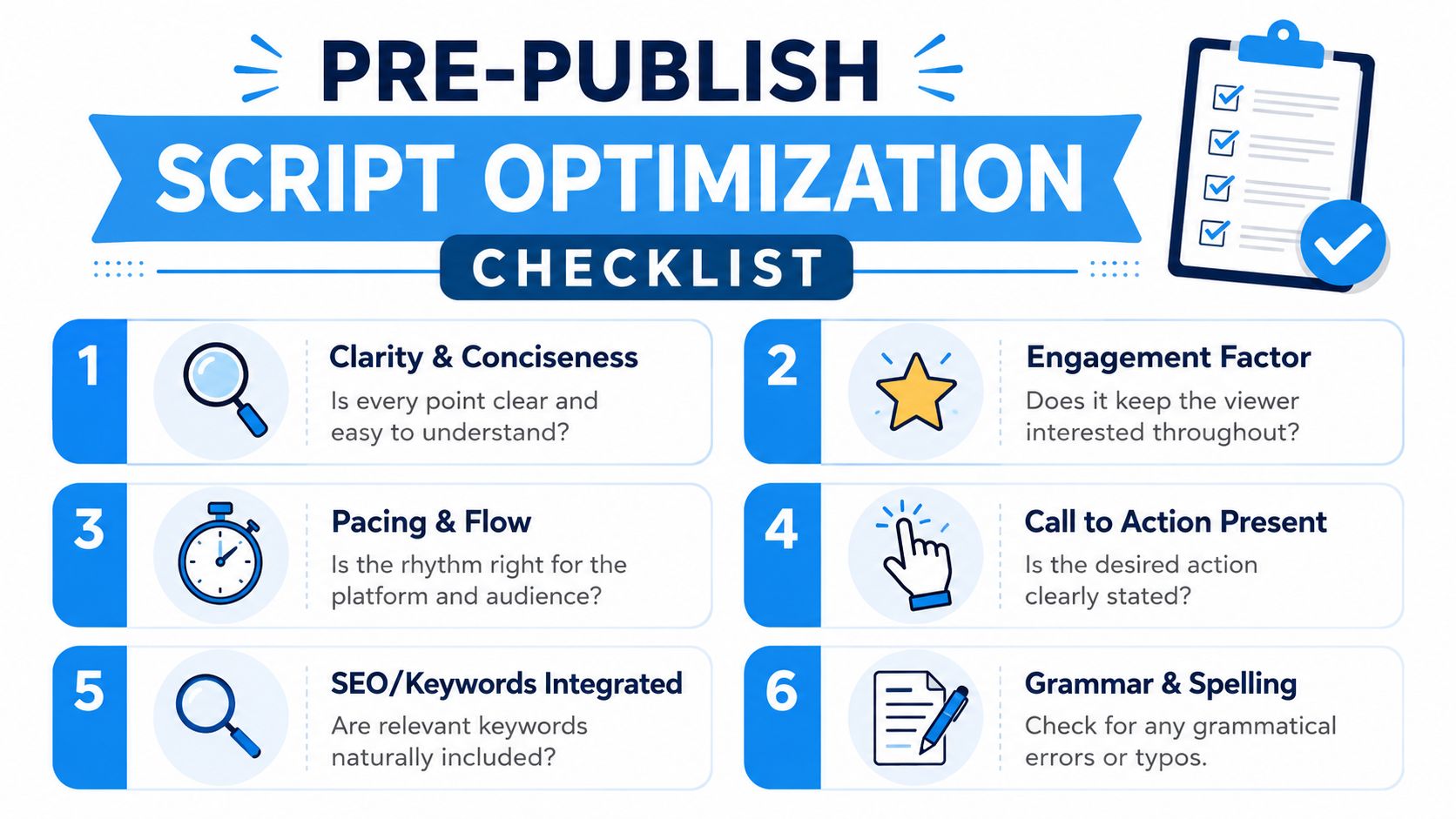
Before publishing, run through a simple checklist.
The final pass
- Read it aloud: If a line feels awkward in your mouth, it will sound awkward in the video.
- Check the opening: The first line should create tension immediately.
- Trim passive wording: Replace soft setup with direct statements.
- Confirm one main payoff: The viewer should leave with one clear takeaway.
- Match lines to visuals: Every key claim should have an obvious visual partner.
- Limit the CTA: Choose one next step.
Here is a clean version of that final review process:
What AI creators should check twice
Existing guides often miss the AI-specific failure points. Data from 2025 indicates that 68% of AI video creators struggle with visual hallucination because their scripts lack precise visual cueing. That means your final check can't stop at dialogue quality.
Look for these issues before you export:
- Visual ambiguity: Does the system know what to show, or just what to say?
- Scene drift: Do consecutive shots feel like the same idea, style, and world?
- Authority gaps: If there's no face on screen, is there still enough evidence and structure to create trust?
- Overwritten narration: Could a visual do the job faster than another sentence?
The strongest script is the one that survives contact with production.
When you know how to write video scripts this way, publishing gets less emotional. You're not hoping the content works. You're checking whether it was built to work.
If you want to turn rough ideas into faceless short-form videos faster, Aicut gives you a practical workflow for script-based AI video creation, templates, voiceovers, and publishing in one place.