
You've got a folder full of story ideas, but turning each one into a finished short feels like a second job. You still need a script, visuals, narration, captions, music, editing, and a consistent style, even if you never appear on camera.
An AI story video generator brings those jobs into one repeatable workflow. Instead of creating a single impressive clip, you can plan a sequence with recurring characters, connected scenes, and a recognizable format. That difference matters if you want to publish a faceless series on YouTube Shorts, TikTok, or Instagram Reels rather than collect disconnected experiments.
What an AI Story Video Generator Is
A faceless channel about workplace confessions might begin with a new employee discovering a hidden company rule. Another episode could follow a tenant hearing footsteps above an empty apartment. Turning each idea into a finished short traditionally means separate writing, recording, visual-sourcing, and editing sessions.
A one-off AI video tool may turn one sentence into an attractive animated shot. An AI story video generator handles a broader job. It helps shape an idea into a beginning, middle, and ending, then produces connected scenes that carry the same narrative from one moment to the next.
The workflow resembles a small production desk. The software may draft the script, divide it into scenes, generate or select visuals, create voiceover, add captions, and assemble a vertical video. For a practical introduction to the broader category, this guide to AI video explains how generative tools fit into modern video creation.
The difference between a clip and a story
A clip can look attractive while saying very little. A story video needs sequence and memory. Viewers should understand who is present, what changed, and why the next scene follows the previous one.
A useful generator should preserve details such as:
- Characters: The same protagonist should remain recognizable across scenes.
- Setting: A bedroom, office, forest, or street should keep a coherent visual direction.
- Narrative beats: The hook, tension, reveal, and conclusion should appear in the intended order.
- Format: The finished video should match the vertical style used by short-form platforms.
Continuity becomes especially important when creators publish a series. A generator can support recurring characters and reusable prompt instructions, sometimes called prompt cloning, so a new episode starts from an established visual and narrative foundation. Multi-model workflows can also assign different jobs to different systems, such as scriptwriting, scene generation, narration, or editing, while the story structure keeps those outputs connected.
The category has moved beyond a niche experiment. Grand View Research estimated the global AI video generator market at USD 788.5 million in 2025 and projected it to reach USD 3,441.6 million by 2033, with a projected 20.3% CAGR from 2026 to 2033. The same AI video generator market analysis reported that Asia Pacific held the largest revenue share at 31.0% in 2025, with China leading the region.
The practical lesson is simple. Treat the tool as publishing infrastructure for a series, not as a button that occasionally makes a surprising video.
How the Technology Turns a Prompt Into a Video
The workflow has five stages: writing the brief, preparing the script, rendering visuals, adding audio, and assembling the final cut. Each stage passes information to the next, much like a production line where every station shapes the result that follows.
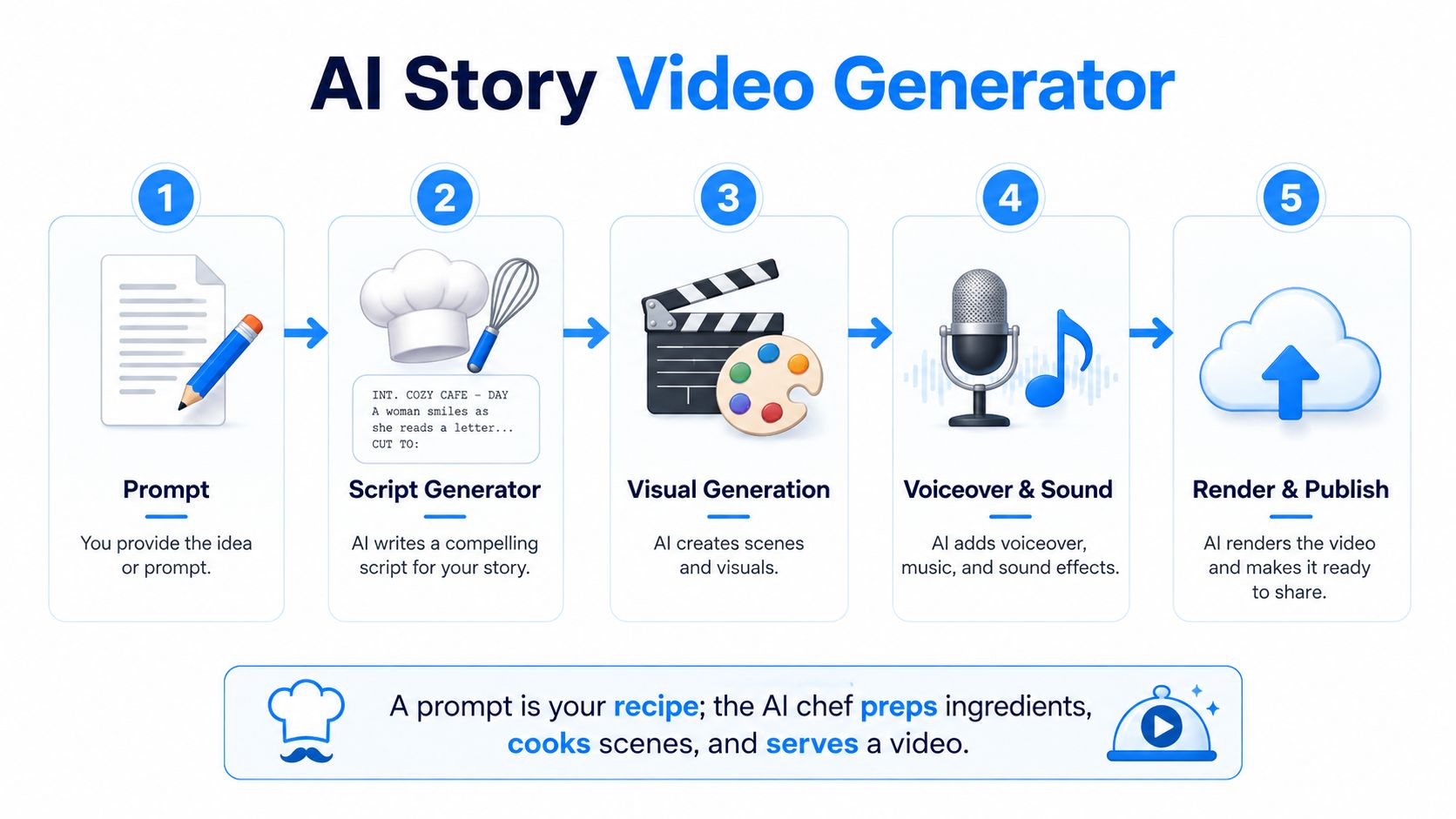
Step one, write the brief
You begin with a sentence, outline, or structured request. “Make a scary story about a house” gives the system too little direction. A stronger brief identifies the character, location, movement, mood, and ending:
A delivery driver enters an empty house during a storm. The lights turn on one room at a time. Keep the driver's red jacket and the narrow hallway consistent. End with a close-up of a second pair of muddy boots.
The generator breaks that idea into scenes or story beats. A clear sequence helps it identify what happens first, what changes, and which details should stay fixed.
Step two, prepare the script
A script model converts the outline into narration and, when needed, dialogue. It can write a hook, shorten sentences for spoken delivery, and assign lines to individual scenes. Read the result before production. A complete script may still sound flat, repetitive, or unlike your channel.
The same workflow applies when you generate an AI video from text. Text supplies the direction, so vague instructions can affect every later stage.
Step three, render the visual scenes
A video model creates candidate clips from each scene prompt. Current systems may use diffusion or transformer-based architectures, but beginners do not need the mathematics to operate them. The practical concern is how well the model interprets descriptions of people, locations, camera movement, lighting, and action.
Some platforms send different prompts through several underlying models. One may fit a realistic advertisement, another an illustrated story, and another a quick draft. Comparing outputs lets creators choose a suitable result for each scene instead of forcing the entire project into one visual approach.
Step four, add voice and sound
Voice synthesis turns the script into narration. The editor can also place background music, sound effects, and captions. Review pronunciation, pauses, emotional tone, and the timing between spoken lines and visual action, because these details determine whether the story is easy to follow.
Step five, assemble and publish
A timeline editor joins the clips, positions captions, adjusts transitions, and renders the final file. You can revise the story, pacing, character details, or visual style, then send the updated instructions through the workflow again. The system handles much of the preparation, while you decide whether the finished cut communicates the story clearly.
Key Features That Make These Tools Useful
The useful platforms separate story control from simple clip generation. Four capabilities matter most when you're producing a repeatable series: templates, prompt cloning, character consistency, and access to multiple models.
Templates remove the blank page
A template gives you a proven structure before you write. A Reddit-style confession may begin with a sharp first-person hook, build conflict through short scenes, and finish with a reveal. A scary tale may reserve the final scene for a visual twist. A listicle can give every item the same rhythm.
Templates don't replace ideas. They reduce setup work and help a new creator understand how much information each scene needs. You can explore AI video templates for structured production and then adapt the format to your own subject.
Prompt cloning protects the series identity
Prompt cloning saves a successful visual recipe. If one episode has the right character design, color palette, camera language, and atmosphere, you can reuse those instructions for the next episode instead of starting from an empty prompt.
This is valuable because series viewers recognize patterns quickly. A recurring narrator, setting, or visual treatment can make separate uploads feel like chapters from the same channel.
Character consistency prevents visual drift
A protagonist who changes hair, clothing, age, or face between scenes breaks the viewer's trust. Tools may address this with reference images, seed controls, face-lock features, or saved character descriptions.
No method makes every generation perfect. Review the face, hands, clothing, props, and background before publishing. If a story depends on a distinctive detective, mascot, or product, consistency should matter more than decorative detail.
Multi-model access reduces tool juggling
Different models have different strengths. You may want a cinematic look for a dramatic opening, an illustrated style for a children's story, or a faster option for rough drafts. A platform that exposes several models in one workspace lets you compare those directions without managing separate workflows and subscriptions.
| Feature | What It Does | Why It Matters |
|---|---|---|
| Templates | Pre-builds common narrative formats | Helps you start faster and maintain a repeatable structure |
| Prompt cloning | Reuses a proven visual and storytelling recipe | Supports recognizable episodes and faster iteration |
| Character consistency | Preserves key character details across scenes | Prevents distracting changes in a recurring series |
| Multi-model access | Routes work through different generation models | Gives you flexibility for style, speed, and realism |
Story continuity deserves special attention. StoryBench evaluates continuous story visualization across 2–4 consecutive events, rather than judging isolated clips alone. Its design shows why an episode should be planned as ordered beats with durations, not as a collection of unrelated prompts. The StoryBench benchmark paper provides the technical background.
Why Creators Are Switching From Traditional Editing
Traditional editing asks you to move through a long chain of separate tasks. You brainstorm an idea, write a script, record a voiceover, search for footage, download assets, cut clips, synchronize captions, add music, export the file, and upload it. Every handoff creates another opportunity for delay or inconsistency.
An AI story workflow condenses much of that chain into a guided production pass. You provide the story direction, choose a format, review generated scenes, adjust the voice and captions, and export. The software doesn't remove creative decisions, but it reduces the amount of mechanical assembly between those decisions.
| Workflow Step | Traditional Editing | AI Story Video Generator |
|---|---|---|
| Idea development | Start with a blank document and plan the story manually | Begin with a prompt, outline, or reusable template |
| Script | Write and revise from scratch | Generate a draft, then edit it for your voice |
| Voiceover | Record, clean, and retake audio | Select or generate narration and review delivery |
| Visuals | Search for stock footage, images, or animations | Generate scene candidates from structured prompts |
| Continuity | Track characters and settings manually | Reuse saved prompts, references, or character settings |
| Captions | Time text against the voiceover | Create captions during assembly, then correct them |
| Export | Configure the timeline and render manually | Render a platform-ready version from the project |
Efficiency isn't the same as autopilot
A faster workflow can still produce weak content if the story lacks tension or the visuals don't match the narration. AI-generated clips need human review for factual details, awkward movement, strange objects, pronunciation, and brand suitability.
The strongest approach is machine-assisted judgment. Let the generator handle repetitive construction, then spend your attention on the hook, emotional pacing, final reveal, and details viewers will remember.
Quality check: Watch the finished video with the sound off, then listen without looking at the screen. Each test exposes a different continuity problem.
Originality also comes from your choices. A generic prompt can produce a generic video, while a specific character rule, unusual setting, or distinctive narrator can give the series a clearer identity. Switching tools is about freeing time for those decisions, not handing the entire creative role to software.
Real Use Cases for Short-Form Creators and Brands
A horror creator, an online shop, and a social media manager may use the same category of tool for completely different reasons.
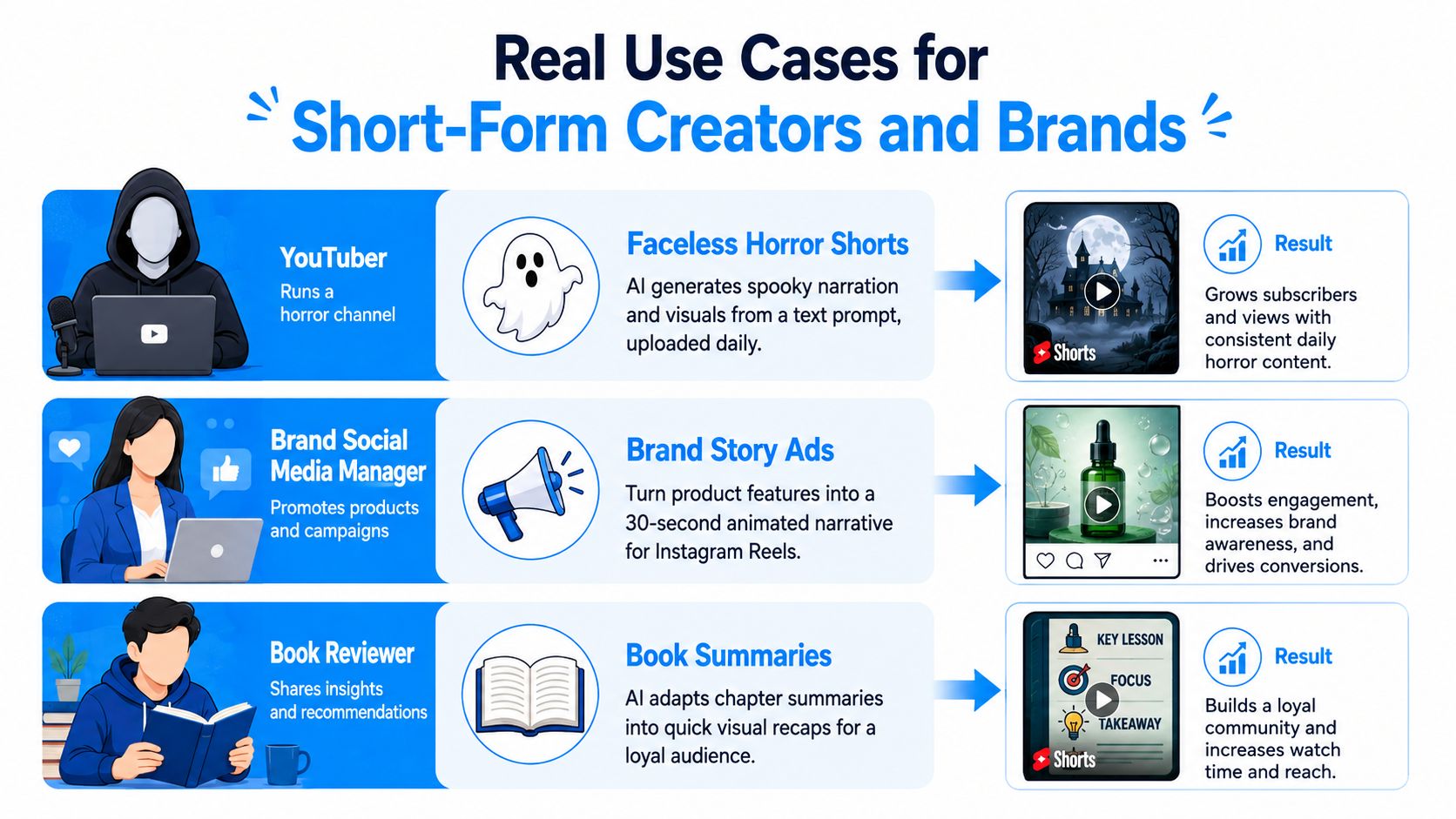
A faceless horror channel
A creator has a collection of unsettling story ideas but doesn't want to film or appear on screen. They save a narrator voice, a muted color palette, a recurring title treatment, and a visual description for the channel's anonymous storyteller.
For each episode, prompt cloning carries those choices forward. Character consistency keeps the narrator's silhouette or recurring locations familiar, while scene prompts handle the new event. The creator's main job becomes selecting stronger stories and reviewing the reveal, rather than rebuilding the production style every time.
A small e-commerce brand
A shop selling outdoor equipment wants short videos that explain product features through situations rather than static descriptions. The team turns a product page into a simple story, such as a hiker preparing for sudden rain, discovering a waterproof pocket, and reaching camp with dry essentials.
The generator can create the visual sequence, narration, captions, and alternate openings without booking a studio. Human review remains important for product accuracy. The generated video must show the actual feature correctly, and the brand should avoid implying performance that the product can't support.
A social media manager with several clients
A manager handling multiple accounts needs each brand to sound different. Templates can provide a repeatable structure for weekly posts, while saved style settings keep one account playful, another educational, and another product-focused.
Batch rendering is useful here because the manager can prepare related concepts together, then review them in one session. The bottleneck shifts from manual editing to approval, fact-checking, and choosing which version fits each audience.
These workflows suit solo creators, agencies, e-commerce teams, and editors who need frequent variations. A filmmaker, premium production studio, or brand with demanding live-action requirements may still prefer hands-on shooting and editing because the creative control and physical detail matter more than speed.
Setting Up and Publishing Your First AI Story Video
Your first project becomes easier if you treat the dashboard like a checklist rather than a maze of buttons.
Start with the account and format
Create your account, connect the publishing profiles you plan to use, and choose the default aspect ratio for short-form video. A vertical project keeps the framing decision out of every future episode, but check that important text and faces stay away from the edges.
Next, select a template that matches the story. Preview its sequence before writing. Look for the opening hook, the number of visual beats, the point where tension rises, and the type of ending it expects.
Write a compact brief
Give the generator enough direction to make decisions without burying the central idea. Include:
- Subject: Who is the main character?
- Conflict: What problem or surprise drives the episode?
- Setting: Where does the action happen?
- Style: Should the visuals feel realistic, illustrated, eerie, bright, or restrained?
- Continuity rules: Which clothing, prop, voice, or location must remain unchanged?
- Ending: What should the viewer understand in the final moment?
A short-form prompt should be specific about the story and economical about decoration. If every sentence introduces a new visual idea, the model may struggle to preserve a clear thread.
Generate, review, and refine
Create the first version, then inspect the video in three passes. First, check the story order. Second, check visual continuity. Third, check voiceover, captions, pronunciation, and music levels.
Don't rewrite everything after one imperfect shot. Replace the scene that fails, tighten the sentence that sounds unnatural, or clone the prompt from the strongest version. Small corrections usually teach you more about the tool than starting over without identifying the problem.
Publish with a human finishing pass
Add platform-native captions or confirm that the generated captions are readable on the target app. Write a clear description, choose a relevant cover frame, and schedule the upload if your publishing routine supports it.
After the first batch, review which hooks earned attention and where viewers stopped watching. Use that feedback to revise the next prompt template. The goal isn't to make one flawless video. It's to build a repeatable loop of writing, generating, checking, publishing, and learning.
Choosing the Right Generator and What Comes Next
Choose a generator by matching its strengths to your publishing habit. A tool that creates beautiful single clips may be a poor fit for a channel that needs recurring characters and connected episodes.
Use a simple scorecard. Rate each candidate from 1 to 5 for your own needs, not as an objective industry ranking:
- Model variety: Can you choose a visual approach that suits your niche?
- Customization: Can you control prompts, voices, pacing, characters, and settings?
- Render speed: Does the workflow fit your posting schedule?
- Export quality: Does the output work cleanly on your chosen platform?
- Pricing and limits: Are credits, clip length, exports, and usage restrictions easy to understand?
Evaluate the series workflow
For story channels, prompt cloning and character persistence deserve more weight than a large effects library. For product teams, accurate visuals, voice control, and fast variations may matter more. For managers, templates, account connections, scheduling, and review permissions can decide whether a platform fits daily operations.
Check how the service handles failed generations and revisions. A low entry price can become difficult to manage if every replacement consumes credits or if longer projects require separate tools. Read the limits before building your entire content system around one platform.
A practical comparison can also include adjacent tools. If you're repurposing long recordings into short clips, this Opus Pro feature breakdown can help you compare a different type of video workflow with your story-generation needs.
Prepare for a more connected workflow
The category is moving toward autonomous, multi-model, agent-driven production, where one description can lead to a more complete finished video rather than an isolated clip. Recent coverage of AI video trends highlights the growing importance of continuity, native audio, and workflow automation for professional use.
You should also evaluate copyright, consent, provenance, and deepfake risk before publishing at scale. Watermarking, consent records, copyright review, and synthetic-media disclosure are becoming practical design requirements, especially when tools generate realistic characters and synchronized audio. This overview of AI video generation trends discusses why those safeguards matter commercially.
Evaluation is becoming more precise, too. The DEVIL benchmark measures dynamics range, dynamics controllability, and dynamics-based quality, and reports correlation with human judgments above 90% at the Pearson correlation level. Its text-to-video dynamics research reinforces a useful production rule: describe movement, not just appearance.
Start by scoring a few tools, then produce one complete pilot episode. Keep the character notes, prompt, voice settings, rejected scenes, and final edits in a project folder. That record becomes the foundation for a series you can improve instead of a collection of unrelated generations.
Aicut offers templates for faceless formats, prompt cloning for recurring styles, AI-generated voices and captions, scheduling, and one-click posting across short-form channels. Try Aicut to turn a story idea into a repeatable episode workflow, then publish your first reviewed video and use the result to shape the next one.