
You’re probably in the same loop most short-form creators hit sooner or later. You need to post constantly, ideas don’t arrive on schedule, editing eats the afternoon, and by the time one video is done you’re already behind on the next three.
That’s where the idea of an autopilot app gets attractive. Not a scheduler. Not a basic template pack. Something that can take a rough concept, turn it into publishable short-form content, and remove enough friction that daily output stops feeling like a full production cycle.
I approached this autopilot app review from that angle. Not “does the app have AI features,” because nearly every tool says that now. The key question is whether it changes the workflow in a useful way for people who publish frequently: faceless creators, e-commerce teams, and agencies juggling client deadlines.
The End of the Content Treadmill
The content treadmill usually looks manageable from the outside. One short video doesn’t seem hard. But creators don’t make one. They make one, then another tomorrow, then another on two more platforms, then a variation for a different hook, then a replacement because the first one underperformed.
That’s when the process starts breaking down. Ideation becomes reactive. Editing becomes repetitive. Posting becomes inconsistent. A lot of creators don’t fail because they lack ideas. They fail because the workflow punishes consistency.
Faceless channels feel this pressure first. If your growth model depends on volume, every delay compounds. E-commerce teams hit the same wall from the opposite direction. They don’t need a single polished masterpiece. They need a reliable stream of fresh creatives, product angles, and platform-native variations. Agencies get squeezed hardest of all because every client expects speed, uniqueness, and results at the same time.
Practical rule: If your process still depends on starting from a blank timeline every day, you don't have a content system. You have a content habit, and habits break under pressure.
That’s why creators start looking for automation. Usually they begin with schedulers, caption tools, or bulk planners. Those help, but they don’t solve the expensive part of the workflow, which is making the video in the first place.
The bigger promise of an autopilot app is workflow compression. You reduce the number of decisions between idea and upload. That matters if you’re trying to learn to monetize content creation, because monetization gets much easier when your publishing process stops being fragile.
The version worth paying attention to isn’t “AI makes content for you.” It’s “AI handles enough of the production chain that you can stay in operator mode instead of editor mode all day.”
Understanding Social Media Autopilot Apps
A social media autopilot app is easiest to understand as a ghost kitchen for content. You bring the concept, angle, or format. The system handles most of the prep, assembly, and delivery.
That’s different from a scheduler. A scheduler assumes the creative work is already done. An autopilot app tries to collapse the full chain: concept, draft, visual generation, voice, edit, packaging, and publishing.
What separates autopilot from ordinary social tools
Traditional social tools are mostly management software. They help you queue posts, assign approvals, store assets, or review analytics. Useful, but they sit after creation.
Autopilot tools sit inside creation. They aim to remove bottlenecks like:
- Blank-page friction: You don’t need to start with a full script or storyboard.
- Template hunting: You don’t spend half your session searching for a style that already works.
- Manual assembly: Voice, visuals, pacing, captions, and export move in one chain instead of separate tools.
- Publishing drag: Finished content can move directly into scheduling and account distribution.
A lot of creators discover this category while trying to solve a consistency problem. If that’s where you are, this guide on automating social media for X users is useful because it frames automation as a workflow issue rather than just a posting issue.
Why creators care about this category now
The main value isn’t magic. It’s repeatability.
When the tool works, you can turn rough ideas into testable short-form faster. That changes how you operate. You stop treating every piece of content like a handcrafted project and start treating it like a system with inputs, variations, and outputs.
That shift matters most for three reasons:
Consistency gets easier
You can keep channels active without rebuilding the process every day.Creative block hurts less
Templates, prompts, and AI-generated starting points give you a draft to react to.Throughput improves
Even when quality still needs supervision, the time from concept to first version drops sharply.
A good autopilot app doesn't remove your judgment. It removes the repetitive production work that keeps stealing your judgment.
There’s also a mindset shift that newer users need to make. These tools aren’t there to produce perfect content unattended. They’re there to give you a faster first draft, a reusable production framework, and a cleaner route to iteration.
If you want a broader look at the mechanics behind this category, Aicut’s own walkthrough on how to automate social media posts is worth reading because it maps the operational side of automation clearly.
Aicut Deep Dive Core Feature Breakdown
Most autopilot app review articles stop at a feature list. That misses the core question. Features only matter if they remove expensive steps from the daily workflow.
What stood out in testing was not one individual tool. It was how the pieces connected. The platform is built around a creator flow: spot a format, generate a version, swap assets quickly, package it, and move it to publishing without leaving the system.

Viral templates that reduce setup time
The first workflow gain comes from viral-ready templates. On paper, templates sound basic. In practice, they matter because they remove the first hard step, which is translating an idea into a format that already behaves like short-form content.
For faceless creators, this is the fastest path to momentum. You’re not building pacing, scene logic, and visual rhythm from scratch. You’re choosing a structure that already fits platform expectations and then adapting the topic.
That’s useful for more than beginners. Agencies can use templates as production baselines. E-commerce teams can use them to test multiple hooks without redesigning every ad concept. The gain isn’t originality. The gain is speed to first version.
Prompt cloning as reverse engineering
Prompt Cloning is the more strategically valuable feature.
A lot of tools let you copy a style loosely. This goes further by helping you reverse-engineer the structure behind a video or image prompt that already works. For creators, that’s important because good performance often comes from hidden production decisions, not just the surface topic.
When cloning is done well, you can preserve the useful parts of a format while swapping the niche, script angle, visual subject, or product context. That makes iteration much faster than writing every generation prompt from zero.
Here’s where this matters by creator type:
- Faceless channels: Clone a winning structure, then rotate topics inside the same storytelling shell.
- E-commerce brands: Keep a proven UGC-style rhythm while changing product claims, scenes, and audience angles.
- Agencies: Build client-safe variations from one base concept without producing every asset manually.
The real value of prompt cloning isn't copying. It's shortening the distance between "that works" and "I can test my version today."
The AI editor is strongest when you need revisions
The editing layer is where many AI platforms fall apart. They generate something quickly, but changing it creates almost as much work as making it manually.
The better part of this editor is that it lets you swap characters, backgrounds, or elements without a full reshoot or rebuild. That changes the revision loop. If you’re running many shorts per week, revision speed matters almost as much as generation speed.
For e-commerce, this is one of the most practical capabilities in the whole stack. Product teams often need slight creative adjustments, not full replacements. New background. Different character feel. Alternative visual context. If the edit layer supports those changes cleanly, content testing becomes much less painful.
For agencies, this helps with client feedback. Many revisions aren’t conceptual. They’re presentational. A tool that handles those changes inside the same system saves a lot of project drag.
Built-in voiceovers and packaging
The built-in AI voiceover system matters because voice is often where fragmented workflows start. Creators generate visuals in one tool, script in another, then bounce to a voice app, then re-sync everything in an editor.
Keeping voice inside the same workflow doesn’t make the voice automatically better. It makes the assembly process less brittle. If you’re publishing at volume, fewer handoffs usually means fewer delays and fewer small errors.
This section of the stack is especially useful for creators who don’t want to be on camera and don’t want to record every script themselves. It keeps faceless production lean.
A good way to see how the production side fits together is this product walkthrough:
Scheduling and one-path publishing
A lot of “all-in-one” tools still break right before the finish line. You create in one environment, then export, rename, upload manually, and schedule elsewhere. That handoff sounds small until you’re doing it every day.
Built-in scheduling and one-click posting reduce the number of final-mile tasks. For solo creators, that lowers the odds of unfinished drafts piling up. For agencies, it centralizes delivery. For e-commerce teams, it creates a cleaner path from creative production to campaign deployment.
The most underrated part is psychological. When publishing sits inside the same workflow, more drafts get posted. That sounds obvious, but content systems often fail because the last few minutes of admin work create friction.
Unified analytics closes the loop
The unified dashboard matters less for vanity tracking and more for operational learning. If you’re running many short-form pieces, you need one place to check what got traction, what stalled, and which formats deserve another round.
That closes the loop between production and performance. Instead of guessing which template, voice style, or visual direction deserves more effort, you can review outcomes and push the next batch with better assumptions.
For creators building a repeatable system, the product evolves beyond a generator, becoming a production environment. That’s also the strongest reason to evaluate the automation flow itself through Aicut Automate v2, because the core advantage is how generation, editing, posting, and review stay connected.
AI Model Support and Output Quality
The multi-model setup is one of the most important parts of this autopilot app review because it affects quality, speed, and cost at the same time.
The easiest analogy is camera lenses. A photographer doesn’t use one lens for every job. Wide shots, portraits, product detail, and low-light work all demand different trade-offs. AI video generation works the same way. A single model can be fine for generic output, but creators who publish seriously benefit from having different model options available for different jobs.

Why multi-model support matters
The platform supports models including Sora 2, Veo 3.1, Grok Imagine, Kling, and Nano Banana. The practical benefit is choice.
You don’t always need the highest-end output. If you’re testing hooks, validating a concept, or building content for a disposable trend window, speed and affordability often matter more than cinematic polish. On the other hand, if you’re producing a flagship ad creative or a channel centerpiece, you may want the stronger visual fidelity and more controlled generation path that a premium model can provide.
That flexibility is strategic. It lets you match the tool to the business goal instead of forcing every video through the same cost-quality profile.
What output quality feels like in practice
The output quality is good enough to be useful, but only if you treat the system like a production assistant and not a replacement for taste.
The strongest results came from workflows where the creator already knew the format, angle, and pacing they wanted. In those cases, the AI layer accelerated production and gave solid visual output that fit short-form expectations. The weakest results came when prompts were vague or when the concept itself was generic. Then the videos looked competent but forgettable.
That’s an important distinction. The platform can generate attention-friendly visuals, but it still needs direction. Scroll-stopping doesn’t come from AI alone. It comes from choosing the right model for the idea, then tightening the prompt, structure, and edit choices.
Use faster models for testing and heavier models for assets you expect to reuse, scale, or spend against.
Choosing models by creator type
Different creator archetypes should use the model stack differently:
- Faceless creators: Prioritize speed and format consistency. The best workflow is usually rapid output with selective upgrades for breakout topics.
- E-commerce brands: Use stronger models when product perception matters. Cheap-looking visuals can hurt trust even if the hook is solid.
- Agencies: Match model choice to client tier and deliverable type. Not every client needs premium generation for every short.
The practical win is that you aren’t locked into one visual engine. That’s rare enough to matter. It gives the platform more range than many single-model AI tools, especially for creators balancing daily publishing against output standards.
Pricing Credits and Real-World Use Cases
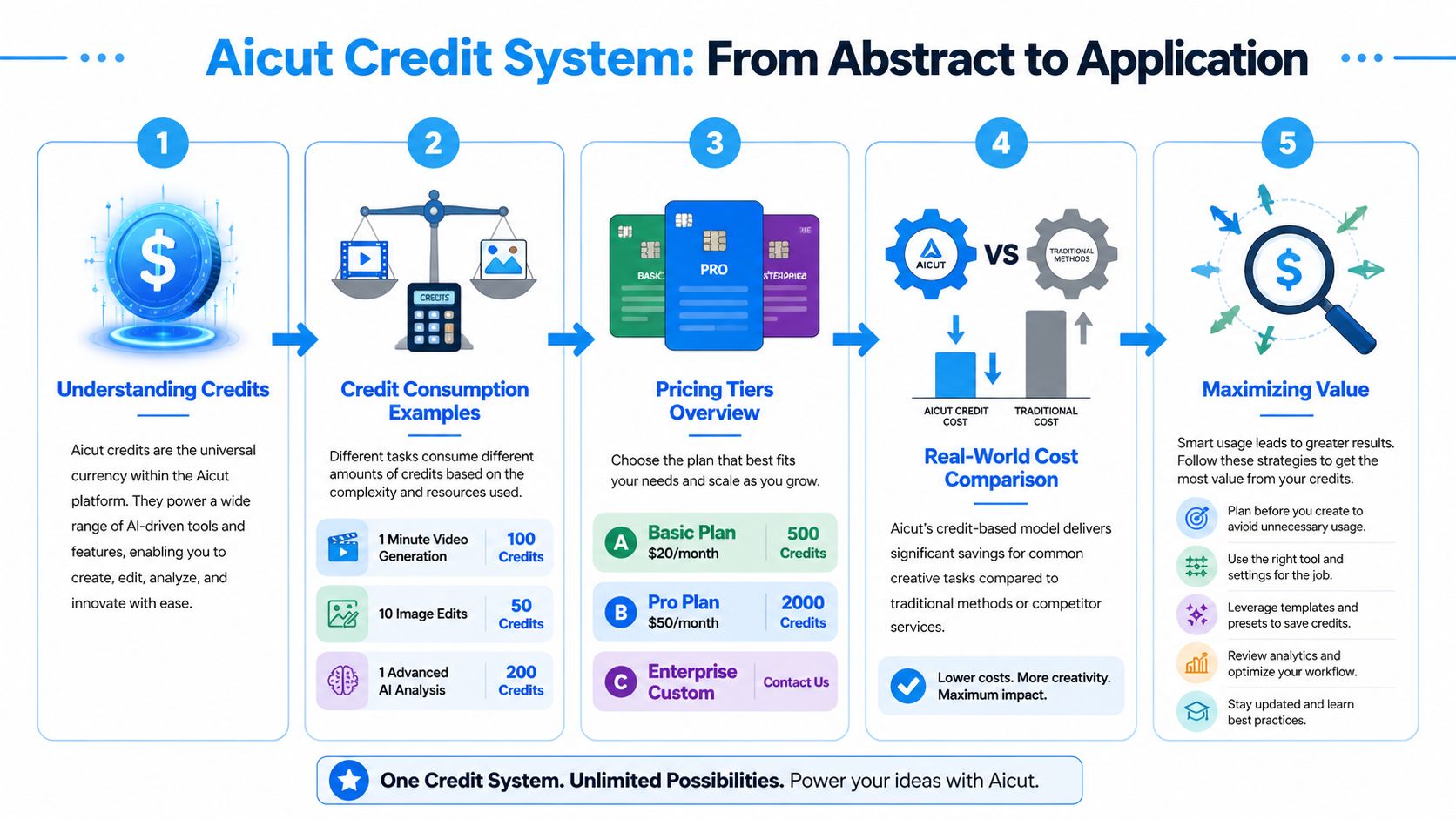
Credit-based pricing is where many creators get skeptical, and fairly so. Credits can feel abstract until you’ve used a system enough to predict what a normal week of production consumes.
The right way to evaluate credits isn’t “how many do I get?” It’s “how much content can I reliably produce before I need to think about limits?” For daily creators, predictability matters more than clever pricing language.
How to think about credits without overcomplicating it
The exact cost of each workflow depends on which models and actions you use. That means there isn’t one universal “price per video” that applies cleanly to every creator.
A better mental model is this:
- Simple test content uses fewer credits because you can rely on lighter generation and fewer revision passes.
- Polished campaign content uses more because stronger models, more edits, and repeated variations add up.
- Waste mostly comes from bad iteration habits rather than the system itself. If you generate aimlessly, costs feel high fast.
That last point matters. Credit systems reward operators who know what they want. They punish random experimentation.
Quick-start workflow for a first video
If you’re starting from zero, the fastest useful path looks like this:
Choose a content type first
Decide whether you’re making a faceless story clip, a product ad, or a social proof style short. Don’t start with the model. Start with the job.Pick a template that matches platform behavior
Choose the format that already fits the kind of content you want to publish.Use prompt cloning if you already know the style you want
This is faster than writing a fresh creative brief every time.Generate a rough first version
Don’t chase perfection on the first pass. You’re looking for structure, pacing, and hook viability.Edit only the weak points
Swap character, background, line delivery, or visual context as needed.Add voiceover and package for posting
Keep the assembly inside one workflow if possible.Schedule and publish
Move it out while the concept is still timely.
If you want the platform-specific version of that setup, Aicut’s guide on how to automate AI video creation with Aicut is useful because it walks through the creation flow in a practical way.
Use case one, faceless history or story channel
An autopilot workflow makes the most immediate sense.
A faceless history, curiosity, or storytelling channel usually wins through consistency and packaging. The operator needs a repeatable format, enough topic variation to stay fresh, and a process that doesn’t require filming. A template-first system works well here because the creator can build around narrative structures instead of reinventing editing patterns constantly.
The strategic value is simple. You can think more about topic selection and hooks, and less about asset assembly. That’s a real workflow upgrade.
Use case two, e-commerce ad production
E-commerce teams need volume, but they also need variation. One static winner rarely lasts. Hooks fatigue. visuals age. audiences respond differently to the same product framing.
An autopilot app helps most when the team needs UGC-style variations, quick concept testing, and fast revisions without new shoots for every angle. The editing layer becomes especially important here because ad teams often need small message or scene changes rather than brand-new creatives.
The limitation is that product-heavy campaigns still need human review. If visual trust, compliance, or brand feel matters, someone should approve every final output carefully.
Cheap production is not the same as efficient production. Efficient production gives you more valid tests, not more random assets.
Use case three, agency operations
For agencies, the biggest gain is operational. You’re not just making content. You’re managing handoffs, revisions, client feedback, and cross-account posting.
In that environment, an autopilot app becomes valuable when it shortens repetitive production cycles and keeps creation close to scheduling and review. Prompt cloning helps with variation. Templates help with throughput. Unified analytics help with reporting and next-step decisions.
The downside is that agencies still need process discipline. If the team doesn’t standardize naming, approval logic, and client-specific creative rules, automation just makes messy output faster. The tool helps. It doesn’t replace a good operating system.
Aicut vs The Competition A Head-to-Head Look
No autopilot app review is useful without context. The question isn’t whether one tool has more features on a landing page. The question is which platform fits the kind of work you do.
Some creators need trend-driven short-form production. Others need blog-to-video conversion. Others want a broad editing environment with AI assistance layered on top. Those are different jobs.
Aicut vs. Alternatives (2026)
| Platform | Primary Focus | Ideal User | Key AI Feature | Pricing Model |
|---|---|---|---|---|
| Aicut | Automated short-form video creation and publishing | Faceless creators, e-commerce teams, agencies | Prompt cloning, AI templates, model choice, workflow automation | Credit-based |
| Pictory | Turning scripts or articles into videos | Blog publishers, educators, repurposing teams | Script-to-video assembly | Subscription-style software model |
| InVideo | General-purpose AI-assisted video production | Marketers, small teams, broad use cases | AI video creation with editable templates | Subscription-style software model |
Where Aicut has the edge
Aicut is strongest when your workflow depends on speed, repetition, and short-form adaptation. That makes it a better fit for creators trying to publish often, agencies producing recurring content, and e-commerce teams testing multiple angles.
Its real advantage isn’t just generation. It’s compression. Fewer tool switches. Faster first drafts. Better support for faceless and trend-responsive formats. If your main problem is getting more publishable shorts out the door with less friction, that’s where it fits.
Where Pictory or InVideo may fit better
Pictory is often the better fit when your core asset already exists in text. If you’re turning articles, scripts, or educational content into videos, that workflow starts from a different source material. You care less about trend templates and more about repackaging information.
InVideo fits users who want a broader creative sandbox. If you prefer spending more time inside a flexible editing environment and less time inside a guided automation flow, that can be the better choice. It’s also friendlier for users who think in terms of traditional video editing rather than repeatable AI-first content operations.
The best choice by creator type
Here’s the simplest way to decide:
- Choose Aicut if your bottleneck is making and shipping short-form content repeatedly.
- Choose Pictory if your bottleneck is converting written material into video efficiently.
- Choose InVideo if you want a more general editing tool with AI help, not a tighter autopilot workflow.
If you’re comparing automation categories more broadly, not just video creation, this list of Find X DM automation alternatives is a useful reminder that “automation” means very different things across creator stacks. Messaging automation, publishing automation, and creative automation solve separate problems. Don’t buy one expecting it to do the work of the others.
Final Verdict Is Aicut Worth It in 2026
Yes, for the right user. Not for everyone.
The strongest case for Aicut is that it changes the daily workflow, not just the content output. That’s the difference that matters. Plenty of tools can generate something. Fewer tools reduce enough production friction that you can post more consistently without feeling like you added another complicated system.
What it does well
- Fast path to short-form output for creators who need frequency.
- Strong format advantage through templates and prompt cloning.
- Useful revision workflow because changes don’t always require rebuilding from scratch.
- End-to-end convenience with voice, scheduling, and analytics in one chain.
- Flexible model choice for balancing speed, cost, and polish.
Where it falls short
- Credits require discipline and can feel inefficient if you generate without a plan.
- Output quality still depends on direction. Weak prompts produce generic content.
- Not ideal for hands-on auteurs who want full manual control over every creative decision.
- Less compelling for long-form documentary workflows where deep editing craftsmanship matters more than throughput.
If your business improves when you can test more short-form ideas each week, this type of tool makes sense. If your work depends on handcrafted precision, it probably doesn't.
The best fit is clear. Faceless creators get a real production advantage. E-commerce teams get faster creative testing and easier variation. Agencies get workflow compression that can save a lot of repetitive labor across accounts.
The weaker fit is also clear. If you make slow, highly authored, detail-heavy work, you may find the automation layer more restrictive than helpful.
The bigger takeaway is that AI video tools are getting less interesting as novelty products and more useful as operating systems. That’s where the core value is heading. The tools that win won’t just generate clips. They’ll remove enough production drag that creators can spend more time choosing what to make, and less time stitching the process together.
If you want to see whether that workflow fits your own channel, store, or client operation, the best next step is to test Aicut on one real publishing sprint, not a toy project. Run a week of actual content through it, measure how much production friction disappears, and judge it on output speed, revision ease, and how many drafts make it to posting.