
You probably have one of two problems right now.
Either you want to learn how to make UGC that looks natural and sells, but every tutorial sounds vague. Or you already make videos, but they still feel too polished, too scripted, or too brand-heavy to perform like real creator content.
That gap matters. Good UGC is not just “film a product and talk about it.” It is a mix of strategy, casual delivery, smart editing, and platform fit. In 2026, the fastest creators are also combining simple phone-shot footage with AI-assisted production, especially for faceless content, rapid testing, and ad variations.
The creators and brands getting results usually do one thing well. They stop treating UGC like random content and start treating it like a repeatable workflow. That workflow starts before filming, gets sharper in the script, and becomes scalable when you add AI tools to the process.
Why User-Generated Content Is Your Growth Engine
A shopper is three swipes deep in TikTok or Reels, sees a polished brand video, and keeps going. Then they hit a clip that looks like a real person solving a real problem in their apartment, car, or bathroom. That second format earns attention because it feels native to the feed.
UGC wins on fit. It matches how people already consume content on social platforms, so the sales message arrives through demonstration, reaction, and context instead of a polished brand setup.
The trust piece matters, but the mechanism is practical. Many brand-produced ads use studio lighting, scripted delivery, and product-first framing. Viewers recognize the format in a second. UGC usually opens inside a believable moment: a creator showing the mess on their desk, recording a quick mirror demo, capturing a screen while narrating a problem, or filming a hands-only unboxing at home. That lower-friction presentation often gives the product more credibility than cleaner creative.
I see this in performance work all the time. The assets that hold attention are rarely the ones with the nicest camera package. They are the ones that make the viewer think, “That looks like my situation.”
That is also why learning what UGC marketing is should come first. The job is not to make short videos at volume. The job is to create decision-shaping content that helps a buyer picture the product in their own routine.
What makes UGC perform
Strong UGC usually shares three traits:
- Relatability: The setting feels lived-in and believable.
- Specificity: The creator names a real use case, frustration, or result.
- Proof: The viewer sees the product doing something useful.
A video can be shot on an iPhone and still miss if it stays generic. It can also be AI-assisted and still work if the angle is clear, the scenario is believable, and the proof lands fast. That hybrid workflow is how a lot of creators are getting an edge now. They shoot original footage for realism, then use tools like Aicut to generate variations, faceless edits, voiceovers, and faster test batches without rebuilding the entire asset from scratch.
Tip: If your video could sell five unrelated products with the same script, it is too broad to perform like strong UGC.
The practical takeaway is simple. UGC is not a side format you add after the campaign is built. For many brands, it is the creative engine that drives testing, trust, and scalable growth.
The Pre-Production Playbook for High-Performing UGC
Most weak UGC fails before the camera turns on.
The product may be good. The lighting may be fine. The editor may even add captions and trending audio. But if the video has no clear objective, no audience pain point, and no angle, it becomes filler.
79% of consumers say user-generated content highly influences their purchasing decisions, according to Backlinko’s UGC statistics roundup. That only helps you if the content speaks to the reason they might buy.

Start with one job for the video
A single UGC asset should do one main job.
Not three. Not five.
Pick the primary outcome:
- Sales: The video should reduce buyer hesitation and create purchase intent.
- Awareness: The goal is to stop the scroll and make the brand memorable.
- Engagement: The content should spark saves, comments, shares, or discussion.
- Product education: The viewer should understand how the product works in real life.
The mistake I see most often is trying to cram all of these into one script. That usually creates a video that opens like a hook, shifts into a tutorial, adds a testimonial, then ends in a hard sell. It feels stitched together.
Build the brief like a strategist
A strong UGC brief can be short. It just needs to be clear.
Use this format before you film or generate anything:
| Brief Element | What to write |
|---|---|
| Goal | What should happen after someone watches |
| Audience | Who this is for, in plain language |
| Pain point | What frustrates them right now |
| Promise | What result or relief the product offers |
| Format | Selfie talk, hands-only demo, voiceover, screen recording, AI-generated clip |
| Hook angle | The first line or visual tension |
| Proof | Demo, before/after, testimonial, product use |
| CTA | Soft next step like shop now, learn more, or watch part two |
Keep it blunt. “Busy parents who want faster breakfast prep” is better than “health-conscious consumers.” “My skin felt dry by noon” is better than “hydration concerns.”
Ask better planning questions
Before filming, pressure-test the idea with questions like these:
- What exact moment is this video about? Morning routine, commute, work break, gym bag, late-night cleanup.
- What objection needs to disappear? Price, complexity, trust, fit, taste, speed.
- What kind of proof fits naturally? Showing texture, timing, setup, app flow, packing process, user reaction.
- What should the viewer feel? Relief, curiosity, confidence, urgency, recognition.
The more concrete your answers, the easier everything becomes later. Hooks get sharper. B-roll becomes obvious. Editing gets faster.
Tip: Write your brief in everyday language. If it sounds like a marketing deck, your final script will probably sound like one too.
Match the format to the message
Not every UGC idea should be filmed the same way.
A few practical pairings:
- Problem-solution products: Selfie video or voiceover works well because the viewer needs context.
- Visual products: Hands-only demos and close-up B-roll often carry the story better than talking.
- Apps and digital tools: Screen recordings with text overlays usually feel cleaner than staged reactions.
- Faceless creator accounts: Product footage, stock-style lifestyle clips, AI scenes, and on-screen text can still feel native if the language is casual.
A lot of creators over-focus on aesthetics at this stage. The better move is to focus on fit. If the content format matches the product and the problem, the video feels more believable before the viewer even processes the message.
Crafting Scroll-Stopping Scripts and Hooks
The first few seconds decide whether the rest of the video matters.
If the opening feels broad, slow, or promotional, the viewer leaves. Strong UGC scripts get specific immediately. They sound like something a real customer would say after using the product.
One useful clue comes from purchase behavior. Consumer reviews are the most impactful form of UGC, influencing purchases for 78% of shoppers, followed by customer Q&As and photos, as noted in the Bazaarvoice data summarized by Backlinko earlier. That tells you something important about scripting. The closer your opening feels to a genuine review or answer, the stronger it usually lands.
Write like a person, not a brand
A UGC script should sound slightly unfinished in a good way.
Not sloppy. Human.
That means:
- Shorter sentences
- Plain words
- Specific reactions
- Natural transitions
- Fewer claims, more observations
Compare these two openings:
Weak: “This skincare serum provides a premium hydration experience for daily use.”
Better: “My skin usually feels tight by lunch, so I tried this for a week.”
The second one creates a real situation. It also invites proof.
Proven UGC Hook Formulas
| Formula Type | Example | Why It Works |
|---|---|---|
| Problem first | “If your coffee always goes cold during work, watch this.” | Calls out a familiar frustration fast |
| Unexpected confession | “I thought this was overhyped, but I was wrong.” | Creates tension and curiosity |
| Direct result | “This is what I use when I need dinner done fast.” | Leads with practical use, not brand intro |
| Question hook | “Why does no one talk about how annoying this part is?” | Pulls the viewer into agreement |
| Side-by-side setup | “I tried the usual version, then I tried this.” | Signals comparison and proof |
| Mini review | “My honest take after using this all week.” | Feels like review content, not an ad |
| Objection flip | “I only bought this because I thought it would save time.” | Begins with skepticism, which feels credible |
| Demonstration hook | “Listen to this before you buy one.” | Makes the viewer wait for proof |
Build the middle around proof
Once the hook lands, the script needs to earn the watch.
The middle should do one of these well:
- Show the product in use
- Answer a likely objection
- Explain the difference it made
- Contrast before and after
- Reveal one detail the viewer would not know from the product page
Many creators go wrong here. They repeat the hook, list features, and jump to a CTA. Strong UGC instead moves like a small story.
A simple structure that works often is:
- Hook
- Problem context
- Product in action
- Honest reaction or takeaway
- CTA
Keep the CTA light
UGC rarely needs an aggressive close.
Most of the time, softer CTAs fit the format better:
- Check it out
- It’s linked in bio
- Worth trying if you deal with this too
- I’d look at the reviews
- This is the one I’d get again
A hard close can break the illusion of authenticity. If the whole video feels like a personal recommendation and the last line suddenly sounds like a sales script, performance often drops.
Tip: Read your script out loud once before filming. If any line sounds like ad copy, rewrite it in the words you would text to a friend.
Production Workflows From DIY Filming to AI Generation
There are now two practical ways to make strong UGC.
You can film it yourself with a phone. Or you can generate it with AI and edit it into a native-looking asset. The smartest creators use both. They shoot when they need real product handling or tactile proof, and they use AI when they need speed, faceless output, or multiple creative angles fast.
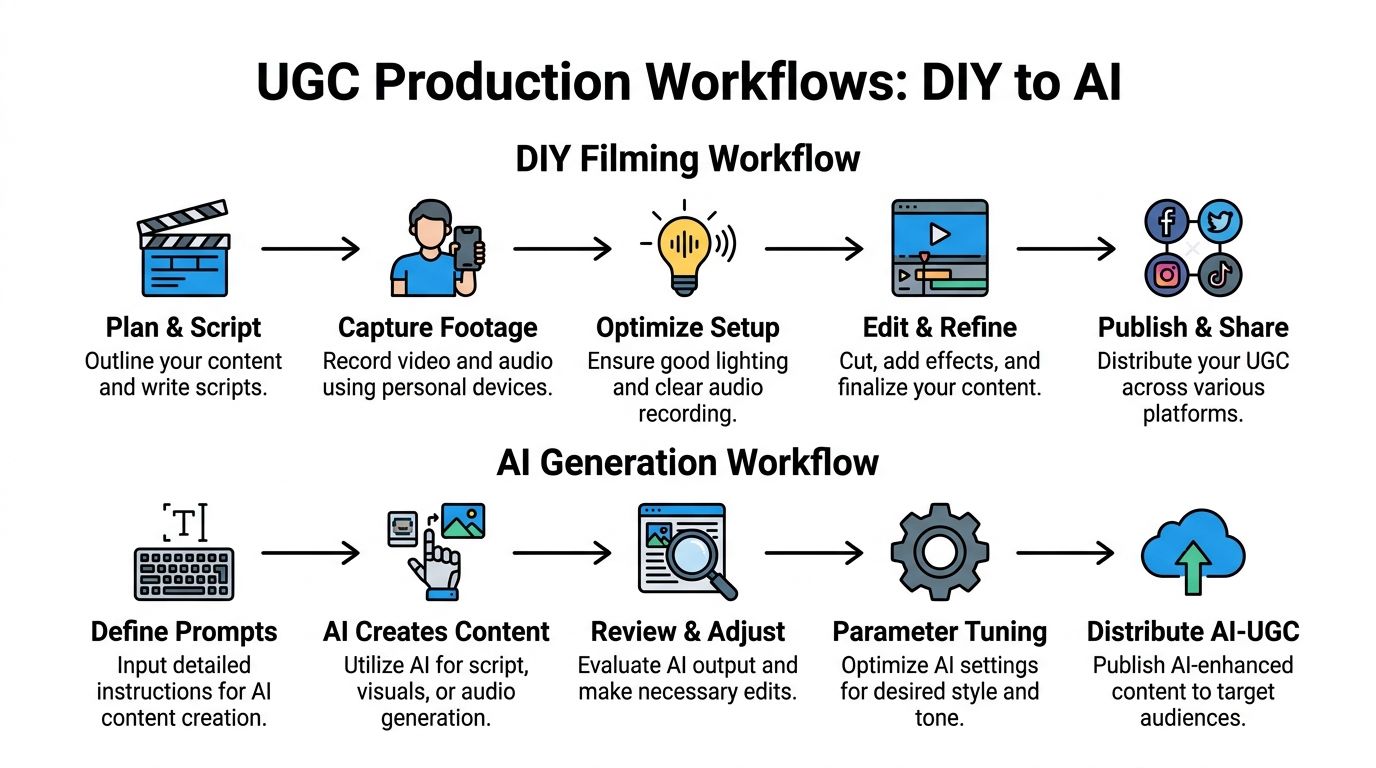
The DIY filming workflow
DIY UGC still works because it captures the little imperfections people trust. Slight camera shake. Real room tone. Natural pauses. Product handling that looks lived-in rather than staged.
Shoot for realism, not polish
The easiest way to make a phone-shot video look wrong is to over-produce it.
UGC usually performs better when it feels close to normal user behavior:
- Use natural light: Window light is usually enough. Avoid harsh overhead lighting if it flattens the face or makes products look sterile.
- Choose believable locations: Kitchen counters, desks, bathrooms, cars, and bedroom setups often look more native than studio backdrops.
- Hold the product naturally: If every movement looks rehearsed, the content loses credibility.
- Leave a little texture: Perfect framing is less important than a believable moment.
You do not need expensive gear for this. A recent smartphone, a quiet room, and a simple tripod can carry most UGC formats.
Capture more footage than you think you need
The raw material for a good edit is variety.
Film these types of shots:
- Talking head clips: Direct explanation, reaction, mini review
- Hands-only B-roll: Opening, using, applying, tapping, pouring, typing
- Environment shots: Product on desk, in bag, in sink, on shelf
- POV angles: What the user sees while interacting with it
- Close-ups: Texture, interface, packaging, ingredients, details
The practical rule is simple. If a line in the script mentions something, try to capture a visual for it.
Record cleaner audio
Bad audio makes even decent UGC feel disposable.
A few fixes matter more than creators think:
- Film in a room with soft surfaces if possible
- Turn off fans and noisy appliances
- Move closer to the phone instead of shouting from far away
- Re-record voiceover if the live take sounds thin or echoey
If the on-camera delivery is weak, switch to voiceover. That is not cheating. It is often the better format.
The AI generation workflow
AI-generated UGC is useful when you need speed, privacy, testing volume, or faceless production.
That includes solo creators who do not want to be on camera, e-commerce teams that need multiple hooks fast, and agencies building creative variations without reshoots.
A practical workflow can include tools like Runway, InVideo AI, CapCut for post, and Aicut’s AI video generation workflows for template-based UGC creation, prompt cloning, editing, scheduling, and publishing.
According to the verified methodology from InVideo’s guide, you can use an AI platform to enter a 50 to 100 word prompt describing the style, audience, and hook, then generate a professional 1080p UGC video in 2 to 5 minutes, with a workflow described as up to 10x faster than traditional shooting and editing cycles (InVideo AI UGC strategy guide).
How to prompt AI for usable UGC
The biggest mistake with AI UGC is under-directing it.
A vague prompt gives you generic output. A useful prompt includes:
- Audience
- Problem
- Tone
- Hook style
- Setting
- Shot feel
- Product behavior
- CTA style
A stronger prompt looks like this:
“Create a short vertical UGC-style video for a portable blender aimed at busy office workers. Start with a quick frustration hook about skipping breakfast. Use natural kitchen and desk scenes, handheld feel, casual voiceover, realistic product handling, and a soft call to action.”
That is not fancy writing. It is production direction.
Tip: Prompt for behavior, not just visuals. “Handheld, casual, slightly imperfect” usually gets you closer to UGC than “high quality, cinematic, premium.”
When AI works better than filming
AI has clear advantages in a few situations.
Faceless creator workflows
If you do not want to show your face, AI can generate scenes, avatars, product-style clips, or ad-ready structures that still feel native once you add human editing choices.
Fast concept testing
You may have three hook angles and no time to film all three. AI lets you test concepts before committing to a full shoot.
Variant production
One base idea can become multiple versions with new openings, scenes, voiceovers, backgrounds, and CTAs. That matters when platforms fatigue creative quickly.
When DIY still beats AI
AI is not a full replacement.
Film manually when the product needs tactile trust:
- texture
- fit
- ingredients
- pouring
- setup steps
- real screen interaction
- in-hand scale
Viewers can usually tell when something important is being simulated. If the buying decision depends on a physical detail, real footage still carries more weight.
The hybrid workflow that usually wins
The strongest setup for many creators is not DIY versus AI. It is a mix.
Use phone-shot footage for proof. Use AI for speed and scale.
For example:
- Film a real product demo on your phone
- Record one honest voiceover
- Generate alternate intros or background scenes with AI
- Make multiple versions for different platforms or audiences
- Swap captions, pacing, and CTAs based on placement
That approach keeps the content grounded while letting you produce more without repeating the whole shoot every time.
A lot of people searching how to make ugc assume they need one perfect method. They do not. They need a workflow that matches the product, the platform, and the volume they want to produce.
Editing and Optimizing Content for Every Platform
Editing is where UGC either becomes watchable or forgettable.
A decent script and solid footage can still underperform if the pacing drags, the captions are hard to scan, or the format feels wrong for the placement. Small choices matter here.

Tighten the first few beats
The opening should move fast.
That does not mean frantic editing. It means the viewer should understand the setup immediately.
A practical checklist:
- Open on the strongest line: Do not keep warm-up words.
- Show the product early: Even if the hook is verbal, the product should enter quickly.
- Cut dead air: Tiny pauses feel longer in short-form feeds.
- Use captions with intent: Emphasize the pain point, result, or objection.
Creators often keep too much setup because it feels natural in the raw take. In the edit, natural often becomes slow.
Build platform-fit versions
One video should not be exported the same way everywhere.
Adjust for placement:
- TikTok and Reels: Vertical, fast hook, larger captions, stronger visual movement
- YouTube Shorts: Similar vertical format, but often benefits from cleaner pacing and clearer information hierarchy
- Feed placements: Square or vertical crops may need tighter framing and simpler text
- Product page embeds: Keep them direct, proof-heavy, and easy to understand without sound
The edit should also reflect why someone is seeing it. Feed content competes with entertainment. Product page content competes with hesitation.
Repurpose without making clones
Repurposing is how modern UGC workflows become efficient. The key is to make variants, not duplicates.
That can include:
- New first line
- Different opening visual
- Alternate CTA
- Faster cut pace
- Different caption style
- New voiceover take
- Different audience framing
Verified data from Xolo’s guide notes that expert agencies report a 2.5x increase in views from tracked, repurposed assets when one core video is turned into multiple versions using AI tools (Xolo’s UGC creator guide).
That result makes sense in practice. One raw idea can serve several placements if you reshape the wrapper around it.
Tip: Keep a “master edit” folder with hook variants, B-roll swaps, alternate CTAs, and caption styles. It saves time every time you need a fresh cut.
Use AI edits where they save time
AI editing is most useful after the core message is already strong.
It can help you:
- Swap backgrounds
- Change characters in generated scenes
- Replace voiceovers
- Extend or shorten versions
- Reframe clips for different aspect ratios
- Generate fresh visual support around the same script
That is especially useful when your product, offer, or audience stays the same but the creative needs a new outer layer.
A useful editing example is below.
Final quality check before publishing
Before you export, check five things:
- Would someone understand the point with sound off?
- Does the first line create tension or relevance fast enough?
- Is there visible proof, not just verbal praise?
- Does the CTA fit the tone of the video?
- Does this version match the platform where it will appear?
Editing is not about adding polish for its own sake. It is about removing friction between the viewer and the message.
The Business of UGC Legal Rights and Measurement
A creator hands over a strong video, the brand starts running it in ads, then a rights question shows up after the content is already live. I have seen that happen more than once. The creative was good. The paperwork was weak. That mistake turns a useful asset into a headache fast.
Many creators master production but overlook the business side. They skip usage terms, rely on casual DMs instead of written approval, and judge performance by views alone. That leaves money on the table, especially when a video could keep working across paid social, product pages, email, and landing pages.
Handle rights before the content goes live
Rights should be settled before the file gets posted, boosted, or handed to a media buyer.
If a person appears on camera, a creator produced the asset for a brand, or the edit uses licensed audio, put the terms in writing early. A simple agreement is usually enough if it answers the practical questions that create disputes later.
Define:
- Where the content can appear: Organic social, paid ads, website, email, product pages
- How long the brand can use it
- Whether the brand can cut new edits from the original
- Whether raw footage is included
- What music license covers the final video
Audio causes more problems than creators expect. If you need a refresher, this guide explaining what royalty-free music means is a useful place to start.
One more point matters here. “Can we repost this?” does not cover paid usage, whitelisting, website placement, or long-term licensing. If a brand wants those rights, spell them out.
Measure what affects revenue
Views help diagnose reach. They do not tell you whether the asset is doing its job.
The metrics that matter most usually sit lower in the funnel:
- Click-through rate
- Watch progression and hold rate
- Landing page engagement
- Add-to-cart activity
- Purchases or qualified leads
- Comments that reveal objections, confusion, or buying intent
I treat UGC performance in layers. The first layer is attention. The second is action. A video that looks average in-feed can still become a strong sales asset once it sits on a product page or in a retargeting sequence. That kind of video often deserves more budget than the flashy one with weak conversion behavior.
Put UGC close to the buying decision
UGC earns its keep when it shows up where customers hesitate.
That usually means product detail pages, comparison pages, FAQ sections, cart recovery emails, and post-click landing pages. A good creator video can answer the exact questions that stop a sale: Does it work? Is it easy to use? Does it feel worth the price? Social distribution matters, but placement matters just as much.
As noted earlier, product-page UGC often lifts conversion more than creators expect. That is why strong brands treat these clips as revenue assets, not disposable posts.
Repurpose based on proof
Once a video proves it can hold attention or drive action, break it into parts and reuse the winning pieces.
Pull the opening hook into a cold ad. Move the demonstration into a product page module. Turn the strongest line from the testimonial into a short retargeting cut. If you use a hybrid workflow, this approach speeds up the process. Keep the original proof from the DIY footage, then use tools like Aicut to generate alternate versions, swap visuals, test fresh voiceovers, or create faceless variants without rebuilding the concept from scratch.
That approach scales what already worked. It also protects margin, because the next round of content starts with evidence instead of guesswork.
Your Path to Becoming a UGC Pro
Strong UGC is not random. It is built.
You start with a clear brief, write a hook that sounds human, choose the right production path, edit for the platform, and treat the final asset like business property, not throwaway content. Sometimes that means filming with your phone. Sometimes it means using AI to produce faceless variations faster. Usually it means combining both.
Consistency beats perfection here. Make one useful video, study what feels believable, and improve the next one.
If you want to turn this workflow into a faster, faceless production system, Aicut gives you a practical way to generate UGC-style videos, test hooks, edit variations, and publish more consistently without rebuilding every video from scratch.