Automating your AI video production means building a system that can generate and publish videos with almost no manual input. It’s about connecting specialized AI tools for scripting, voiceovers, and video creation to build a content engine that works for you. This allows you to produce content at a scale that's just not possible by hand.
It’s a fundamental shift from tackling one-off projects to running a continuous, hands-off content machine.
The Big Shift to Automated Video Content
Welcome to a new way of working, where creating high-quality video content is no longer a slow, painstaking process. For marketers, creators, and businesses, being able to automate AI video workflows is a total game-changer, especially if you're chasing consistency and scale. Not too long ago, the idea of a fully automated pipeline—going from a simple idea to a published video—felt like science fiction. Now, with the right tools, it's a practical reality.

Think of this guide as your roadmap. We’ll walk through how to build your own hands-free system, moving from a basic concept to a self-sustaining publishing machine that consistently cranks out engaging videos.
Why Automation Is No Longer Optional
Let's face it: the demand for video content is relentless. But your time and budget? They're finite. This is the exact problem that AI video automation solves. Instead of getting bogged down in hours of manual editing, you can shift your focus to high-level strategy while the system handles the grunt work.
The core benefit is simple: it allows you to decouple content output from the hours you work. More content doesn't have to mean more effort.
The market's explosive growth tells the same story. The global AI video market was valued at USD 11.2 billion in 2024 and is on track to hit a staggering USD 246.03 billion by 2034. That's a compound annual growth rate of 36.2%, which highlights just how quickly these technologies are being adopted.
Key Advantages of an Automated System
Putting your video workflow on autopilot offers some powerful perks that go way beyond just saving time. For creators and marketers, these benefits translate directly into better results and sustainable growth.
Here’s what you stand to gain:
- Massive Scalability: Imagine creating dozens, or even hundreds, of unique videos from a single template and a spreadsheet of data. It’s entirely possible.
- Brand Consistency: Every video automatically follows your brand guidelines—from colors and logos to the tone of voice. No more off-brand oopsies.
- Increased Publishing Frequency: A steady stream of content keeps you top-of-mind and helps feed the algorithms on social platforms.
- Resource Efficiency: You can dramatically reduce your reliance on expensive software, freelance editors, or big production teams.
To really get an edge, it pays to stay on top of the latest trends in content automation, as this space is moving incredibly fast.
Assembling Your AI Video Automation Stack
To really get AI video working for you, you can't just rely on a single, cool tool. The real power move is building a “stack” – a set of specialized platforms that talk to each other and work together seamlessly. Think of it like a digital assembly line where each tool does its specific job before passing the work to the next one down the line.

The secret to a solid AI video workflow is picking tools that integrate without a fuss. You want to connect your content source directly to your video generator, creating a hands-off process that just hums along in the background.
The Core Components of Your Tech Stack
Don't worry, your automation stack doesn't need to be overly complex. It just needs to cover four key functions to take you from a raw idea to a published video. Each piece of the puzzle handles a specific part of the journey.
- Content Source: This is what kicks off your entire workflow. It could be a new post popping up in a blog's RSS feed, a fresh row added to a Google Sheet, or even an update to a product in your Shopify catalog.
- AI Scriptwriter: This is where tools like ChatGPT or Jasper come in. They can grab your source content and whip it into a tight, engaging video script, ready for narration.
- AI Voice Generator: Platforms such as ElevenLabs or Play.ht are perfect for creating natural-sounding voiceovers from your script. This gives your video that professional, human touch.
- AI Video Engine: This is the heart of the operation. A text-to-video generator takes the script, voiceover, and any visual direction you have and turns it all into the final video.
If you're hunting for the right engine, our guide on the best AI video creation tools is a fantastic place to start. It breaks down the top platforms to help you find the best fit for what you need to do: https://www.aicut.pro/blog/best-ai-video-creation-tools
The Glue Holding It All Together
Okay, so you have your tools. Now, how do you get them to talk to each other? That's where automation platforms and APIs come into play. They act as the central nervous system for your whole setup.
An Application Programming Interface (API) is basically a set of rules that lets different software programs communicate. When you're picking an AI video tool, you absolutely have to prioritize one with a robust API. It's non-negotiable. Without it, you can't really automate much of anything.
This is what allows a platform like Zapier or Make to listen for a trigger (like that new spreadsheet row) and then tell your video generator to get to work.
A strong API is what turns a random collection of tools into a single, unified content machine. It's the key that unlocks custom workflows built specifically for your goals.
For example, imagine setting up a flow where every new customer testimonial you add to a spreadsheet automatically triggers the creation of a slick social media video. The API is what makes that happen behind the scenes, no manual work required from you.
To give you a clearer picture, here’s how these pieces fit together.
Key Components of an Automated AI Video Stack
| Tool Category | Primary Function | Example Tools | Integration Method |
|---|---|---|---|
| Content Source | Triggers the workflow with new data | Google Sheets, RSS Feeds, Airtable, Shopify | Webhooks, Direct Integration |
| AI Script/Voice | Converts source data into script & audio | ChatGPT, Jasper, ElevenLabs, Play.ht | API Calls |
| Automation Hub | Connects the tools and manages the workflow | Zapier, Make, n8n | API Connections, Webhooks |
| AI Video Engine | Generates the final video from the inputs | InVideo, Synthesia, Pictory | API Commands |
This table shows a typical setup, but the beauty is that you can swap components in and out based on your specific needs and budget.
Making Smart Integration Choices
When you build an automated workflow, the goal is a reliable system you don't have to babysit. This means choosing tools known for their stability and easy integrations. For a high-level look at bringing this kind of tech into your business, this CMO Guide to Integrating Generative AI in B2B Marketing offers some great strategic insights.
Ultimately, your stack should be built around what you’re trying to create. A YouTuber making Shorts from Reddit stories will have a very different setup than an e-commerce brand creating hundreds of product ads.
My advice? Start small. Connect just two tools first, get them working together, and then add more pieces to your stack as you get more comfortable.
Laying the Groundwork: Your Core Video Blueprints
Real automation isn't about churning out random videos. It’s about building a machine that produces consistently great content, all on-brand. The secret sauce? A solid set of blueprints—which are really just a smart combination of video templates and a library of proven prompts. These are the repeatable instructions that make sure every single AI-generated video hits the mark.
Think of your template as the visual skeleton. It locks in the core look and feel of your brand, so no matter what the AI creates, it’s instantly recognizable as yours. You absolutely need this foundation before you can even think about scaling up.
Nailing Down a Master Video Template
Your first real step is to build a "master template" in your video tool of choice. This is where you set the visual rules of the road. Instead of reinventing the wheel every time, the AI will use this template as its guide, giving your audience that familiar feel with every video.
So, what goes into this master template? I always focus on these core pieces:
- Brand Kit: Get your exact brand colors, fonts, and logos loaded and locked in. This is non-negotiable for building brand recognition.
- Logo Placement: Where does your logo live? Is it a subtle watermark in the corner, or does it get a spotlight in the intro? Decide once and stick with it.
- Standardized Scenes: I like to create placeholder scenes for my intros and outros. The automation can then just drop the unique, freshly generated content right in the middle. Easy.
- Text & Overlay Styles: Define how your text overlays, captions, and headlines should look. This keeps the aesthetic clean and consistent across the board.
Most good AI video platforms have pre-built options to get you started. If you're feeling stuck, I'd recommend browsing a gallery of AI video templates just to see what’s possible. It can really help you zero in on a style that clicks with your brand.
Building Out Your Prompt Library
If the template is the skeleton, the prompt is the brain. A well-written prompt tells the AI exactly what you want and how you want it. A lazy, generic prompt? You'll get a lazy, generic video. Every time. This is why building a library of go-to prompts is a game-changer for getting reliable results.
A great prompt does more than just state a topic. It gives the AI context, tone, and specific stylistic direction. It’s the difference between "make a video about coffee" and "create a fast-paced, energetic TikTok-style video showing the journey from coffee bean to latte art, with upbeat, trending music."
I organize my own prompt library by the type of video or the campaign goal. This makes it incredibly easy to just grab the right set of instructions for whatever I need, whether it's a quick social clip or a detailed product explainer.
Prompt Examples for Different Formats
Let’s look at a few real-world examples of how you can tailor prompts for different platforms and goals:
- For a Short-Form Social Clip (e.g., Reels/Shorts):
- Prompt: "Create a 15-second vertical video for Instagram Reels. Use quick, snappy cuts and trending audio. The visual style needs to be bright and highly saturated. The core of the video should be a surprising 'before and after' reveal."
- For a Product Explainer Video:
- Prompt: "Generate a 2-minute horizontal video explaining our new [product feature]. Keep the tone calm and professional. Make sure to include on-screen text callouts for key benefits. The pacing should be moderate and easy for anyone to follow."
- For a UGC-Style Ad:
- Prompt: "Produce a 30-second UGC-style video shot from a selfie perspective. The AI avatar needs to sound genuinely enthusiastic and authentic, like a real customer leaving a review. I want to see close-ups of the product in use."
By crafting and saving these kinds of detailed prompts, you're not just making a video; you're building a repeatable system that delivers predictable, high-quality results. This one-two punch of a locked-in visual template and a flexible prompt library is what truly powers an effective automated video workflow.
Building Your End-to-End Publishing Pipeline
Now that you have your video blueprints sorted, it's time to connect the dots. This is where you build a completely hands-off content machine that generates and publishes videos for you. The whole idea is to create a workflow that hums along in the background, so you can stop worrying about the day-to-day grind and focus on the bigger picture.
Let's walk through a real-world example I see all the time: automatically turning new blog posts into short, punchy summary videos for social media. It’s a fantastic way to squeeze more life out of your content without doing any extra work once it's set up.
Think of it like this—your templates and prompts are the core ingredients that feed the machine, which then churns out the final video.
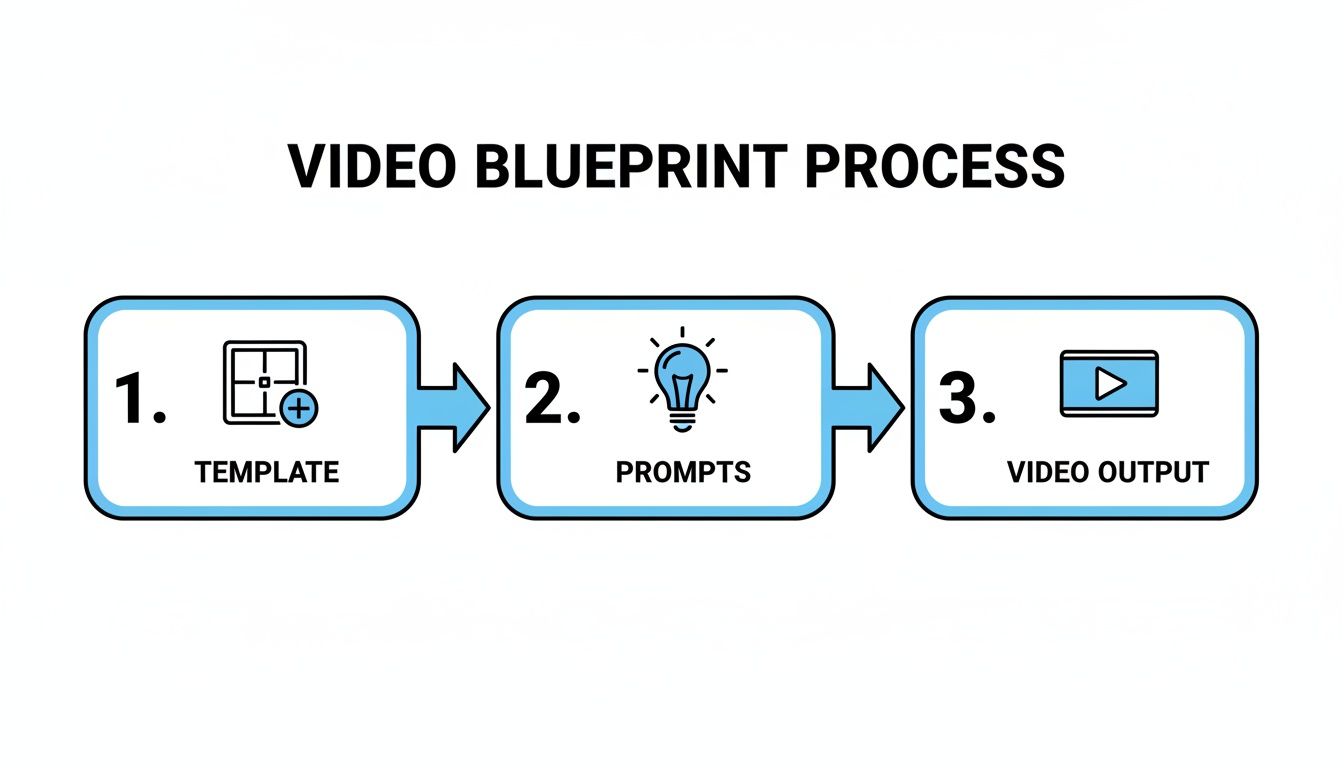
This simple flow is the key. When you have well-defined templates and repeatable prompts, you get consistent, on-brand videos every single time.
Setting Up the Trigger and Data Flow
Every great automation starts with a trigger—that one event that kicks the whole process off.
For our blog-to-video example, the trigger is a "New Item in Feed" from your blog's RSS feed. You can set this up in minutes using an automation platform like Zapier or Make. It’s dead simple.
Once that trigger fires, the automation tool grabs the blog post's title, URL, and summary. This data is then passed to the next step. Honestly, this is the most critical part; if the trigger fails, the whole chain breaks.
From Raw Text to Polished Script
Next, the blog post data is sent over to an AI text model like ChatGPT. Its job is to turn that raw text into a tight, engaging video script. The beauty is you can feed it a pre-written prompt right inside your automation workflow.
For instance, your prompt could be something like: "Summarize this blog post into a 150-word script for a short social media video. Pull out the three most important takeaways and finish with a strong call to action encouraging people to read the full article. Keep the tone upbeat and conversational."
This step ensures every script hits the right notes and is perfectly tailored for the platform you're posting on.
Generating and Publishing the Final Video
With a polished script in hand, your automation hub makes an API call, sending it straight to your AI video engine. Using your master template, the video tool gets to work. It generates the AI voiceover, pulls in relevant B-roll clips, and slaps on your brand colors and logo.
This API handshake is where the magic happens. It’s the moment your instructions become a real video file, and it’s the core of how you automate ai video production from start to finish.
In just a few moments, the video is ready. The final step? Automatic publishing. Your automation tool can take that finished video file and post it directly to YouTube, add it to your Buffer queue, or drop it in a Google Drive folder for a final once-over. For a closer look at this last piece of the puzzle, our guide on how to automate social media posts has some great strategies.
The entire process—from a new blog post to a published social video—happens without you lifting a finger. It's no wonder that 55% of businesses are looking to AI for content creation and 52% are focused on video generation specifically.
Before you set it and forget it, make sure you build a resilient pipeline. Run a full test from start to finish, fix any API errors that pop up, and make sure the video quality is up to your standards. A little testing now saves a lot of headaches later.
How to Optimize and Scale Your Workflow
Getting your first automated workflow running is a huge win, but don't fall into the "set it and forget it" trap. The real magic happens when you start refining the process. This is where you transform a simple setup into an intelligent video factory that learns and improves.
Think of it this way: your audience is giving you a constant stream of feedback through their views, likes, and shares. Paying attention to that data is the key to making your videos better and your workflow more efficient.
Analyze and Refine Your Outputs
Once your videos are out in the wild, your role shifts from creator to analyst. It's time to dig into the performance data on each platform. Are certain video templates holding viewers' attention longer? Do videos based on a specific blog post format always get more shares?
This is your chance to make small, data-backed tweaks that can have a massive impact. A/B testing is your best tool for this job.
- Test Prompt Variations: For the same type of content, try two completely different script prompts. Maybe a direct, benefit-focused script works better than a creative, storytelling one. Run the test and find out.
- Experiment with Templates: Pit two different visual styles against each other. Does a template with bold, kinetic text get more clicks than a clean, minimalist design? Let the numbers decide.
Running these kinds of tests moves you beyond guesswork. You're using hard evidence to perfect your automated output and create videos that people actually want to watch.
Scaling from a Single Flow to a Video Factory
Once you've fine-tuned your system and it's churning out consistently good videos, you're ready to scale. And moving from one automated flow to a full-on video production engine is probably easier than you think. The trick is to start thinking in batches.
Instead of having your automation rely on single triggers, you can feed it from a centralized data source to create dozens or even hundreds of videos at once. A simple Google Sheet or an Airtable base is perfect for this. Each row in your spreadsheet becomes a unique video, with columns for the script, keywords, calls-to-action, or any other variable.
This shift in thinking turns your workflow from a reactive system that responds to one event at a time into a proactive content factory. You can map out an entire month's video calendar in a single spreadsheet and generate everything in one shot.
This kind of efficiency is a game-changer. Automation with AI video tools unlocks some serious productivity gains. Some organizations have reported saving up to 62% of their time. For a solo creator or small team, that can add up to 45 hours a month—time you can pour back into big-picture strategy and creative development. You can dive deeper into these numbers by checking out these stats on AI's impact on productivity. This is how you truly automate AI video production on a scale that matters.
Common Questions About AI Video Automation
Jumping into any new tech stack is bound to bring up a few questions. When you start automating AI video production, it’s completely normal to wonder about the costs, quality, and what technical hiccups you might run into. Let's tackle some of the most common concerns I hear.
Is This Going to Be Expensive?
The price tag can swing pretty wildly, but it's probably more accessible than you think. Sure, some enterprise-level platforms will make your wallet cry, but plenty of powerful AI video tools offer plans that won't break the bank. The real way to look at this is through the lens of return on investment (ROI).
Think about the sheer number of hours you'll get back from not having to do manual edits. Consider how you can ramp up your video output without hiring more people. More often than not, the savings in time and labor costs quickly outpace the subscription fee, making it a much smarter financial decision than sticking with traditional video production.
Will My Videos Feel Robotic?
This is a big one, and I get it. But with the right strategy, it's a fear you can definitely put to rest. The "human touch" doesn't magically appear from the AI itself; it comes from your creative direction during the initial setup. You're still the one calling the shots.
Your brand's voice and personality get baked into the system through the templates you build and the prompts you write. The point of automation isn't to churn out sterile, soulless content—it's to scale the unique creative vision you’ve already established.
When you put in the effort to design high-quality, on-brand templates, write detailed prompts, and pick natural-sounding AI voices, your unique style will shine through in every video that gets produced.
What Are the Biggest Technical Roadblocks?
For most folks just starting out, the biggest hurdle is usually the initial API integration. Getting different tools to talk to each other for the first time using a platform like Zapier or Make can feel a little daunting if you've never done it before. My advice? Start with a simple two-step automation and work your way up.
Another common challenge is just getting consistent quality from the AI. Sometimes, a model will interpret a prompt in a bizarre or off-brand way. This is precisely why building, testing, and refining a solid prompt library is so crucial for getting reliable results. Don't try to build a super complex, multi-stage workflow from the get-go. Get the basics down first, and the whole process will feel a lot less intimidating.
Ready to build your own hands-off content machine? With Aicut, you get access to viral templates, powerful prompt libraries, and a simple workflow designed to help you automate AI video creation for YouTube, TikTok, and Instagram. Start creating and automating for free today!