
You've got the clip. The hook lands. The edit looks clean on your phone. Then you post the same video to TikTok, Reels, and Shorts and the numbers split in a way that makes no sense at first. One platform gives you traction, one feels muted, and one seems to ignore the post almost completely.
That gap usually isn't random. It's the result of cross platform compatibility breaking somewhere in the workflow, not just in the export settings. The file may upload everywhere, but the video can still lose impact when the crop hides the hook, the caption sits under the UI, the watermark signals a repost, or the tone doesn't match what each audience expects. For a quick breakdown of how platform behavior shapes distribution, see this explainer on the social media algorithm.
Why the Same Video Can Flop on One Platform and Pop on Another
A creator can spend an afternoon making a strong TikTok, post it to Reels and Shorts ten minutes later, and wonder why the second and third uploads feel flat. The clip is technically the same, but the delivery changed. On one platform, the opening text sits perfectly in frame. On another, the app UI covers it. On a third, the pacing feels slow because viewers scroll differently.
That's why cross platform compatibility for short-form video isn't just “does the file upload.” It's whether the same idea survives three different feeds without losing clarity, context, or momentum.
The part creators usually miss
Most of the damage happens before anyone notices. A creator exports a vertical video, checks that it plays, and moves on. But one version might have a text hook too close to the bottom, another might carry a visible watermark, and another might feel recycled because the caption and title weren't rewritten for the platform.
Practical rule: if the first three seconds depend on text, placement matters as much as the edit itself.
That's why one post can look native on TikTok and feel “reposted” everywhere else. The creative core is fine. The workflow around it is what breaks.
Why workflow beats one-time exporting
A one-time export mindset assumes the file is the product. In reality, the product is the version that survives each platform's layout, audience habits, and recommendation system. A creator who treats distribution as a workflow starts checking the same clip in multiple contexts, not just one.
That mindset also makes the rework visible. Instead of asking “Why did this flop?”, you start asking which step failed, the crop, the caption, the sound, or the pacing. That's a much easier problem to fix than guessing at engagement after the post is already public.
What Cross Platform Compatibility Really Means for Video
Think of one kitchen serving three different tables. The food starts from the same recipe, but each plate gets a different presentation. That's the right way to think about cross platform compatibility for short-form video. The core idea stays the same, but the delivery has to fit the platform.
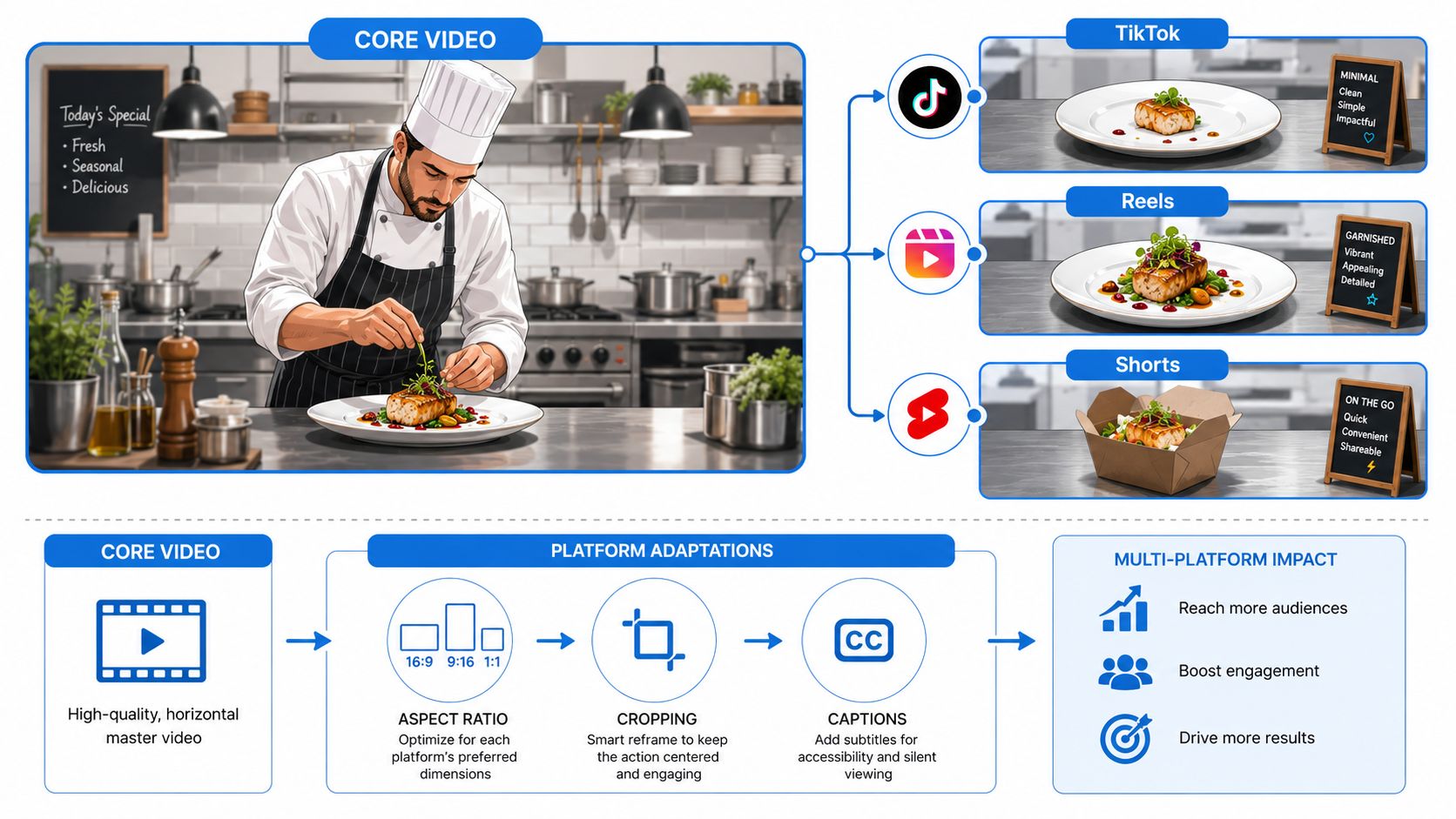
The creator controls three layers. Format specs decide whether the file is technically playable and visually clean. Metadata tells the platform what the post is about, through captions, descriptions, hashtags, and titles. Creative adaptation changes the hook, pacing, and on-screen text so the same video feels native instead of copied.
The three layers you actually control
The first layer is the easiest to spot. If the aspect ratio is wrong or the video is too long for a target platform, the upload may still happen, but the post often looks awkward or gets trimmed in a way that hurts the opening.
The second layer is metadata. A caption that works on one app can feel too vague, too noisy, or too keyword-stuffed on another. The post may still publish, but it won't communicate the same thing to people or to the platform.
The third layer is audience context. A clip with a slow intro might work if your audience is already warm, but it can feel too soft in a feed where people decide in a blink. That's why the exact same raw video can need different cut-downs, different overlays, and different copy.
A useful way to judge compatibility
If you want a simple test, ask three questions. Does the file fit the frame. Does the metadata fit the platform. Does the edit fit the attention pattern.
The file can be valid and still be wrong for the feed.
That's the difference between technical upload success and real compatibility. One gets the video posted. The other gives it a chance to perform.
Platform Specs That Break Compatibility
| Spec | TikTok | Instagram Reels | YouTube Shorts |
|---|---|---|---|
| Aspect ratio | Vertical works best | Vertical works best | Vertical works best |
| Safe zone | Keep key text away from edges and UI | Keep key text away from edges and UI | Keep key text away from edges and UI |
| Duration | Check current upload limits before posting | Check current upload limits before posting | Check current upload limits before posting |
| Codec and container | Use a common mobile-friendly export | Use a common mobile-friendly export | Use a common mobile-friendly export |
| Watermarks | Reposted watermarks can hurt distribution | Reposted watermarks can hurt distribution | Reposted watermarks can hurt distribution |
| Captions and metadata | Rewrite per post | Rewrite per post | Rewrite per post |
The detailed specs shift over time, so the useful habit is to check the current upload rules before each post. The point is not to memorize a single number. It is to know which spec breaks the video first, because that is usually where the rework starts.
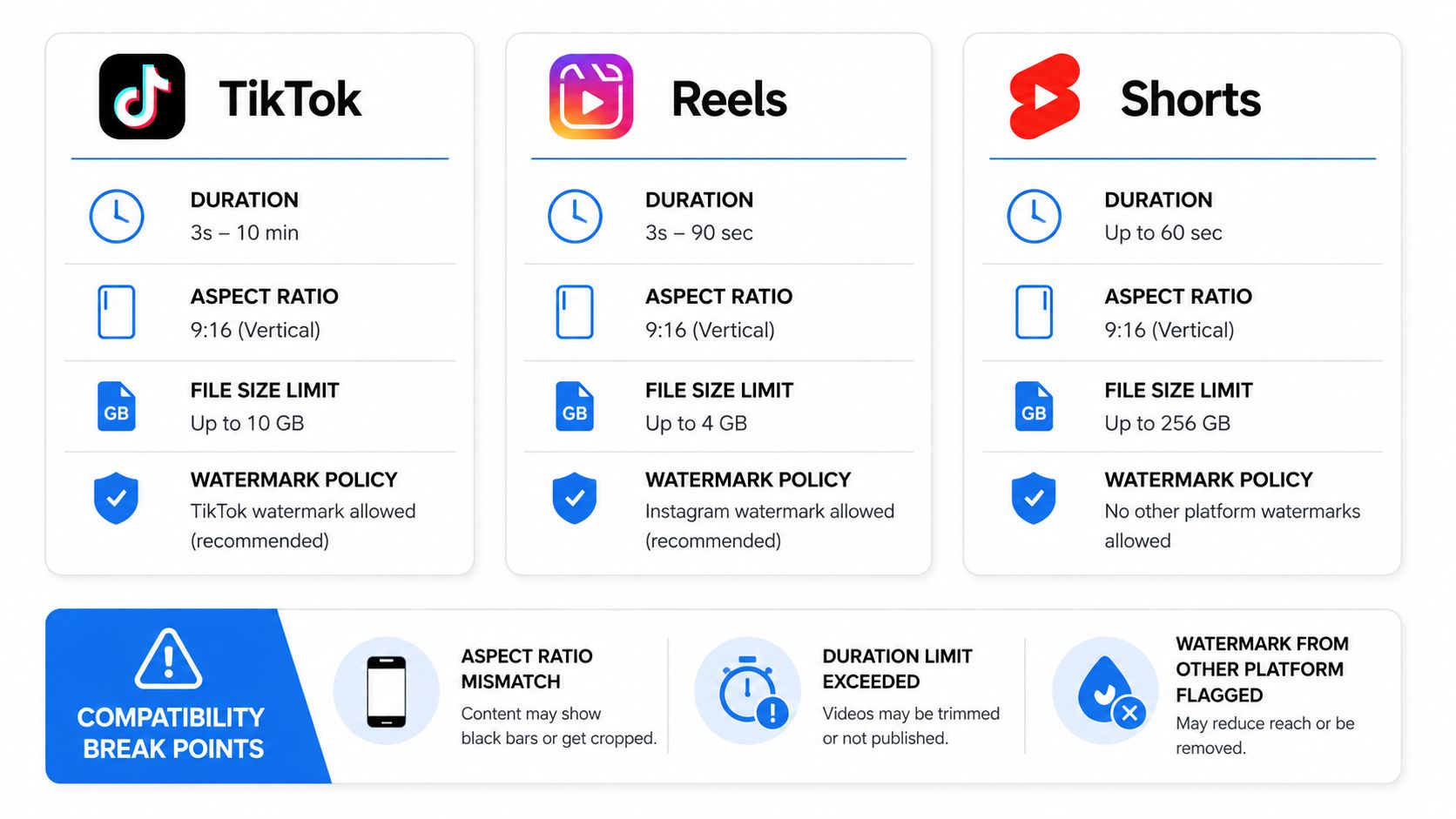
Where the main breakpoints show up
Aspect ratio problems are the easiest to catch. If the frame is off, the post can look boxed in, stretched, or cropped in a way that hides the subject. Safe zones matter just as much, because each app places buttons, captions, and icons in different spots, and those overlays can cover the line that matters most.
Duration is trickier. A clip can feel tight on one app and drag on another, especially if the first seconds do not earn attention fast enough. Codec and container issues are less visible to viewers, but they can affect how reliably the file processes and how cleanly it displays after upload.
Audio and metadata are the quiet failure points. A sound that seems fine in editing can land differently after upload, and a caption that is too broad, too repetitive, or too platform-agnostic can make the post feel detached from the feed it sits in.
If you are choosing an export path, the guide on best video format is a useful reference before you lock the file.
Useful habit: export once, then review the same post as if you are a stranger on each app.
The goal is not perfection. It is removing the small mismatches that make a video feel slightly off, because slight friction is enough to lose the scroll.
Common Pitfalls That Quietly Break Cross Platform Reach
Most creators think compatibility fails only when the file won't upload. That's too narrow. The bigger issue is that the video uploads fine, then underperforms because it carries signals that don't belong on the target platform.
Five mistakes that look harmless
- Leaving the TikTok watermark on the repost. It tells viewers, and sometimes the platform, that the clip came from somewhere else.
- Burning captions into the wrong area. If your text sits where the UI lives, people miss the hook or the punchline.
- Reusing a sound without checking the target platform's rules. The audio can be a core part of the video, but licensing and availability don't always match.
- Using the same opening pace everywhere. A hook that feels fast enough on one app can feel slow on another.
- Copying the same hashtags without adapting them. Discovery language changes by platform, and the same tag stack can look lazy or noisy.
Each of these problems is small on its own. Together, they make the post feel imported instead of native.
A few concrete examples
A creator reposts a TikTok with the watermark still visible. The content is good, but the audience immediately recognizes it as a duplicate. Another creator drops a Reels caption too low on the frame, and the platform's interface covers it on smaller phones. The edit survives, but the actual message doesn't.
A third creator uses the exact same hashtag cluster across all three apps. On one platform, the post looks focused. On another, it reads like a pile of copied tags. The content hasn't changed, but the context has.
The main assumption to drop
Compatibility isn't only about format. It's also about tone, pacing, and how the post sits inside each platform's culture. That's why a clip can be technically clean and still feel wrong.
Once you start looking for these silent breaks, you'll spot them fast. The file didn't fail. The workflow did.
Testing and Validation Before You Hit Publish
A quick validation pass catches most of the stuff that causes avoidable underperformance. The goal is simple, preview the post the way a viewer will see it, check the file details once, then make sure the metadata doesn't fight the edit.
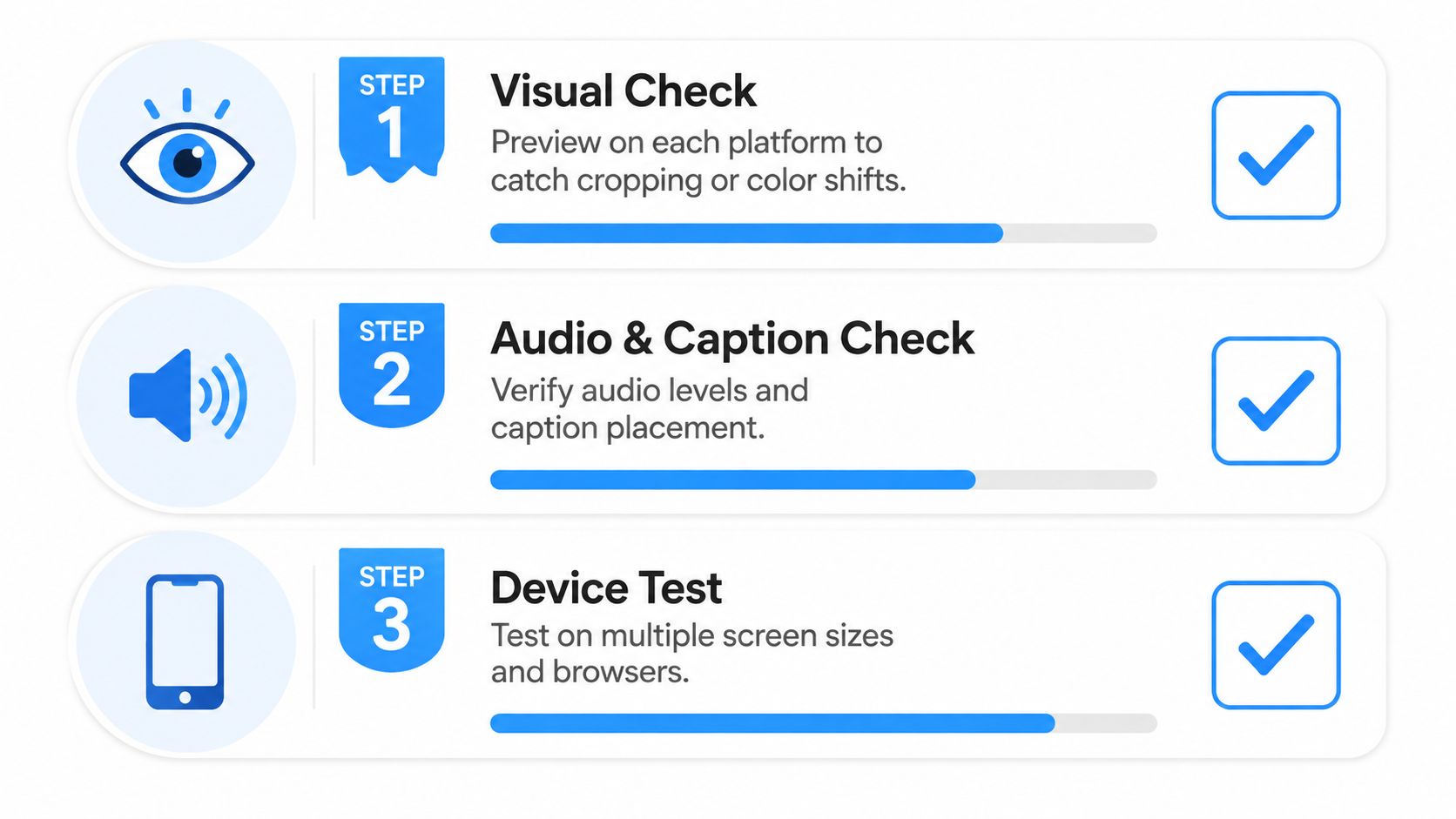
Visual check first
Open the video in each platform's upload preview or mobile UI if you can. Look for cropped text, awkward framing, and UI overlap. If the hook depends on on-screen words, check the bottom and right edges carefully, because that's where platform controls tend to cause trouble.
Then audio and caption review
Listen once with headphones and once on your phone speaker. If the voiceover is muddy, rushed, or buried, the post will feel harder to follow. Review the captions for timing and placement, and make sure the words match the spoken line if you've burned them in.
Finish with metadata
Check the title, description, hashtags, and cover frame one last time. The copy should sound like it belongs on that platform, not like the same sentence got pasted everywhere. The cover image should frame the subject clearly, because people decide fast when they're scrolling.
A simple rule helps here, test the post before you ask the platform to judge it. That takes a minute or two, and it saves a lot of second-guessing later.
Automating Compatibility With Templates, Prompt Cloning, and Auto-Resize
Manual rework is where most compatibility problems begin. A creator starts with one strong idea, then spends extra time resizing, rewriting, recutting, and reposting it by hand. Tools can remove a lot of that friction when they're set up around the workflow instead of the file.
How templates change the starting point
Template-based generation gives you a format-safe base, so you're not rebuilding every post from scratch. In Aicut, that can mean starting from viral-ready formats such as Cheating Fruits, AI Skeleton Stories, Motion Control, or AI Influencers, then letting the structure handle a lot of the repetitive setup. That matters because the more the layout is prebuilt, the less likely you are to miss a safe zone or break the pacing.
Prompt cloning adds a different layer. Instead of guessing how a popular video was constructed, you can reverse-engineer the prompt structure and regenerate a version that fits your own topic. That makes adaptation faster, because you're not reshooting or reinventing the creative logic every time.
Auto-resize closes the gap
Auto-resize is the cleanup step that handles the cross-platform frame change without forcing manual cropping. When the aspect ratio, safe zones, and length variants are handled together, the creator can move from idea to publish with fewer places to make a mistake.
For creators who want one publishing flow, Aicut's auto-posting workflow for TikTok, YouTube, and Instagram combines scheduling and destination setup with per-platform post details. Used well, that kind of automation turns compatibility from a repeated chore into a repeatable production line.
Your Cross Platform Publishing Checklist
Pre-production
- Choose the template first. Start with a structure that already fits short-form pacing.
- Clone or draft the prompt. Keep the core idea consistent before you adapt it.
- Plan the hook for the first seconds. If the opening needs text, place it where it won't get covered.
Export
- Resize for vertical delivery. Check the crop before you save the final file.
- Review captions carefully. Make sure text stays readable on small screens.
- Normalize the audio. A clean voice track travels better than a loud one.
- Export a version you can reuse. Don't trap yourself in a single platform-specific file.
Post-publish QA
- Rewrite the metadata per platform. Keep the copy native to the feed.
- Confirm the cover frame. The thumbnail should still make sense outside the edit.
- Check the first hour manually. Make sure the video displays the way you intended.
- Track results from one place if you can. A unified view makes it easier to spot where the workflow breaks.
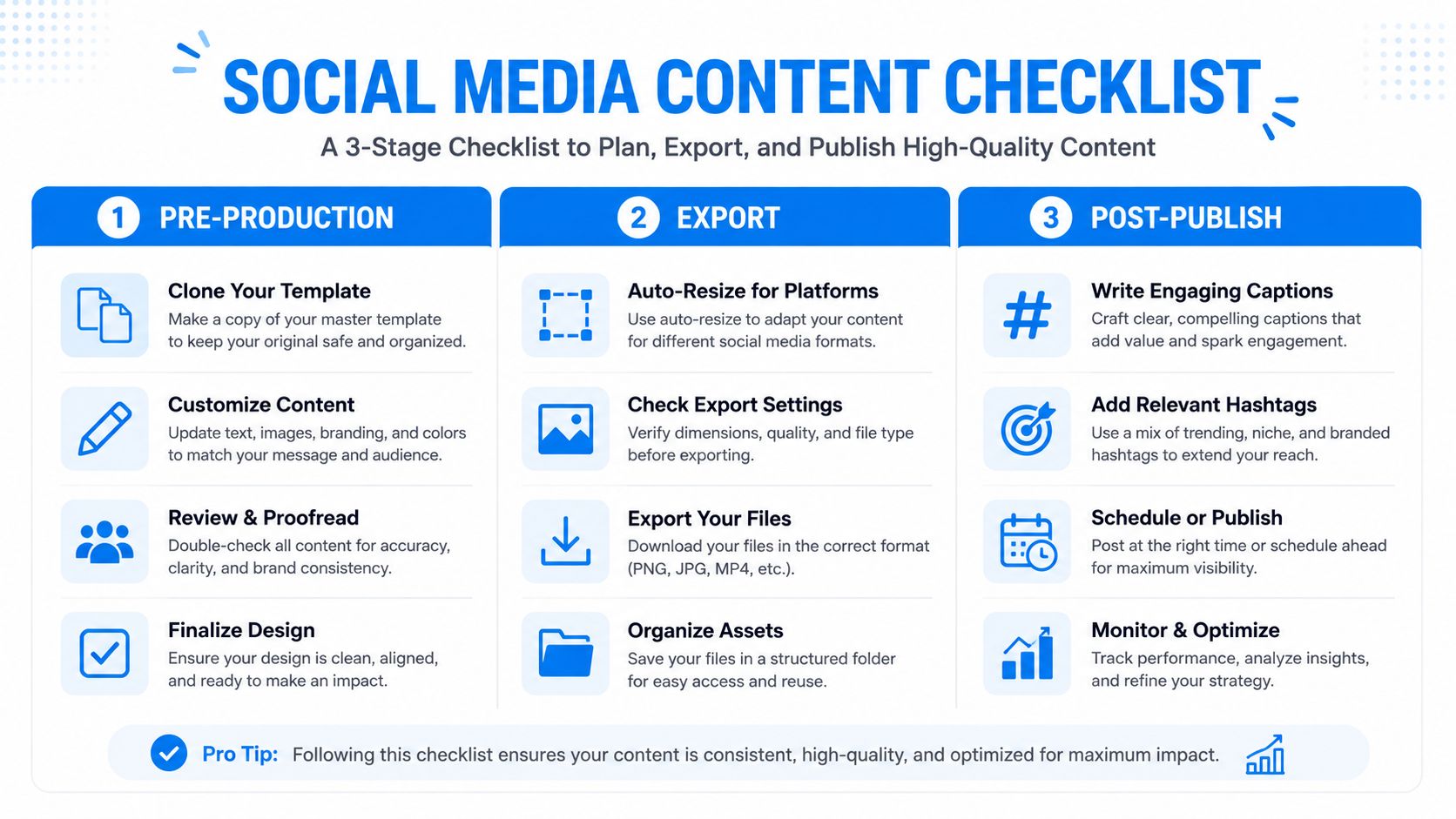
If you're new to this process, use the tutorials and community support that come with your tools so you're not guessing at every step. The checklist gets easier once the same routine runs a few times in a row.
Compatibility as an Ongoing Workflow, Not a One-Time Fix
Cross platform support used to feel like a single export decision. Today, it behaves more like a living workflow that has to keep up with shifting devices, changing layouts, and new audience habits. That's the reason creators keep getting surprised when the same clip behaves differently across apps.
The broader product world has already moved this way. Cross-platform compatibility is now a mainstream expectation, not a niche feature, and a 2025 industry summary says 61% of gamers globally have adopted crossplay, while 72% of global gamers use two or more platforms, which shows how common multi-device behavior has become. The same summary reports 92% console support, 85% PC support, 78% mobile support, and 95% cloud gaming support, all of which point to a market where interoperability is already the norm in many places. Source data on cross-platform adoption and support
That shift matters for creators too. The platforms you post on now expect faster iteration, more native formatting, and less manual cleanup than they used to. If you keep exporting one file and hoping it works everywhere, you're fighting the workflow instead of fixing it.
The better move is to treat compatibility as a system. Build the template. Clone the prompt. Resize automatically. Review once. Then publish with a process you can repeat tomorrow.
If you want to cut the manual rework out of your short-form pipeline, try Aicut for template-based video generation, prompt cloning, auto-resize, scheduling, and one-click posting across TikTok, YouTube, and Instagram. Start with a single clip, run it through the workflow, and see how much faster Aicut makes cross-platform publishing when the format work is already handled.