
You've probably had this happen. The clip is good, the hook is solid, the pacing works, and then one face ruins the shot. Maybe the expression feels off. Maybe you need to anonymize someone in the background. Maybe you want to swap in a branded character without filming the whole scene again.
That's where a face video editor becomes useful. Not as a novelty effect, but as part of a real content workflow. For short-form creators, faceless channels, UGC teams, and ad editors, face editing is no longer just about making one funny clip. It's about deciding when face edits help, when they hurt, and how to use them without slowing down production or making videos feel fake.
Most guides stop at features. They'll show you how to swap a face, smooth a skin tone, or track a head turn. What they usually skip is the part creators care about. How do you build a repeatable system around these tools and still keep your videos believable?
What Is a Face Video Editor Anyway
A face video editor is any editing tool that uses AI to identify, track, modify, replace, or hide a person's face inside video footage. That can mean a face swap, a blur over someone's identity, facial relighting, expression-aware edits, or a tracked effect that stays locked to a moving subject.
For a creator, the simplest way to think about it is this. A face video editor changes the face layer of a video while trying to keep the rest of the clip intact. You keep the timing, camera movement, and scene, but change what the viewer sees on the person's face.
This isn't some niche Hollywood-only workflow anymore. FaceApp generated $135 million in revenue in 2024 and has been downloaded more than 480 million times since launch. That matters because it shows face manipulation has become mainstream consumer behavior, not just a studio tool.
What creators usually mean by the term
When creators search for a face video editor, they're often looking for one of these outcomes:
- Swap a face to create a character, meme, or alternate version of a clip
- Hide a face for privacy in interviews, street content, or customer footage
- Fix a face-related issue like awkward expression continuity
- Keep identity consistent across a batch of AI-generated or edited videos
If you're also sorting out the broader context of synthetic media, this guide on what AI-generated content means in practice helps put face editing into the bigger creator workflow.
Face editing is best treated as a production tool, not just an effect. The moment you use it across multiple videos, workflow matters as much as visual quality.
A good face video editor doesn't just make one frame look impressive. It helps you produce clips that survive playback, scrolling, and repeat viewing without calling attention to the edit.
How Face Editing AI Actually Works
AI face editing can feel mysterious until you break it down. Under the hood, it's less like magic and more like a digital artist doing the same careful job on every frame, at a speed no human editor could match.
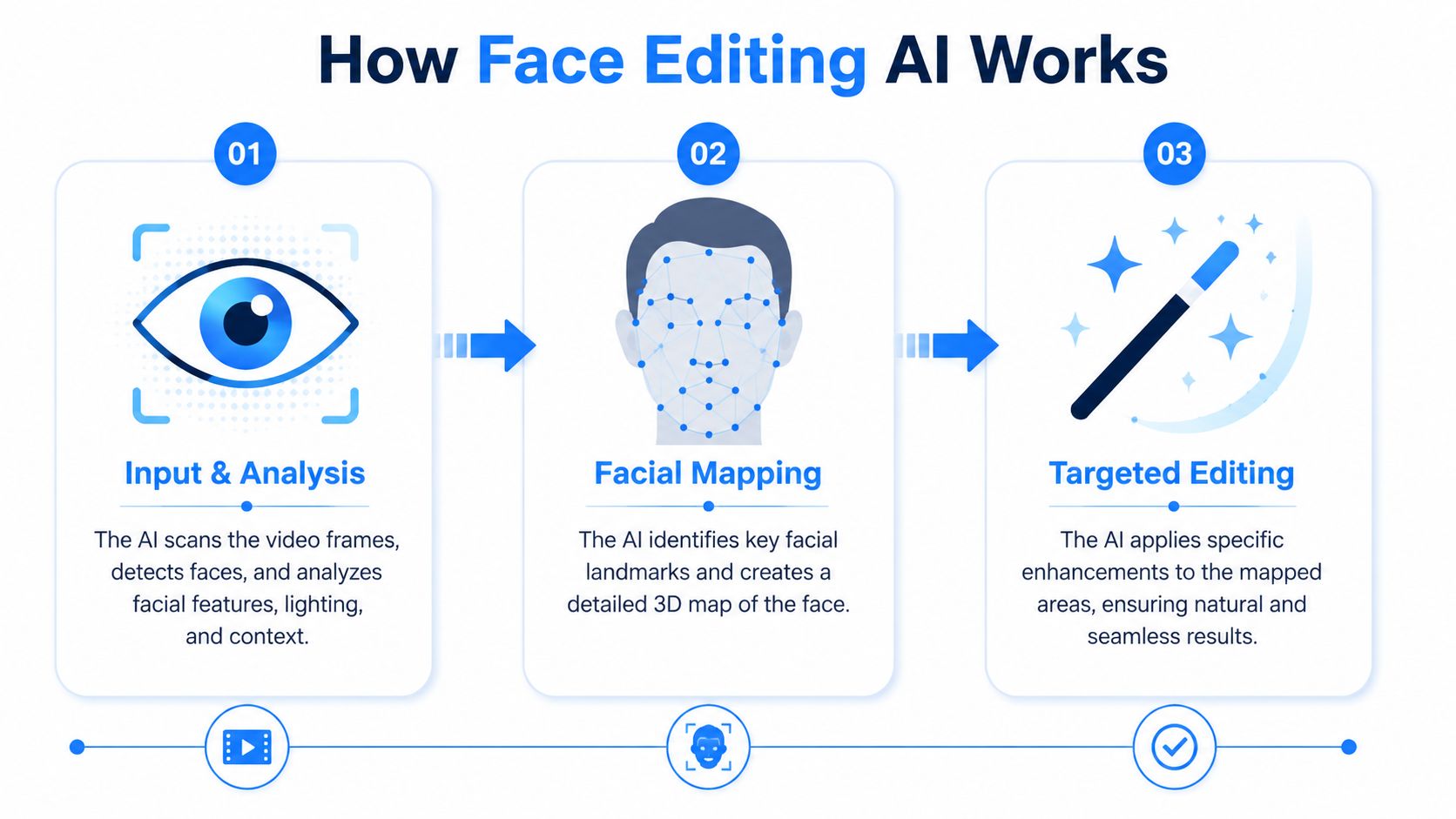
A modern face video editor usually follows a multi-stage pipeline. That pipeline includes face detection, landmark localization, and temporal tracking, and the main quality bottleneck is often temporal consistency. If the system can't track facial landmarks smoothly from frame to frame, viewers see jitter, drifting identity, or edges that shimmer.
Step one: find the face
Before the software edits anything, it has to locate the face in each frame.
Think of this as the AI saying, “There's the head, there are the eyes, there's the mouth.” If it misses the face or finds it inconsistently, every later step gets weaker. That's why difficult footage, like heavy motion blur or a profile view in poor lighting, often breaks the result before the actual edit even starts.
Step two: map the face
Once the face is found, the tool maps key points. These are facial landmarks such as the corners of the eyes, mouth shape, jawline, and brow position.
This stage tells the model how the face is structured. It's similar to putting a flexible wireframe over a moving face. That wireframe gives the editor something to anchor to, whether you're doing a swap, an anonymizing mask, or expression-aware adjustments.
If you want a practical example of where this sits in the broader AI editing stack, this overview of AI face merge workflows connects the mapping stage to actual creator use cases.
Step three: follow movement over time
This is the part many people underestimate. A single frame can look great and still fail in motion.
Temporal tracking means the editor follows the same face from one frame to the next. It watches how the head turns, how the mouth opens, when the eyes blink, and how shadows shift across the cheeks and forehead.
Without strong tracking, you get common problems like:
- Jitter when the edited face vibrates slightly during playback
- Identity drift when the face slowly stops looking like the intended person
- Edge artifacts when hairlines, cheeks, or jaw edges flicker
Practical rule: Judge a face edit in motion first. A perfect still frame can hide a bad video edit.
Step four: blend the edit into the shot
The last stage is compositing, blending the new face, modified face, or masked area back into the original video.
Good compositing tries to preserve expression, motion, and lighting so the edit doesn't look pasted on. Bad compositing creates the “uncanny” look people notice right away. That often shows up around the eyes, teeth, skin tone, or hairline.
For creators, the big takeaway is simple. A face video editor succeeds when it stays boring. If viewers notice the tool before they notice the message, the edit failed.
Key Features and Common Use Cases
A face video editor can do several different jobs, and those jobs are easy to mix up. Some tools specialize in face swapping. Others are better at privacy masking, relighting, or keeping a moving face tracked through a clip.
The easiest way to understand the category is by matching each feature to a creator problem.
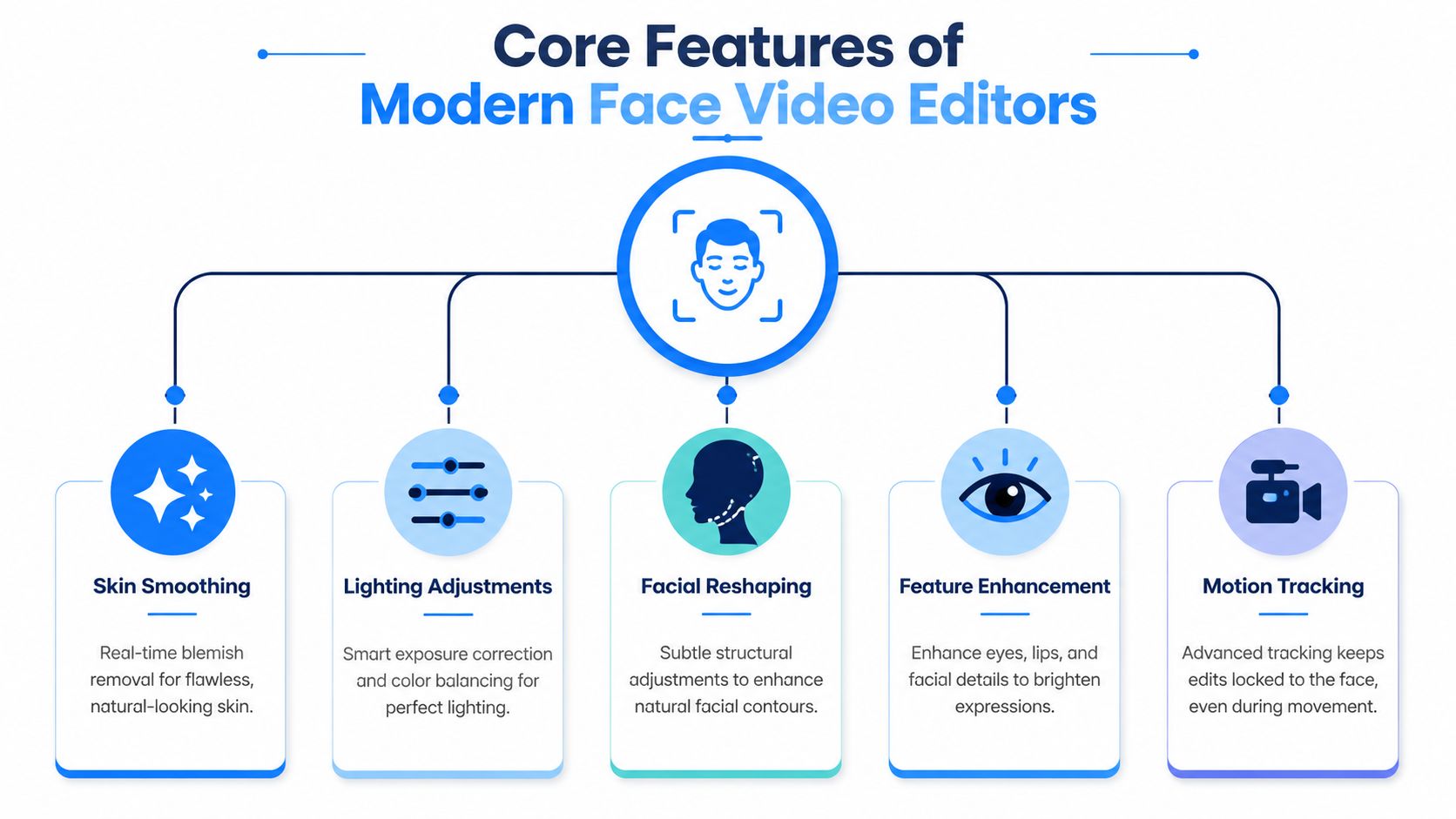
The five features creators use most
Face swap
This replaces one face with another while trying to preserve the original head movement and expression. Creators use it for parody clips, character-based storytelling, and alternate versions of UGC-style ads.Face replacement
This sounds similar to face swap, but it's often used more deliberately across a whole clip or a set of clips. The goal is continuity, not just novelty. This matters when a faceless channel wants one repeatable on-screen identity without reshooting.Anonymization
This includes blur, pixelation, masking, or covering a face for privacy. It's useful in testimonials, public footage, reaction content, or customer story videos where someone's identity shouldn't be shown.Face tracking
Tracking keeps the effect attached to the subject as they move. It's less flashy than swapping, but it's foundational. Without tracking, the edit slides, jitters, or falls apart.Facial reenactment
This changes how the face appears to perform speech or expression. It can help with dubbed content, corrected lines, or stylized character output, though it needs careful review because trust drops fast when mouth movement feels wrong.
Here's a quick comparison:
| Feature | Primary Goal | Example Use Case |
|---|---|---|
| Face swap | Change visible identity | A meme-style TikTok where a creator plays multiple roles |
| Face replacement | Keep a consistent alternate face across footage | A faceless brand building a recurring AI spokesperson |
| Anonymization | Protect privacy | Blurring customers or bystanders in street-style UGC |
| Face tracking | Keep edits stable during motion | A moving talking-head clip with an attached mask or effect |
| Facial reenactment | Adjust expression or speech performance | Localized video where lip motion needs to feel closer to the audio |
A short demo helps make the feature differences easier to spot in practice.
Which feature fits which creator
A meme creator and a performance marketer may use the same face video editor for completely different reasons.
A short-form comedy page often cares about speed and recognizability. If the joke lands, the audience may forgive slight imperfections. A UGC ad team has a stricter standard. If the face feels synthetic, trust in the product pitch drops.
That's why feature choice should start with the job:
- If privacy is the issue, anonymization beats face replacement.
- If repeatable identity is the issue, replacement matters more than one-off swapping.
- If motion keeps breaking the result, tracking is the feature to care about first.
- If a creator wants multilingual or corrected performance, reenactment becomes relevant.
The most useful feature is usually the one that removes a production bottleneck, not the one that looks most impressive in a demo.
Some software bundles these into one interface. Others separate them into modules or workflows. Either way, creators usually get better results when they pick one goal per clip instead of stacking multiple face edits at once.
A Creator's Workflow for Professional Results
Most bad face edits aren't caused by weak software alone. They start much earlier, with poor source footage, rushed settings, or no review pass before export.
Industry guidance is clear on the inputs that matter most. Source-video clarity, pose match, and lighting consistency are the biggest drivers of realism, and high-resolution footage with minimal motion blur plus matched angles reduces post-processing work.
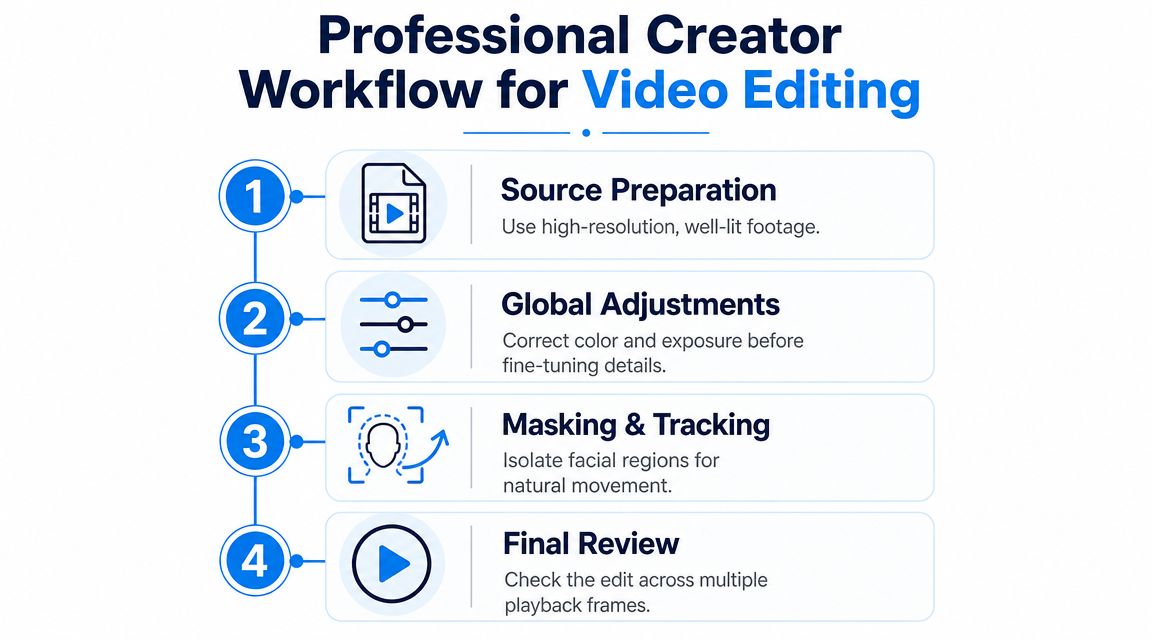
Stage one: prepare your inputs
Start before the software does.
Choose footage where the face is clear, well lit, and not constantly whipping across the frame. Near-frontal angles are easier to edit cleanly than extreme side views. If you're matching one face to another, try to keep the lighting direction similar. A bright face pasted into a dim shot rarely looks natural.
Use this quick prep checklist:
- Pick the cleanest source clip with the least blur
- Favor stable takes over dramatic movement if realism matters
- Match angle and lighting between source and target footage
- Trim the clip first so you only process the usable section
If your work includes other AI production steps, it helps to think of face editing as one piece of a larger system. For example, teams building full short-form pipelines often also explore AI for music with Drumloop AI so the soundtrack, pacing, and visuals are planned together instead of stitched together at the end.
Stage two: make small edits first
Creators often overcorrect. They push blend strength too far, choose a weak source face, or accept an aggressive automatic result because it looked fine in the preview.
A better workflow is conservative:
- Run a short test render on the most difficult part of the clip
- Check the eyes, mouth, and jawline first
- Lower the effect strength if the face starts to look waxy or detached
- Reprocess with a better source clip before trying to “fix” a weak result with more settings
This is where platform choice matters. Some tools are made for one-off edits. Others are built for repeatable short-form creation. If you're producing faceless or AI-assisted social videos in batches, tools such as Aicut's AI video generation workflow are relevant because they connect video generation, editing, and publishing inside one system rather than treating each clip as a standalone project.
Stage three: review like an editor, not a spectator
Don't just watch the exported clip once at full speed and call it done. Scrub through it.
Look for these failure points:
- Eyes that lose life and stop matching the rest of the face
- Blink glitches that make the subject feel robotic
- Hairline shimmer where blending breaks at motion edges
- Skin tone mismatch between the edited face and neck
- Expression flattening when the face moves less naturally than the body
A usable face edit doesn't need to be perfect. It needs to survive normal playback without pulling attention away from the story.
For short-form creators, this review step is what separates “AI-looking” output from publishable output. You don't need a post-production studio. You do need the discipline to reject a weak render and rerun it with better inputs.
Navigating Privacy and Ethical Issues
The technical question is easy compared with the trust question. You can edit a face. The harder issue is whether you should, and whether your audience will feel misled when they notice it.
A useful rule is simple. If a face edit changes someone's identity, expression, or presence in a way that matters to the viewer, treat it as a trust decision, not just a creative one.
A common problem with face editing advice is that it focuses on what the tool can do, not what preserves credibility. As noted in this discussion of realistic face editing and publishable results, the hardest question isn't technical. It's how to edit a face without making it look synthetic and losing audience trust. That same guidance also notes that frontal or near-frontal takes are usually the most authentic-looking option.
Consent comes first
If you're using someone else's likeness, get permission. That applies whether the clip is an ad, a joke, a character experiment, or a faceless content workflow.
Creators sometimes think ethics only matter in extreme cases like deceptive deepfakes. In practice, the smaller everyday violations can hurt just as much. Editing a customer testimonial face without clear approval, altering a collaborator's performance, or making an ad look like a real person said something they never said can damage relationships fast.
Creative use versus deceptive use
There's a real difference between:
- Creative use, like parody, privacy masking, stylized characters, or post-production fixes
- Deceptive use, like impersonation, non-consensual edits, or manipulated clips meant to mislead
That line gets blurry when creators chase speed. A fast content pipeline can tempt you to skip review, skip disclosure, or skip consent. That's usually where the trouble starts.
If you're building workflows that involve user data, likeness handling, or account-level policies, it helps to review examples of our privacy practices from teams that publish them clearly. Not because every policy will match your use case, but because transparency is part of audience trust.
If viewers feel tricked, technical quality won't save the video.
Short-form audiences are sensitive to uncanny signals. A face can be “good enough” technically and still feel off emotionally. When that happens, creators often blame the model. The issue is that the edit crossed the line from enhancement into manipulation the audience can feel.
Understanding Performance and Quality Tradeoffs
Face editing always involves tradeoffs. You're balancing quality, processing speed, and workflow friction. If you push too hard in one direction, something usually gives.
The simplest mental model is this: a face video editor can be fast, high quality, or easy to scale. It can hit all three to a degree, but not equally on every clip.
What creators usually trade away
A quick draft render helps you move faster, but it may hide subtle problems until export. A more careful render often looks better, but it takes longer and may interrupt high-volume posting. A very automated workflow helps with scale, but it can increase the risk of publishing uncanny results if nobody reviews the outputs.
That's why “garbage in, garbage out” still applies. Bad source footage limits the ceiling no matter how advanced the model is. If the face is blurry, badly lit, or captured at a difficult angle, the software has less useful information to work with.
A practical way to think about it
Use this framework when deciding how much effort to put into a clip:
| Priority | What to optimize for | What to accept |
|---|---|---|
| Fast posting | Speed and output volume | More manual review after export |
| Clean realism | Better source footage and careful settings | Slower turnaround |
| Scalable batches | Reusable templates and consistent shot setup | Less freedom per clip |
This matters even more when a team is trying to keep AI workflows safe and repeatable. If you're comparing how different companies frame synthetic media handling, safe AI video generation with LunaBloom is a useful reference point for thinking about privacy and operational guardrails around generated content.
A strong system doesn't assume every clip deserves maximum polish. It sorts clips by purpose. A joke post, a faceless explainer, and a paid ad need different quality thresholds.
How to Choose the Right Face Editing Tool
Selecting a face video editor often misses the mark. It's common to compare feature checklists first. A better starting point is the workflow you're trying to support.
That matters because there's still very little guidance on how these tools fit into scalable content systems. As GoStudio's perspective on AI video workflows notes, the missing question isn't “can I change a face?” It's “how do I build a content system around face edits that remains believable, compliant, and efficient at scale?”
Choose by creator type
A solo creator usually needs simplicity. Fast setup, decent presets, and easy test renders matter more than deep control.
An agency or growth team often needs consistency across many assets. They care about repeatable identity, versioning, approval steps, and how well the tool fits into batch production.
A faceless channel sits somewhere different. It may need a persistent character, privacy controls, and a way to produce platform-native clips without reshooting every variation.
Use these questions before you pick anything:
- What's the repeated job? One-off meme edits, ad variants, anonymized testimonials, or recurring AI characters
- How much review can you afford? Some tools save time upfront but demand more cleanup later
- What breaks trust in your niche? Audiences tolerate different levels of synthetic editing
- Will this tool fit the rest of your pipeline? Editing alone isn't enough if scripting, voice, publishing, and iteration all happen elsewhere
The right tool is the one that supports your system, not the one with the longest feature page. If you publish often, a reliable average result beats a flashy result you can't reproduce.
If you're building a short-form workflow around AI video creation, Aicut is one option to consider. It's built for creators producing faceless videos for YouTube, TikTok, and Instagram, with templates, AI-generated video workflows, character and background swapping, voiceovers, scheduling, and publishing tools designed for repeatable content output rather than one-off experiments.