AI image editing is exactly what it sounds like: using artificial intelligence to handle the heavy lifting in photo editing. It can be as simple as instantly removing a background or as complex as creating a whole new scene from scratch.
Think of it like having a super-fast, super-smart assistant who's a master of lighting, touch-ups, and composition, all rolled into one. This technology puts professional-level editing tools into anyone's hands, without the years of training that traditional software used to require.
Why AI Image Editing Matters Now
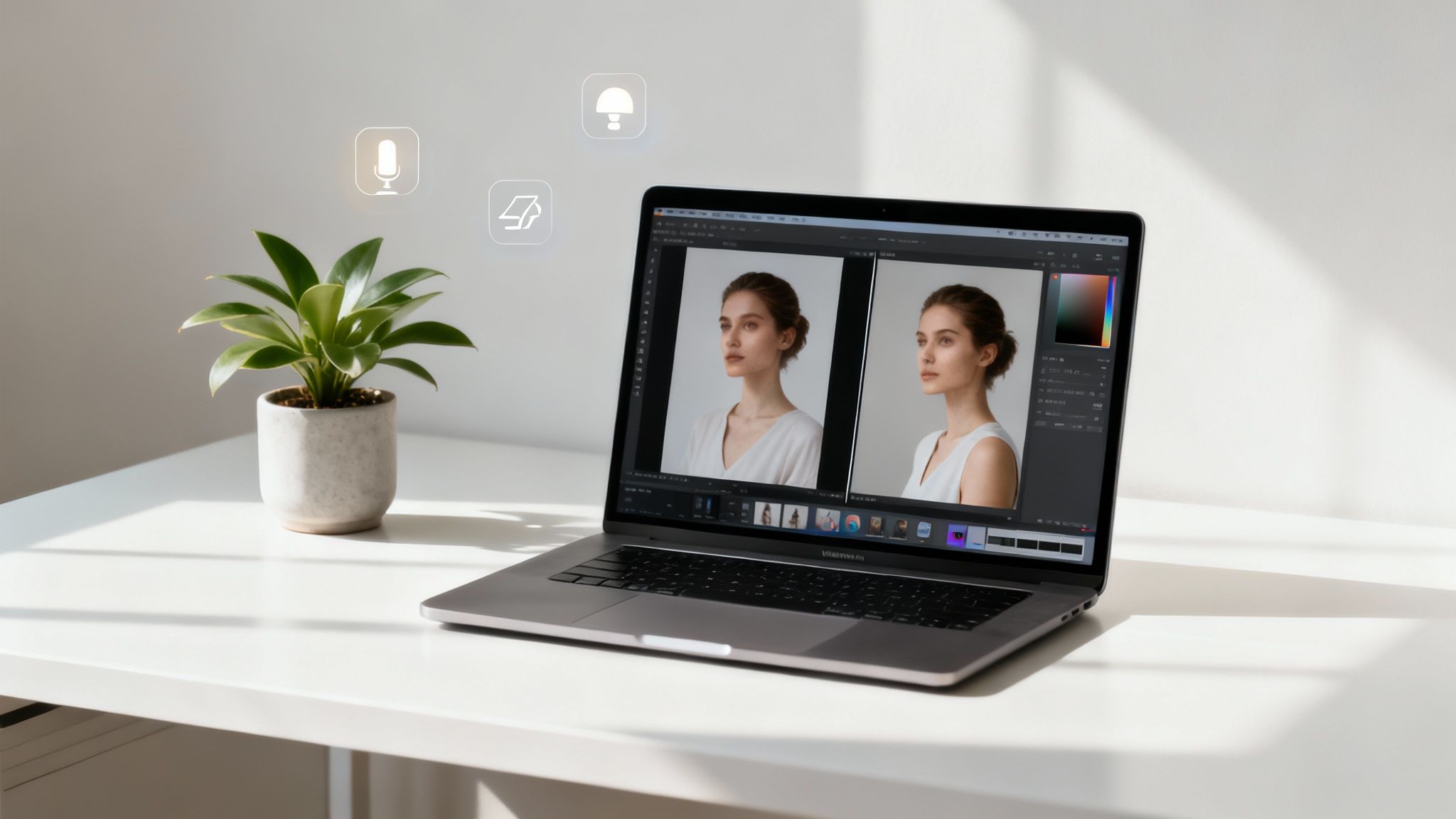
At its heart, image editing AI is changing the entire game for visual content. Forget about spending hours fiddling with sliders, painstakingly masking layers, or tracing around objects. Now, you can get incredible results just by typing a simple sentence. This isn't just about making old tasks faster; it's about opening up creative avenues we couldn't have imagined a few years ago.
And this isn't some futuristic concept—it's happening right now. The AI image editor market is booming, expected to grow from USD 88.7 billion in 2025 to a massive USD 229.6 billion by 2035. Businesses are jumping on board in a big way, projected to make up about 42% of all spending in 2025. If you're curious, you can explore more data on the AI image editor market to see just how fast it's growing.
A New Era of Creative Freedom
For creators, marketers, and small business owners, this shift is huge. The old roadblocks—time, money, and technical skill—are starting to disappear. You no longer need to book an expensive photoshoot to see your product on a beach in Bali or spend a decade learning Photoshop to give a portrait that perfect cinematic glow.
This new way of working lets you:
- Create More, Faster: Turn one source image into dozens of ad variations or social media graphics in minutes, not days.
- Test Ideas Instantly: Want to see how your product looks in a different setting? Or try a completely different visual style? Now you can do it without sinking a ton of resources.
- Focus on the Idea, Not the Execution: You get to spend your energy on the creative vision and strategy, rather than getting stuck in the weeds of complex software.
To really see the difference, let's compare the old way with the new.
Traditional Editing vs AI Powered Workflows
This quick table shows just how much has changed in terms of time, cost, and the skills you need.
| Aspect | Traditional Editing (e.g., Photoshop) | AI Image Editing (e.g., Aicut) |
|---|---|---|
| Time Investment | Hours or days per project. | Minutes or even seconds per task. |
| Skill Requirement | High. Requires deep technical knowledge. | Low. Focuses on creative prompting. |
| Cost | High software subscriptions, training, and/or hiring specialists. | Affordable subscriptions, minimal training needed. |
| Scalability | Difficult. Each new asset requires manual effort. | Effortless. Generate hundreds of variations automatically. |
The takeaway is clear: AI isn't just a minor upgrade; it’s a complete overhaul of the creative process.
The real magic of AI image editing is that it levels the playing field. A solo creator working from their kitchen table can now produce visual assets that look like they came from a major creative agency.
This shift means your success hinges less on your technical skills and more on the strength of your ideas. Whether you're launching an e-commerce brand, building a faceless YouTube channel, or running social media for a client, AI tools give you the ability to create amazing visuals and stand out from the crowd.
Getting to Grips with Core AI Editing Techniques
To really get the hang of AI image editing, it helps to peek under the hood at the core techniques that power everything. Think of these as the fundamental tools in your new creative toolkit. Once you understand what they do, you'll be able to write much better prompts and pick the right tool for any job.
Each technique has its own specialty, like a painter has different brushes. Some are for adding new things to your picture, others are for cleaning up mistakes, and some can change the entire vibe of an image.
Adding And Removing Elements
The AI editing features everyone is talking about right now really come down to one powerful idea: generative manipulation. This is where the AI doesn't just shuffle existing pixels around; it actually dreams up entirely new ones that fit right in.
Here are the main methods you'll see everywhere:
Generative Fill: This is like having a magic "smart patch" for your image. You can select an empty spot or an object you don't like and just describe what you want there instead. The AI then fills that space with something new that perfectly matches the lighting, shadows, and textures of the original photo. For instance, you could highlight a patch of empty grass and type "add a red picnic blanket," and just like that, a brand-new, realistic element appears.
Inpainting: This is a more surgical version of Generative Fill, mostly used for repairs. Got a tiny scratch on a product photo or a random person photobombing your vacation shot? Inpainting lets you simply paint over that spot, and the AI cleverly fills in the blank, making it seem like the distraction was never there to begin with.
Outpainting (or 'Uncrop'): Ever take a great photo but wish you'd captured more of the scene? Outpainting literally expands the borders of your image. The AI looks at what's already there and intelligently generates new content beyond the original edges. It creates a bigger, more complete picture that feels totally natural.
Once you get comfortable with these generative tools, you unlock some serious creative speed. Instead of spending hours manually cloning and patching, you can now add, remove, and expand your images with a simple sentence.
Boosting Image Quality And Style
Beyond just adding and removing stuff, AI is brilliant at improving the basic quality and look of your visuals. This is how you can take a decent photo and make it truly fantastic, without needing to be an expert in color grading or sharpening.
One of the most valuable techniques is Super-Resolution, where an AI increases an image's size and clarity. It doesn't just stretch the pixels; it intelligently adds new ones to make low-resolution photos sharp enough for professional work. If you need to enlarge a small image for a print ad or an HD video, you can learn more about how to AI upscale an image the right way.
Another game-changer is Style Transfer. This lets you take the artistic style of one image—say, a Van Gogh painting or a shot from a sci-fi movie—and apply it to a completely different photo. With just a click, a standard product photo can become a vibrant piece of art, perfect for a social media campaign that needs to stand out.
Smarter Workflows for E-commerce and Ad Creatives
If you're in e-commerce or marketing, you know the grind. The demand for fresh, high-quality visuals is relentless, but traditional photoshoots are a huge drain on time and money. Trying to keep up with A/B tests, social media campaigns, and seasonal promotions can feel impossible. This is exactly where a smart image editing AI workflow changes everything.
Instead of booking a studio and hiring a crew, you can take one simple product photo and spin it into a whole library of marketing assets. The first step is usually isolating your product. AI tools can now cleanly remove a background in seconds—a task that used to mean hours of tedious clicking and pathing for a designer.
Once your product is floating on a transparent background, the real fun begins. You can drop it into any scene you can imagine. Want to see your new water bottle on a rocky mountain trail, in a serene yoga studio, or on a clean, minimalist desk? Just type what you want, and an AI can generate all three, complete with believable lighting and shadows that make it look like it was really there.
Generating High-Volume Ad Creatives
This is the secret to cranking out ad variations at scale. You can instantly create dozens of platform-specific creatives for Instagram Stories, TikTok videos, and Facebook ads, each tweaked for a different audience.
Think about it: you can place your skincare line in settings that look exactly like authentic user-generated content (UGC). This lets you create those relatable, trustworthy ads that perform so well, but without the headache of coordinating with a dozen different influencers. You get to control the entire visual story and keep everything on-brand, all while capturing that coveted UGC vibe.
By swapping expensive photoshoots for an AI-driven workflow, brands can multiply their creative output for A/B testing and slash production costs. The return on investment isn't just theoretical; it's direct and measurable.
A simple way to think about this workflow is a four-step process: Fill, Extend, Style, and Enhance.
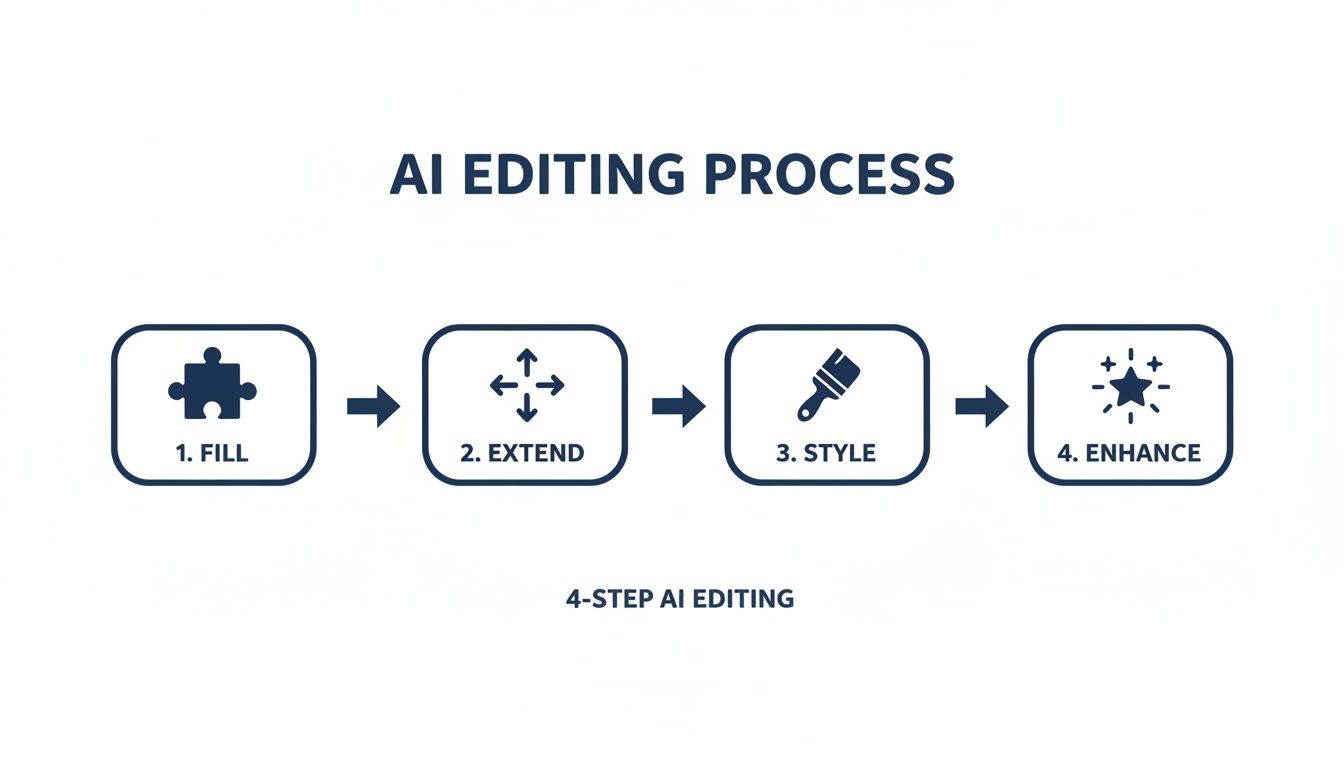
Each stage logically builds on the last, taking your image from a basic idea to a polished, campaign-ready asset in a fraction of the usual time.
The Clear Financial Impact
This isn't just a niche trend; it's a massive market shift with real numbers behind it. The AI photo editors market was valued at around USD 2.1 billion in 2024 and is projected to hit USD 8.9 billion by 2034.
Looking closer at e-commerce, the AI product photography niche is set to explode from USD 450 million in 2024 to USD 5 billion by 2035—that’s a staggering 24.5% compound annual growth rate. This growth is happening because brands are seeing the undeniable cost-savings and efficiency gains.
You can discover more insights about AI photography stats to see just how quickly the industry is moving. The data paints a clear picture: for modern e-commerce brands, adopting an image editing AI workflow isn't just a nice-to-have. It’s essential for staying competitive and scaling your business effectively.
How Creators Can Go Viral with AI Images
If you're a creator who'd rather stay behind the camera, image editing AI isn't just another tool—it's the core of your entire content strategy. On platforms like YouTube, TikTok, and Instagram, faceless channels are booming, and their secret weapon is AI's ability to pump out stunning visuals consistently and at scale.
This is how you build a recognizable brand without ever showing your face. Forget sifting through tired stock photos or learning complex animation. Now, you can generate a never-ending stream of unique, high-quality images that perfectly capture your niche and style. That kind of speed is exactly what you need to keep your audience hooked and your channel growing.
Speed Up Content Production for Faceless Channels
The daily pressure to create content is real, but a smart AI workflow can shrink hours of work down to mere minutes. This is a game-changer for popular faceless formats that need a constant supply of fresh visuals.
Here’s how AI helps you stand out in these niches:
- Reddit Narration Videos: Need a compelling background image that matches a specific story? You can generate one in seconds, making sure your visuals are always on-point.
- Text-Based Storytelling: Turn a simple line of text into a fully-realized character or scene. You can even see how an AI image story generator can build out entire visual narratives for you automatically.
- YouTube Thumbnails: A killer thumbnail is everything. With AI, you can brainstorm and generate dozens of eye-catching, scroll-stopping options in minutes to see which one gets the most clicks.
The real edge for faceless creators is velocity. AI gives you the freedom to test more ideas, post more often, and build a massive content library way faster than the competition.
From a Still Image to an Engaging Video
This is where things get really interesting. You can take a static AI-generated character and bring it to life with simple animation, turning it into the star of your videos. This little trick adds a dynamic feel to your content that keeps people watching.
Think about it: you could create a unique avatar for your channel and have it narrate stories, explain complex topics, or react to other content. Suddenly, your faceless brand has a "face"—a personality your audience can actually connect with, all powered by AI. Businesses that need to produce a lot of visual content have found that using specialized tools for tasks like mass AI image generation with Midjourney can also make a huge difference in their workflow.
When you put all these pieces together, you're essentially building an automated content machine. An AI tool can help you create the image, animate it, add a voiceover, and get the final video ready to post. This kind of end-to-end process smashes through creative blocks, gets you monetized faster, and gives you a serious advantage in a very crowded space.
Choosing the Right AI Image Editing Tools
Trying to find the right image editing AI tool can feel a bit like wandering through a massive, noisy bazaar. New options seem to appear every single day, and it's easy to get overwhelmed. The trick is to figure out which one actually fits into your daily routine and helps you get your work done faster.
The good news is, you can boil most of these tools down into one of three main camps. Once you know which camp you belong in, picking the right tool becomes a whole lot easier.
The market is exploding for a reason. In 2024, AI image editing became the fastest-growing software category on G2, shooting up by an incredible 441% year-over-year in both the number of tools available and the people using them. Right now, North America is the biggest market, but Asia–Pacific is catching up fast as more and more content is created there.
Three Main Types of AI Editing Tools
Let's cut through the jargon and look at the main options you'll come across. Each one is built for a different kind of person with a different kind of goal.
Standalone AI Generators: Think of tools like Midjourney. These are pure creativity machines. They’re fantastic for conjuring up beautiful, artistic images from text prompts, but they don't really do much else. If you're an artist who just needs a stunning visual to start with, this is your sweet spot.
Integrated AI Features: This is when AI gets baked right into the software you already use, like Adobe Photoshop’s Generative Fill. It’s perfect for designers and photographers who want to add some AI magic to their process without having to learn a completely new program.
All-in-One Content Platforms: Then you have platforms like Aicut, which bring everything together under one roof—AI image creation, video editing, scheduling, and more. This is the go-to choice for social media managers, e-commerce stores, and faceless creators who need a streamlined way to get content from an idea all the way to a published post.
For a niche like real estate, there are even more specialized options. You can find some of the best virtual staging software tools that use AI to furnish empty rooms digitally.
Why an All-in-One Platform Wins for Creators
If you're a solo creator or a marketer, you know the pain of subscription fatigue. One tool for generating images, another for editing video, and a third for scheduling posts—it's not just expensive, it's a huge time sink. An integrated platform solves this by putting your entire creative workflow in one place.
By combining image editing, video generation, and social media scheduling into one seamless workflow, you can drastically reduce subscription costs and save hours of manual work. This is the key to producing high-volume content consistently.
Think about it: you could generate a new product photo, drop it into a promo video, and schedule it to go live on Instagram, all without ever leaving the same dashboard. This kind of unified system is a massive advantage for anyone trying to create more content without burning out.
To see what else is out there, take a look at our guide on the best AI image editing tools available right now.
Your Top Questions About AI Image Editing, Answered
Jumping into AI image editing brings up a lot of questions. It's totally normal. Getting some straight answers can make the difference between feeling confused and feeling confident. Let's break down what creators and marketers usually ask.
We'll cover the real-world concerns about quality, ethics, and just how easy it is to get started.
Can AI Really Replace a Professional Human Editor?
For a lot of the everyday grunt work, absolutely. When you're talking about tasks like cutting out a background, making simple color adjustments, or zapping minor blemishes, an image editing AI is often faster and more consistent than a person. A 2024 report even found that AI tools can slash editing time by up to 80% on these kinds of repetitive jobs.
But a seasoned human editor still has the upper hand when it comes to highly creative, artistic, or emotional work. They bring a deep understanding of context and creative vision that an algorithm just can't replicate yet.
The true magic of AI, though, isn't about perfectly mimicking a human—it's about doing things at a scale humans can't. If you're running social media or ad campaigns, you need to create and test tons of visuals. AI gives you a huge advantage by letting you pump out hundreds of high-quality variations in the time it would take a human to do just a few.
What Are the Ethical Ground Rules for AI-Edited Images?
Thinking about AI ethics really comes down to three things: authenticity, copyright, and the potential for misuse. The golden rule? Transparency. You have to be upfront when an image has been heavily changed or generated by AI, especially if you're in journalism, advertising, or any field where your audience's trust is on the line.
Using AI to create misleading product photos or deceptive content is a major ethical no-go.
Copyright law is still catching up, but here’s the lay of the land right now:
- You typically own the rights to images you make with AI if you started with your own original photos.
- Stay away from trying to replicate copyrighted styles, characters, or big-name logos. That's just asking for legal headaches.
- Images made purely from a text prompt may not be copyrightable, so it's always smart to read the terms of service for the tool you're using.
At its core, the principle is simple: Use AI to boost your creativity and tell better stories, not to trick people or bend the truth. Honesty with your audience should always come first.
How Do I Write Prompts That Actually Work?
Getting good at writing prompts is a skill, but it’s one you can pick up fast. The secret is to be specific, descriptive, and crystal clear about what you want. A vague prompt like "make the background better" will get you vague results. A killer prompt sounds more like, "replace the background with a sun-drenched, modern minimalist kitchen with marble countertops."
Think of it like you're a director on a film set. Use strong, clear action words to tell the AI exactly what to do:
- Remove the stray hair from her shoulder.
- Add a small, potted succulent on the corner of the desk.
- Change the color of the t-shirt to a deep forest green.
- Enhance the image with warm, cinematic lighting.
The more detail you give—describing the mood, the lighting, the textures, the composition—the closer the AI will get to creating exactly what you see in your head.
Is AI Image Editing Too Complicated for Beginners?
Not at all. In fact, most modern image editing AI tools are built with beginners in mind. The whole point is to ditch the ridiculously steep learning curve of traditional photo editing software.
Instead of getting lost in a sea of confusing menus and trying to master dozens of different tools, you can get incredible results just by typing what you want or clicking a button. Many platforms feel intuitive because they're made for creators, not professional graphic designers. With built-in templates and guided steps, someone with zero experience can be making pro-level images in minutes. It lets you focus on your big idea, not the technical stuff.
Ready to stop wasting hours on tedious edits and start making incredible visuals in minutes? Aicut brings all these powerful AI features together in one platform designed for creators and marketers. Generate viral videos, produce stunning ad creative, and put your workflow on autopilot. Start creating with Aicut for free.