
A client's payment is late. A receipt is buried in an email thread. An invoice has the wrong tax detail, so someone sends it back after a week of waiting. For a creator, freelancer, or small agency, these problems rarely arrive one at a time. They interrupt production, delay contractor payments, and make cash flow harder to predict.
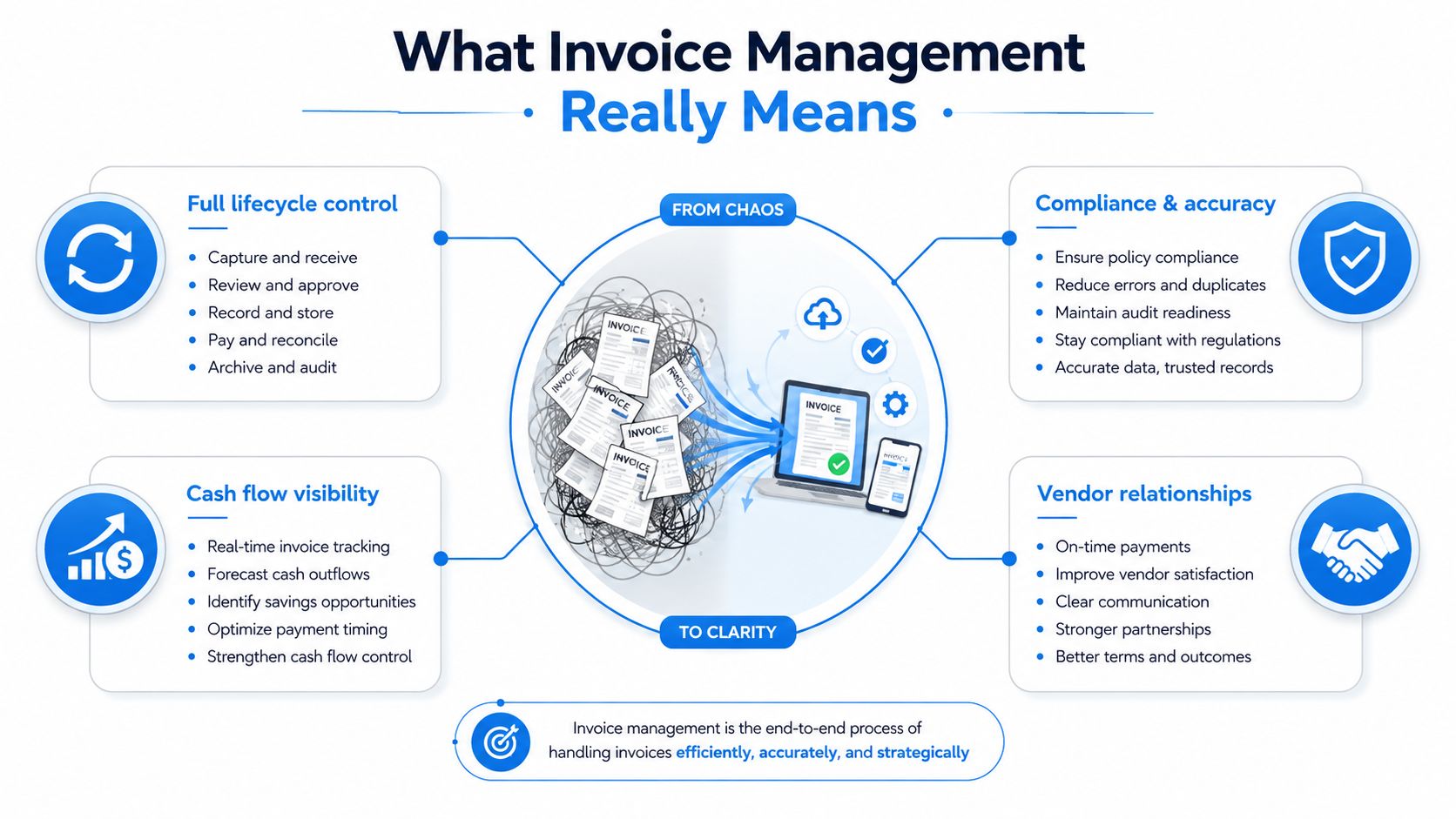
Invoice management is the system that prevents those interruptions from becoming normal business practice. It covers how invoices and bills are created, received, checked, approved, paid, recorded, and reviewed. The aim isn't to add bureaucracy. It's to give every document a clear owner, a reliable path, and an auditable result.
What Invoice Management Really Means
A freelance video editor finishes an agency campaign and sends an invoice on Friday. The producer confirms the work, but the finance contact never sees the email. Two weeks later, the editor follows up. Finance asks for a purchase order, the producer searches old messages, and no one can confirm approval. The work is complete, yet payment is delayed because ownership and follow-up were never defined.
Invoice management gives every money-related document a clear owner, a reliable path, and an auditable result. It covers the document's full lifecycle, from creation or receipt through checking, approval, payment, recording, and follow-up. For a creator, that can include issuing an invoice to a brand, monitoring its due date, recording payment, and sending a reminder. It also includes checking bills from a music-licensing service, editor, designer, or software provider before paying them.
The two directions of the process
Accounts receivable covers money entering your business. You create an invoice, send it to the client, monitor its status, record payment, and address disputes or overdue balances.
Accounts payable covers money leaving your business. You receive a bill, confirm that the purchase was valid, route it for approval, schedule payment, and match the transaction to your accounting records.
The documents serve different purposes. An invoice requests payment for goods or services. A bill describes the same obligation from the buyer's side. A credit note reduces or reverses part of an earlier invoice. A statement summarizes account activity. A remittance explains which invoices a payment settles.
Cash flow links both directions. A profitable project can still create pressure when client invoices remain unpaid while contractor bills are due. A clear process makes these timing differences visible instead of leaving them scattered across spreadsheets and inboxes.
For creators, invoice management also connects with contracts, deliverables, usage rights, and project approvals. A creator monetization platform can help organize the commercial side of content work, while the invoicing process still needs clear payment terms, accurate records, and a defined follow-up routine. A folder full of invoices provides storage. It becomes a process only when someone knows what happens after sending.
Practical rule: An invoice process is real only when another person could follow it without asking you where everything is.
The End-to-End Invoice Workflow and Who Owns Each Step
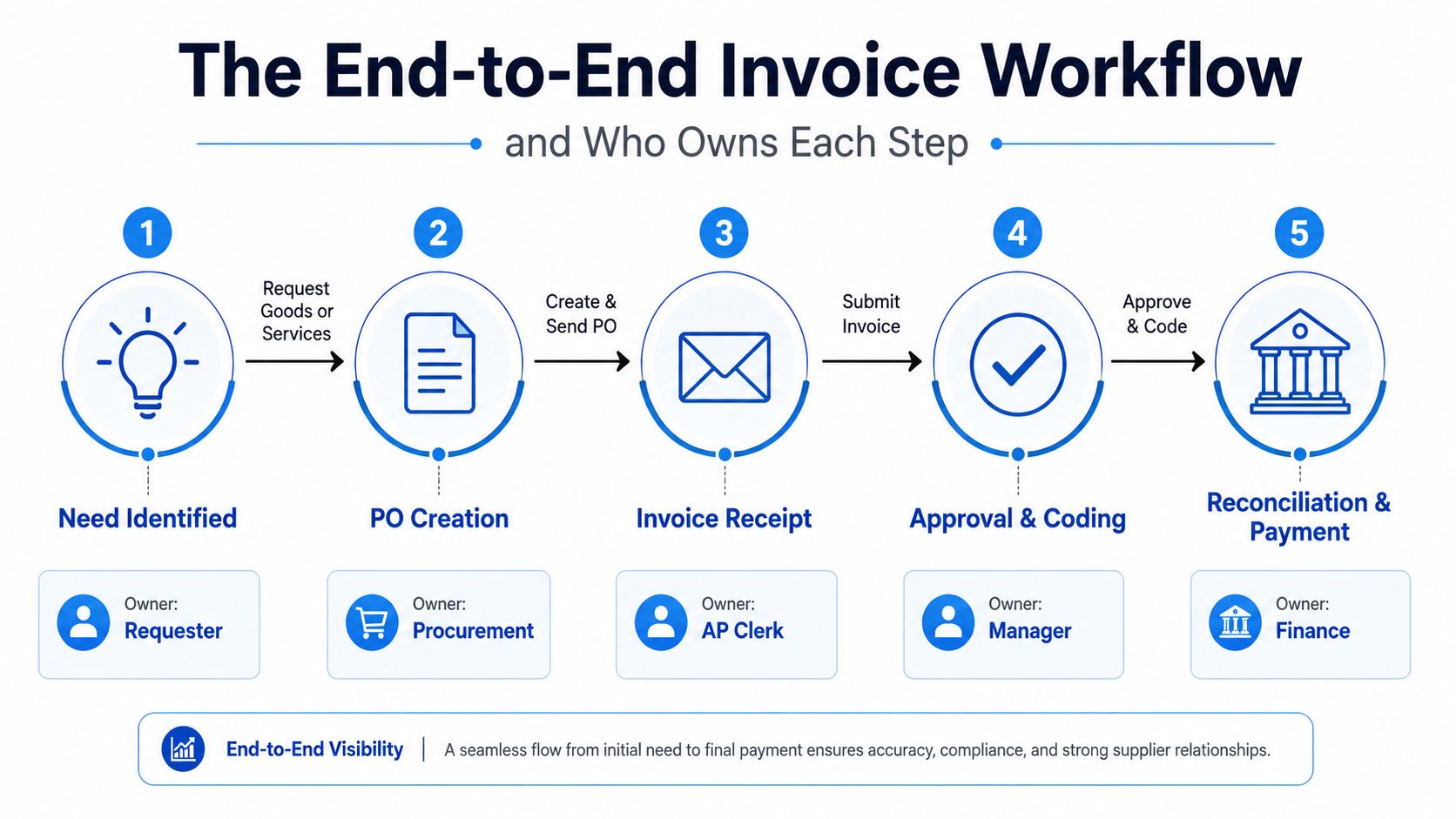
A dependable invoice workflow resembles a relay race. Each person receives a clear hand-off, performs a specific check, and passes the record forward. The process breaks when ownership is vague, not necessarily when the accounting software is inadequate.
Start with the business need
The requester identifies what the business needs. In a small agency, that might be a creative director requesting a freelance animator. The requester records the supplier, service, project, expected cost, and relevant contract or statement of work.
Procurement, if the business has that role, creates or confirms the purchase order. A solo creator may handle this personally. The point is to establish what was authorized before the bill arrives.
When the invoice is received, the AP owner or bookkeeper captures it from email, a portal, or an e-invoicing network. They check that the document belongs to the business, contains the supplier's details, and includes enough information to identify the work.
Validate, approve, and pay
The next hand-off goes to the person who understands the purchase. A manager or project owner checks whether the service was delivered, whether the price matches the agreement, and whether the invoice should be charged to the correct project or category.
A three-way match compares the purchase order, proof of delivery or receipt, and invoice. For a creator, proof of delivery might be a completed video, a signed approval, or a campaign report rather than a warehouse receipt. If the three records agree, approval is straightforward. If they don't, the invoice becomes an exception and needs a human decision.
Finance then schedules payment according to the agreed terms, confirms the bank or payment details, and records the transaction. After payment, reconciliation matches the bank entry to the invoice so the accounting record shows the correct status.
The accounts payable cycle is useful background if you want a fuller explanation of how purchasing, approval, payment, and reconciliation connect.
Assign ownership to match your size
A solo creator may be requester, approver, and finance owner. That's acceptable if the roles are still recorded separately in the workflow. A small agency might have the producer confirm delivery, a director approve the spend, and a bookkeeper manage payment and reconciliation.
Documenting those hand-offs in a simple workflow guide prevents the recurring question, “Who's waiting on this?” A clear workflow documentation page should name the owner, required evidence, approval route, and next action for each stage.
The True Cost of Manual Invoice Processing
A creator finishes a client call, notices an unpaid contractor invoice, and opens a spreadsheet to investigate. The document needs a project code, an approval, and a tax-field correction. What looked like a five-minute task becomes a chain of messages, edits, and checks. Manual invoice processing charges time in small pieces, then hides the total inside ordinary work.
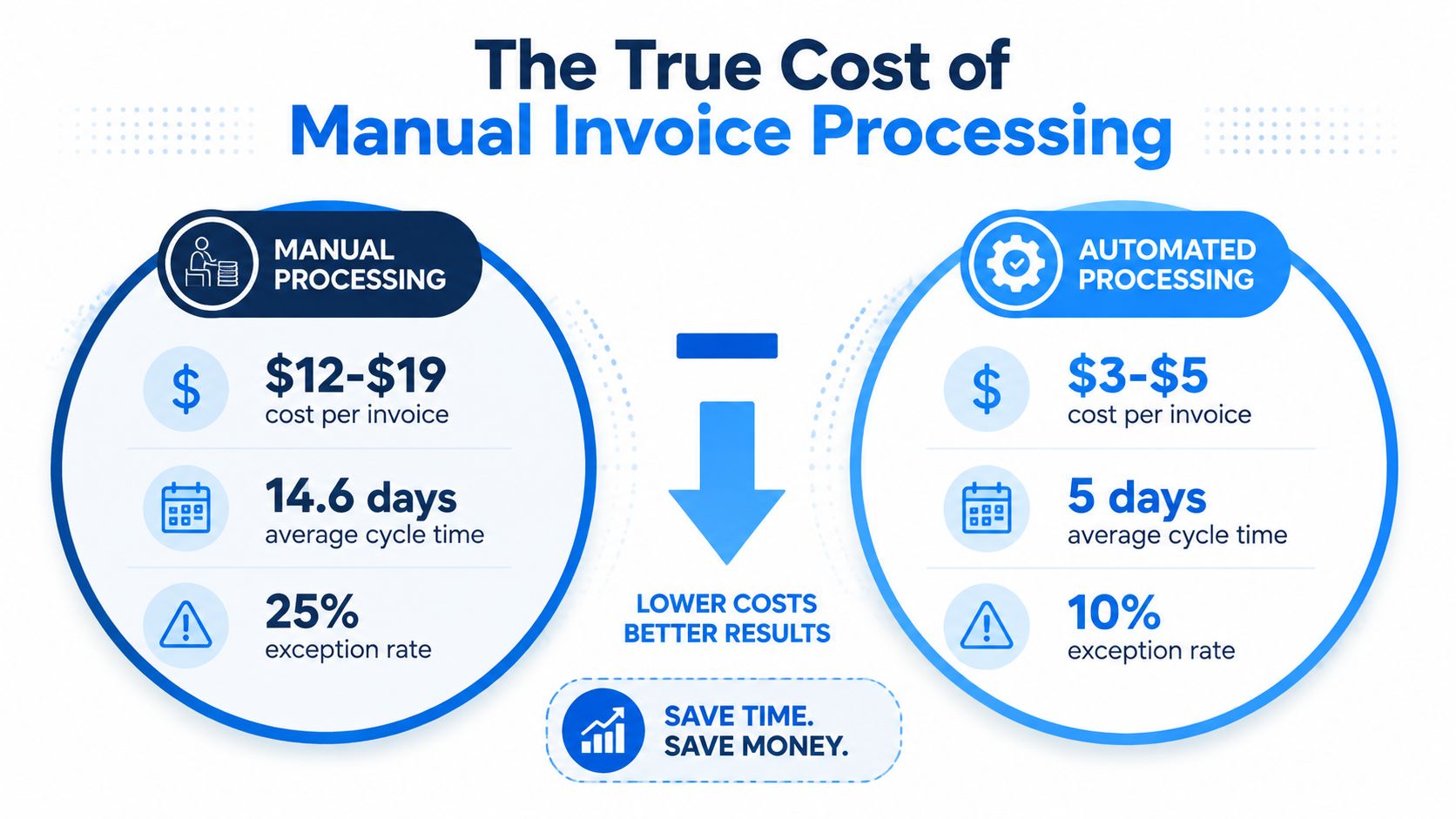
The cost includes data entry, approval follow-up, duplicate detection, correcting supplier or project details, and finding evidence when a client or tax adviser asks a question. Benchmark data places fully loaded manual processing at roughly $8 to $15 per invoice, while highly automated straight-through processing can bring the cost to about $1 to $3 per invoice, according to AP automation ROI benchmarks. Another benchmark reports manual processing at about $12.88 to $19.83 per invoice, with automation reducing the cost to approximately $3 or less and manual processing taking around 14.6 days.
For a small agency, one invoice can consume several rounds of work. Someone checks a missing purchase order, asks for a corrected tax field, and re-enters a payment after finding a duplicate. The business pays for the same document repeatedly. A late payment can also delay contractor work or force the owner to use cash reserved for another expense.
Errors create a second invoice
Manual workflows create follow-up work after the original invoice arrives. Industry benchmark data cited by accounts payable automation statistics places the manual invoice error rate at about 39%, compared with under 0.1% in AI-based systems. These figures describe benchmarked workflows, not a promise for every tool. They do show why exception handling deserves attention alongside document capture.
A wrong amount, duplicate invoice, missing receipt, or incorrect supplier record can stop approval. The finance owner must locate the right person, clarify the discrepancy, update the record, and restart the process. For creators and small operators, compliance adds another layer. Tax fields, approval evidence, and payment records must remain findable, even when the team has no dedicated accounts payable function.
Use the gap as a practical benchmark
The benchmark source describes manual invoice processing at roughly 14.6 days and automated processing at about $3 or less per invoice. Your result will depend on invoice quality, approval complexity, and integration, so use these figures for comparison rather than as a guaranteed target.
A useful test: Count the invoices that needed a correction or follow-up last month. Those exceptions often reveal more about your real cost than the number of invoices received.
For a small team, the practical lesson is simple: remove repeated hand-offs that add no judgment, then keep human attention for commercial questions, unusual charges, and compliance evidence. Efficiency is not only about processing more invoices. It is also about preventing one exception from becoming several hours of unpaid administration.
Where Automation Actually Helps and Where It Doesn't
A small agency can lose an afternoon to one invoice with a missing project code, an unclear tax field, or a total that does not match the agreed scope. Automation can move the document quickly, but it cannot decide whether the extra work was approved. That distinction matters because the hidden cost sits in exceptions, not only in data entry.
Automation works best when the rule is stable and the input is predictable. It can extract supplier names, dates, totals, and line items, identify possible duplicates, route documents to the right approver, send reminders, and prepare payments for review.
It struggles with commercial judgment. A system can flag a difference between an invoice and a purchase order. A person still needs to determine whether the supplier added approved revisions, the campaign scope changed, or a client dispute is justified.
Automate the repeatable work
For a creator or small agency, begin with tasks that recur without much judgment:
- Capture: Turn incoming documents into structured fields instead of retyping each detail.
- Duplicate checks: Compare supplier, reference, date, and amount before the same charge enters the ledger twice.
- Approval routing: Send a software bill to the budget owner and a contractor invoice to the project owner.
- Payment preparation: Group approved obligations by due date and payment method, with human review before release.
- Status updates: Show whether an invoice is received, under review, disputed, approved, scheduled, or paid.
A 2025 survey reported that 63% of AP teams still cite manual effort as their biggest invoicing challenge, while 66% still manually enter invoice data into ERP systems and 40% struggle with disputes, data errors, and weak ERP or CRM integration. The findings appear in the 2025 AR Automation Survey Report. Capture automation cannot repair a broken approval rule or unreliable supplier record.
Design the exception path
An exception queue should state why a document stopped. Useful categories include a missing purchase order, amount mismatch, uncertain tax treatment, suspected duplicate, invalid supplier details, and disputed delivery. Give each category an owner and a response time, even when the response is to send the invoice back to the requester.
Compliance can create another exception before payment is even considered. For cross-border operators, the document may look correct yet fail a customer's required network, format, identifier, or reporting process. Keep those requirements in the workflow rather than treating them as a final check.
If the business pays overseas suppliers, guidance on how to automate cross-border supplier payments helps frame the payment side. Automate the repeatable majority first, then give unusual charges and compliance evidence a clear human review path.
Features That Matter When Choosing an Invoice Management Tool
A tool should fit the workflow you run, not the process shown in a polished product demonstration. Before comparing vendors, collect a sample of real invoices, including a clean document, a disputed bill, a foreign-currency invoice, and one that required a correction. Ask each tool to process those examples and show what happens when the data is incomplete.
| Feature area | What to look for | Common gap discovered later |
|---|---|---|
| Capture and extraction | OCR or AI extraction with editable fields and confidence review | The system reads standard layouts but struggles with supplier variations |
| Matching | Purchase order, receipt, contract, and invoice matching | A service invoice has no conventional receipt, so the workflow stops |
| Approval routing | Rules based on project, entity, supplier, category, or amount | The approval engine can't model the team's real reporting lines |
| Tax and currencies | Support for required tax fields, currencies, and document formats | The tool handles display currency but not local compliance requirements |
| Integrations | Reliable connections with accounting, ERP, banking, and expense systems | Data sync is delayed, incomplete, or creates duplicate records |
| Access controls | Role-based permissions and separation between preparation and approval | A small team gives everyone broad access because the defaults are too rigid |
| Audit trail | History of edits, approvals, disputes, and payment status | The tool records the final result but not who changed the source data |
| Reporting | Cost, cycle time, exceptions, overdue balances, and supplier views | Reports show volume but don't explain why invoices stalled |
Compare the type of tool to the problem
A built-in accounting platform module may be enough if your invoices are simple, your team is small, and your approval path is short. A point solution can make sense when capture or payment approval is the specific bottleneck. A broader AP suite becomes more useful when several entities, currencies, systems, and approval policies must work together.
Don't pay for complexity you won't maintain. A creator may need dependable recurring invoices, client reminders, payment status, and clean accounting integration. An agency may need project coding, contractor approvals, purchase orders, and stronger audit history.
Before buying: Ask the vendor to demonstrate an exception from start to finish, not only a perfectly scanned invoice.
The final mile also matters in industries where proof of delivery triggers billing. If transport or field services are part of your work, practical guidance on how hauliers accelerate invoicing shows why delivery evidence and invoice approval belong in the same workflow. For everyone else, the equivalent may be a signed brief, accepted milestone, or client approval email.
Compliance and E-Invoicing for Cross-Border Operators
A PDF is designed for human reading, while a structured e-invoice is designed for systems to validate, exchange, record, and sometimes report. That difference matters when a customer or tax authority requires a specific format or network. A creator selling services abroad, or an agency billing clients in several markets, can face rejected invoices even when the visible document looks correct.
Some jurisdictions use a clearance model, where an authority or approved platform checks the invoice before it reaches the buyer. Others use continuous transaction controls, with transaction information reported close to the sale or invoice issuance. Rules differ by market, so a tool that works for domestic clients may fail when your legal entity, customer, or transaction type changes.
Build a country-aware checklist
Begin by checking whether your current tool creates a structured document, rather than only a visual invoice. Confirm support for customer and supplier identifiers, tax fields, document types, credit notes, currency treatment, and the required delivery network.
Peppol IDs and national tax numbers identify the parties involved and help route or validate the transaction. Store them in your supplier and client master data. Give someone responsibility for checking changes, because an outdated identifier can create an exception that delays approval or payment.
The global shift is substantial. Around 600 billion B2B invoices annually worldwide and about 300 billion B2B invoices expected in 2026 were cited earlier, alongside the finding that only around 29% currently electronic. More than 80 countries have implemented or announced mandatory adoption. The direction is clear, but the rules are not uniform, so small operators need a market-by-market checklist instead of one global setting.
Roll out in controlled stages
Start with the markets creating the greatest exposure. For each one, record the customer's location, your legal entity, the transaction type, required format, and submission route. Then ask a tax adviser to confirm deadlines and exceptions for your situation.
The EU provides a useful signal of direction. E-invoicing uptake there grew from 10.3% in 2013 to 38.6% in 2023, according to Vertex e-invoicing research. That change does not establish the rule for Germany, France, Italy, Romania, Malaysia, or Singapore. It does show why cross-border compliance belongs in routine operations, not in a last-minute formatting fix. For a small agency, that may mean testing one client route first, documenting the exceptions, and only then extending the process to other markets.
KPIs, Templates, and a 30-60-90 Day Implementation Plan
A useful invoice dashboard answers three questions: How much effort does each document require? Where does it stop? Does the business receive and send money on time? Start with a small set of measures that someone can update consistently.
Track cost per invoice, cycle time, exception rate, first-pass match rate, on-time payment rate, and the cash conversion cycle. The benchmark ranges discussed earlier provide reference points for manual cost, automated cost, processing time, and error performance, but your first objective is a reliable baseline. A metric built from inconsistent statuses won't guide a good decision.
Create the records before changing tools
A starter invoice-management pack can include:
- Invoice template: Legal name, business details, client details, invoice number, issue date, due date, service description, tax information, payment instructions, and contract reference.
- Supporting-document folder: Contract, purchase order, delivery evidence, approval record, credit note, and remittance advice.
- Approval matrix: Project or expense category, approver, backup approver, required evidence, and escalation route.
- Dispute log: Invoice reference, issue, owner, date raised, next action, and resolution.
- Supplier and client register: Legal name, identifiers, payment details, currency, tax treatment, and approved contact.
Use a 30-60-90 day sequence
By day 30, document and measure. Trace several recent invoices from receipt or creation through reconciliation. Mark every hand-off, correction, duplicate check, and delay. Clean obvious supplier and client records before configuring automation.
By day 60, configure and pilot. Choose one invoice type with repeatable rules. Set approval routes, required fields, exception categories, and accounting integration. Train the people who request, approve, and reconcile invoices. Keep a manual fallback while the pilot runs.
By day 90, expand carefully. Compare the pilot against the baseline. Review cost, cycle time, exceptions, and first-pass matching. Add another invoice type only after the first workflow is stable, and schedule a regular review of compliance requirements and master data.
Teams that already track content operations can apply the same discipline to financial operations by using content performance tracking principles, define the measure, assign an owner, review the result, and change one part of the process at a time.
Invoice management isn't a monthly chore you survive. It's a system you design, measure, and refine as your clients, suppliers, and markets change.
Aicut helps creators and small content teams produce and schedule short-form videos with AI, so you can spend less time managing production hand-offs and more time delivering paid work that invoices depend on. Visit Aicut to explore templates, prompt cloning, voiceovers, scheduling, and unified performance tracking for your next content workflow.