
You can feel it when a short-form video stalls. The hook is solid, the edit is clean, the captions are tight, and yet the same clip gets recycled across TikTok, YouTube Shorts, and Instagram Reels with almost no change in response. The problem usually isn't effort, it's that every viewer is being treated like the same person.
That's where personalization at scale matters. For creators, it means building a video system that can adapt a core idea to different audiences, platforms, and moments without rewriting or reshooting everything by hand. In practice, it's the difference between posting content and running a content engine.
Why Every Creator Needs Personalization at Scale
A creator publishes the same clip everywhere. The opening line lands on one platform, the pacing feels right on another, and the comment section is decent, but growth flattens because the video still assumes every viewer wants the same angle. That's the normal failure mode of batch-and-blast content, and it shows up fast in algorithmic feeds.
Personalization at scale is not just segmentation with a fancier label. Segmentation groups people, while personalization changes the actual experience a viewer receives, ideally in real time and without manual rebuilds. That distinction matters because a creator with a thousand niche viewers doesn't need a thousand totally separate productions, just a system that can change hooks, overlays, voice, examples, or product framing based on what the viewer is likely to care about.
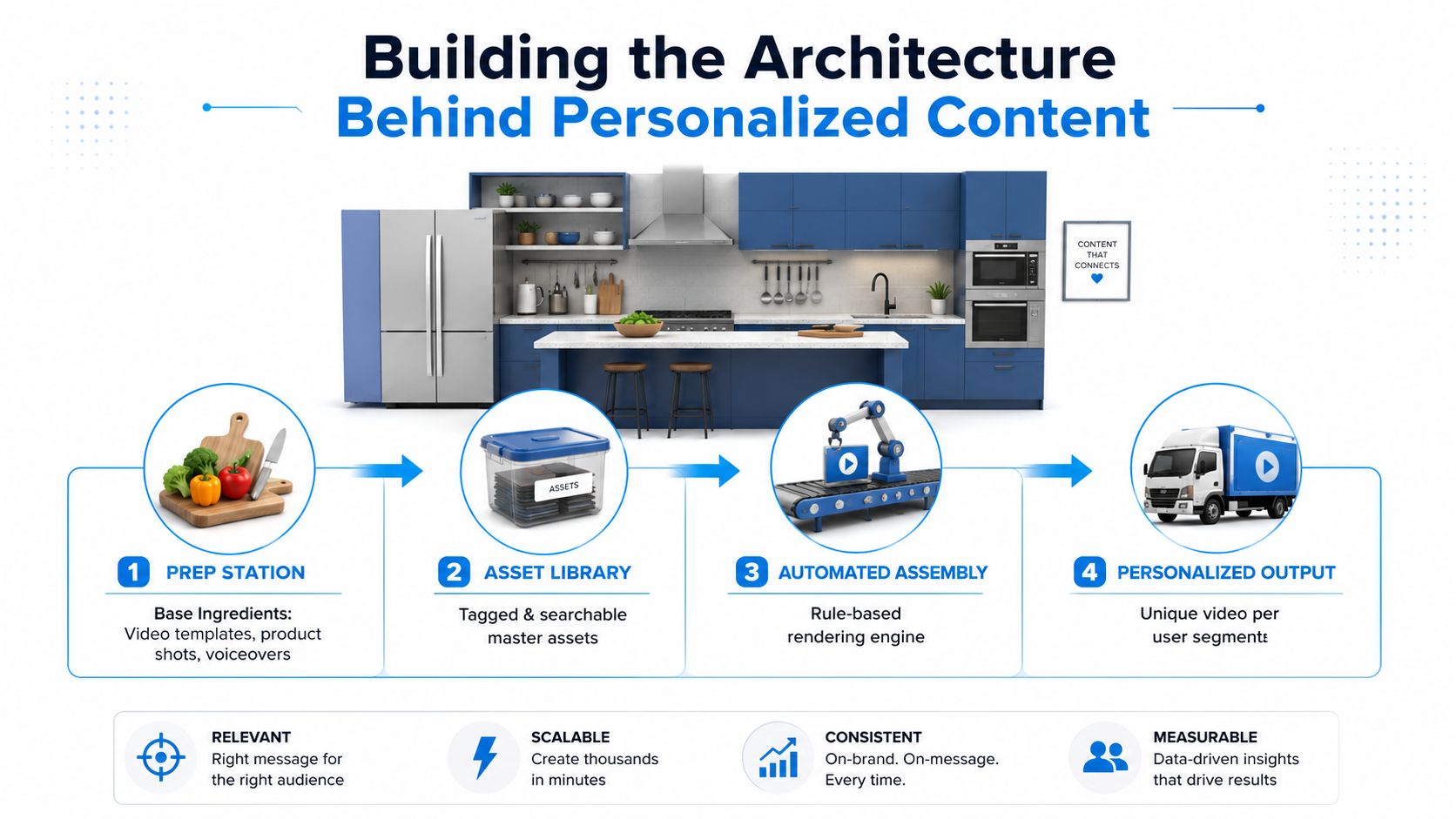
A simple analogy helps. Batch content is a chef cooking one plate and serving it to everyone. Personalization is a prep kitchen that keeps the base ingredients consistent, then adjusts the final dish for each guest.
The practical reason this matters is reach. Short-form platforms reward fast relevance, and one-size-fits-all creative often underperforms once the initial audience is exhausted. If your content engine can generate variations without turning every post into a manual project, you get more chances to match viewer intent before attention disappears.
Practical rule: don't personalize the whole video first. Personalize the first 2 to 5 seconds, the framing, and the CTA before you touch the full production workflow.
If you want a creator-friendly way to think about that first layer, the workflows in AI content creation for social media are a good reference point for how repeatable video output starts to look like a system instead of a one-off post.
The Business Case for Personalized Short-Form Video
The business case starts with a mismatch. Adobe reports that 71% of consumers want personalized offers and proactive assistance, but only 34% of brands provide it, which is a wide expectation gap that creators can feel in their own feeds because generic content is easier to ignore than customized content is to skip. Deloitte's 2024 personalization report also shows that only 43% of consumers described their experiences as personalized, up from 38% in 2022, so the market is improving, but slowly. Adobe also says the customer experience and personalization software industry is projected to reach $11.6 billion by 2026, up from $7.6 billion in 2021, which signals that this is no longer a niche tactic, it's infrastructure.
McKinsey's research makes the upside even clearer. Personalization at scale can drive 5% to 15% revenue growth across sectors such as retail, travel, entertainment, telecom, and financial services, and top performers can see up to 25% uplift depending on execution and industry. McKinsey also reports that companies that excel at personalization generate 40% more revenue from those activities than average players, which is why personalization has moved from a nice-to-have creative idea into a commercial lever.
For creators, that revenue lift shows up in simpler places. A better hook keeps more people watching, which improves distribution. A better segment match raises the odds that affiliate clicks, product purchases, or email signups feel relevant instead of random. A better offer frame also reduces the waste that comes from pushing the same message to viewers who were never likely to care.
If you're trying to connect the strategy side to the execution side, a useful companion resource is customer segmentation with big data, because the same logic that helps large retail teams organize audiences also applies to creator brands trying to separate casual viewers from high-intent buyers.
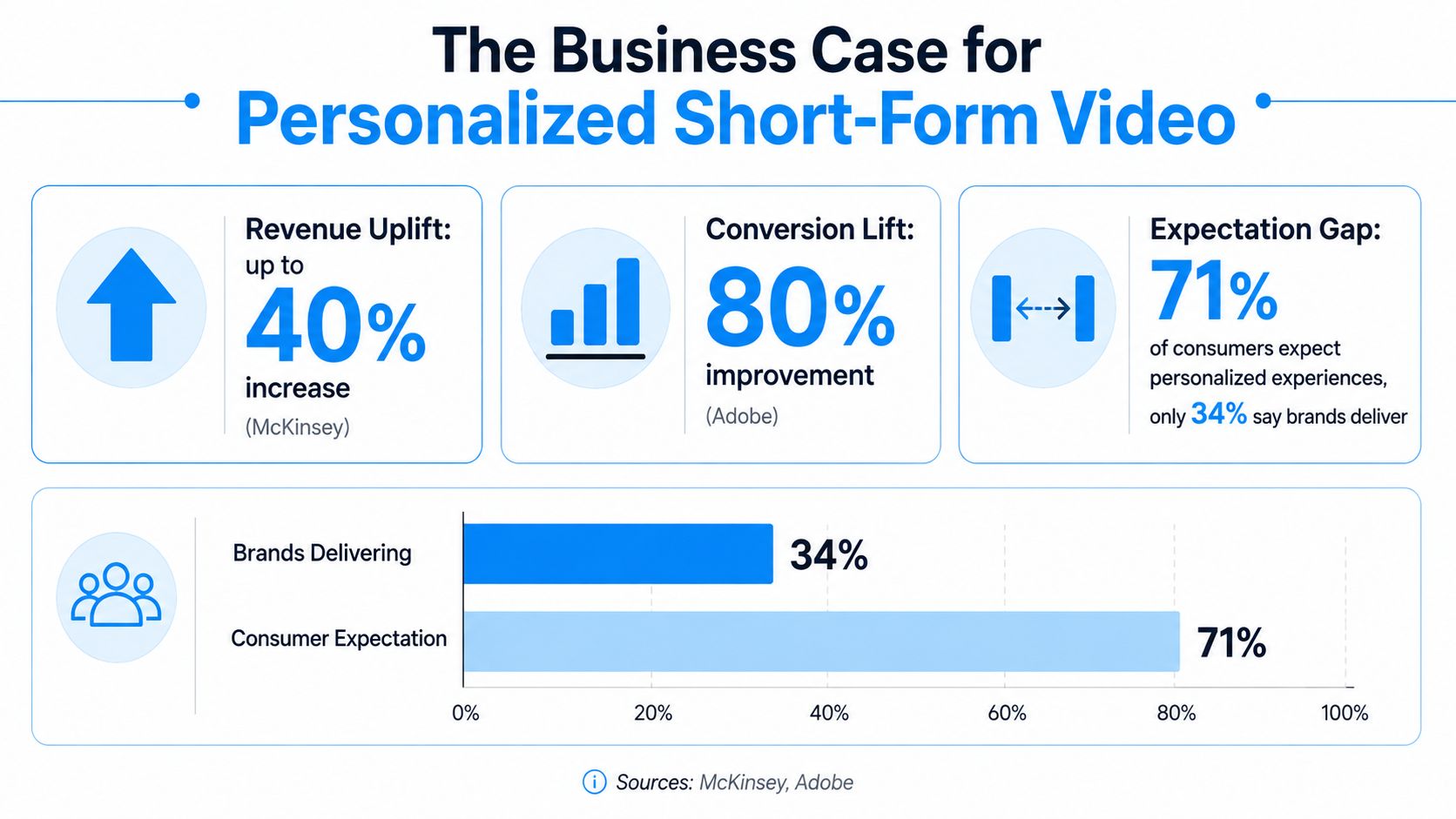
The point is not that every creator needs enterprise software. The point is that the market already rewards relevance, and the gap between what viewers expect and what they get keeps widening unless the content system catches up.
Building the Architecture Behind Personalized Content
Personalization at scale breaks when the plumbing is wrong. McKinsey notes that the system falls apart when data stays trapped in silos, decisioning logic lives in channel-specific black boxes, and real-time orchestration across channels is missing. That's why most personalization efforts fail, not because the idea is weak, but because the architecture can't support the speed.
A modular kitchen is a useful analogy. You don't cook every meal from scratch for every customer. You prep ingredients once, store them in a way the team can find, then assemble the final plate based on the order that comes in. Video works the same way when it's built for scale.
Break the content into reusable parts
The biggest shift is decomposing content into modules. Instead of one finished asset, create separate building blocks, such as hooks, backgrounds, voiceovers, captions, product shots, and character layers. That lets the system mix and match pieces without demanding a full reshoot every time the audience changes.
Modular thinking pays off here. A single concept can become many outputs if the opening line changes for different viewer groups, the background changes for different contexts, or the voiceover changes for different tones. You're not making endless unique videos, you're building a library of components that can be assembled into many credible variants.
Treat recommendation systems as infrastructure, not magic
At production scale, the technical bottleneck is often the size and latency of embedding-based models used for ranking and recommendation. In technical discussions of Facebook-style personalization systems, the majority of parameters can sit in embedding tables that reach tens of gigabytes, hundreds of gigabytes, or even terabytes, which creates serious memory, storage, and serving challenges because sparse-feature lookups still have to happen fast enough for real-time personalization to work. That's the hidden cost of scale, the system has to decide quickly, not just cleverly.
For creators, you don't need to manage terabytes yourself. You do need to know whether your stack can tag assets cleanly, trigger the right variant from the right rule, and publish without forcing a human to manually rebuild every output. If the workflow can't do that, the personalization strategy will keep collapsing back into manual editing.
Modular systems win because they reduce the number of times you have to solve the same creative problem twice.
Tactical Approaches for Video Personalization
The fastest way to make this real is to start with four tactics that work together, not one at a time. The first is audience segmentation by behavior and platform. A viewer who watches your content to the end on YouTube Shorts is signaling something different from someone who taps through quickly on TikTok, so the hook, pacing, and CTA should not be identical.
The second tactic is template-based assembly. Viral-ready formats such as Cheating Fruits or AI Skeleton Stories are useful because they give you a repeatable shell, then let you swap the story, product, or character details without rebuilding the entire video language from zero. That's the right way to think about templates, not as shortcuts for lazy posting, but as reusable structure.
Build variants from one base concept
Start with one script skeleton. Then clone the prompt, change the audience angle, and swap the scene assets or character details. If you're using AI character swaps or background swaps, keep the core promise of the video stable so the variation stays coherent. The goal is not novelty for its own sake, it's controlled relevance.
A workable workflow looks like this.
- Choose one base concept. Pick a message that already fits your offer or niche.
- Split it into variables. Hook, character, setting, caption, voice, and CTA.
- Generate controlled variants. Change one or two variables at a time so you can tell what matters.
- Schedule and publish in batches. One workflow should handle multiple platforms without separate manual uploads.
- Review performance by variant. Keep the winners, kill the rest, and reassemble the next round from what worked.
Use model choice as a budget and quality lever
Credit-based generation matters because not every output needs the same production weight. In creator workflows, picking between Sora 2, Veo 3.1, and Kling is less about chasing the fanciest model and more about matching model cost to the role that asset plays in the funnel. A throwaway test creative and a high-intent product clip should not consume the same resources.
One useful operational rule is to reserve the most expensive generation for the variants with the highest upside, then use lighter variants to explore hooks, angles, or audiences. That keeps experimentation alive without burning budget on every idea.
The best systems also collapse editing and posting into one place. When voiceover, scheduling, and one-click publishing sit inside the same workflow, teams move faster and leave fewer opportunities for a broken link, a mismatched caption, or a forgotten upload.
Measuring What Actually Works
Most creators say they test. Fewer can prove what caused the lift. That gap matters because more variants don't automatically mean better results, especially when multiple channels, AI decisioning, and content differences all change at once. PwC calls measurement one of the core gaps that limits scale, alongside technology, data, and operating model, and that matches what breaks in practice: teams look at totals, but they don't isolate incrementality.
A better approach is to decide up front what question the test is trying to answer. If you only want to know whether a hook beats another hook, a simple A/B test is enough. If you want to know whether personalized content drove more watch time, followers, or sales than a generic control, you need a holdout design.
Use the right test for the question
A practical decision tree helps.
- Small audience, low volume: run simple A/B tests on hooks, thumbnails, or captions.
- Larger audience with enough traffic: create a holdout group that sees non-personalized content.
- High-frequency publishing: use rolling tests so new variants are evaluated against a stable baseline.
- Multi-channel journeys: track how short-form video interacts with paid social, email, or lifecycle messaging instead of judging each channel alone.
The point of the holdout is clarity. If one group sees your personalized variant and another group does not, the difference between the two is the best evidence that the personalization itself mattered. Without that control, you're just guessing whether the lift came from the content, the timing, the platform, or the audience mix.
For creators who need a simple operating view, content performance tracking is a useful companion because it keeps the focus on the metrics that matter instead of vanity totals that look good but prove nothing.
Useful standard: if you can't explain the control group, you probably can't explain the result.
Track outcomes that match the business goal
Watch time matters when the goal is distribution. Follower growth matters when the goal is audience building. Conversion revenue matters when the goal is sales. Mixing those goals in one dashboard usually creates confusion, so the better move is to assign one primary outcome and one secondary outcome per test cycle.
That's the test of personalization at scale. Not whether the system produced more versions, but whether the right version changed the right outcome in a way you can defend.
Governance and Privacy in AI-Driven Personalization
Personalization gets risky fast when teams scale without rules. PwC notes that regulatory and compliance planning has to happen up front for organizations whose data crosses international lines, and Adobe's personalization guidance also stresses strong privacy measures and governance from a single source. That's not bureaucracy, it's what keeps a fast-moving content system from creating brand damage or legal exposure.
A good starting point is GDPR compliance design principles, because privacy by design forces the right question early, not after the workflow is already live. If your personalization stack can't explain consent, retention, access, and auditability, it's too early to scale.
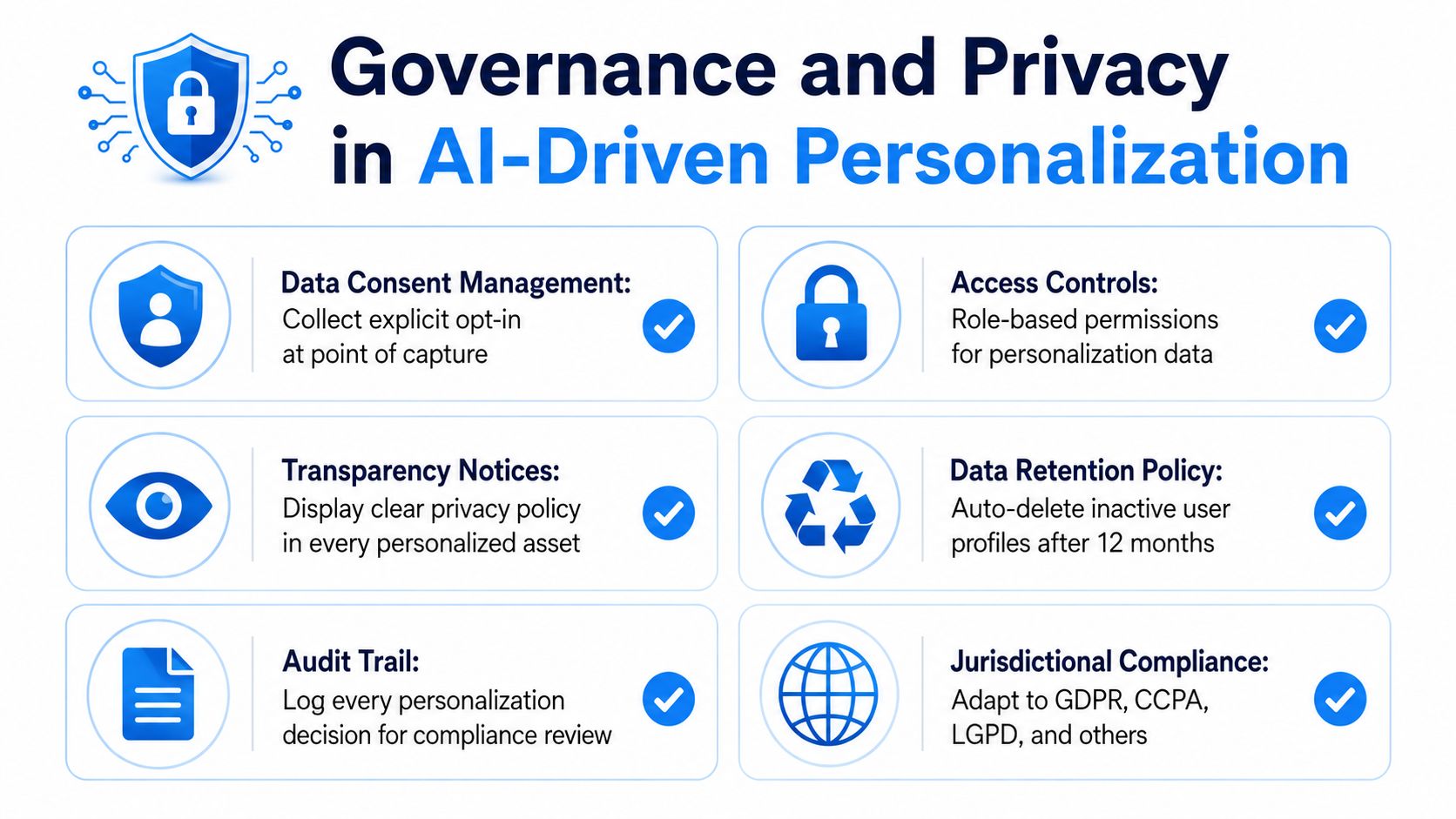
The safest way to think about use cases is to separate low-risk personalization from high-risk personalization. Changing a hook based on platform behavior is relatively low-risk. Building dynamic profiles that combine sensitive user signals, cross-border data, and AI-generated creative variation is much more complex. The more personal the data and the more automated the output, the more discipline the system needs.
Draw a line between speed and overreach
There's also a brand risk that gets ignored. Too much variation can make a creator look inconsistent, or worse, uncanny. If the audience can't recognize the voice, visual style, or offer logic across versions, the personalization has gone too far.
That's why governance isn't just legal review. It's also creative consistency, access control, audit trails, and a clear rule for what the model can and can't change. Teams that define those boundaries early usually move faster later because nobody has to stop production every time a new variant is proposed.
For a broader compliance lens, the Will YouTube demonetize AI-generated content guide is useful context if you're publishing at scale and need to understand how platform rules can shape your workflow.
Personalized content should feel relevant, not invasive. If the viewer notices the machinery before the message, the system is doing too much.
Your Implementation Roadmap for This Week
Start small, but start with a real system. Day 1, audit your audience segments and decide which behavior signals matter most, platform, watch depth, or purchase intent. Day 2, decompose one video concept into modular pieces, then map which parts can be reused without changing the message.
Day 3, generate a batch of variants from the base concept and schedule them through one workflow. Day 4, launch a test with a holdout group so you have a baseline, not just a pile of views. Day 5, review the results, check the governance rules, and decide which variables deserve another round.
A simple scaling checklist keeps the work from getting messy.
- Keep the base concept stable. Change one meaningful variable at a time.
- Tag every asset. If you can't find it later, it's not reusable.
- Protect the control group. No control, no proof.
- Write the approval rules down. Speed without governance usually becomes rework.
- Promote winners into the next cycle. Don't keep testing dead ideas.
That's the practical shape of personalization at scale for creators. Not endless customization, not enterprise theater, just a repeatable content system that can adapt, prove lift, and stay safe while it grows.
If you want to turn one idea into many platform-ready videos without rebuilding everything by hand, visit Aicut and see how its modular templates, prompt cloning, voiceovers, and one-click publishing can support a real personalization workflow. It's built for creators who need speed, consistency, and a cleaner path from testing to scale.