
Ever feel like you’re wrestling with an AI to get the exact video clip you have in your head? You know the vision is there, but the AI keeps giving you something… generic. The secret to bridging that gap isn't magic; it's a skill called prompt engineering.
Think of it as the difference between being a passenger and a driver. Anyone can ask for a "video," but learning how to craft the right instructions lets you take the wheel and steer the AI exactly where you want it to go. For creators using tools like Aicut, this skill is your ticket to making content that truly stands out.
What Is Prompt Engineering Explained Simply
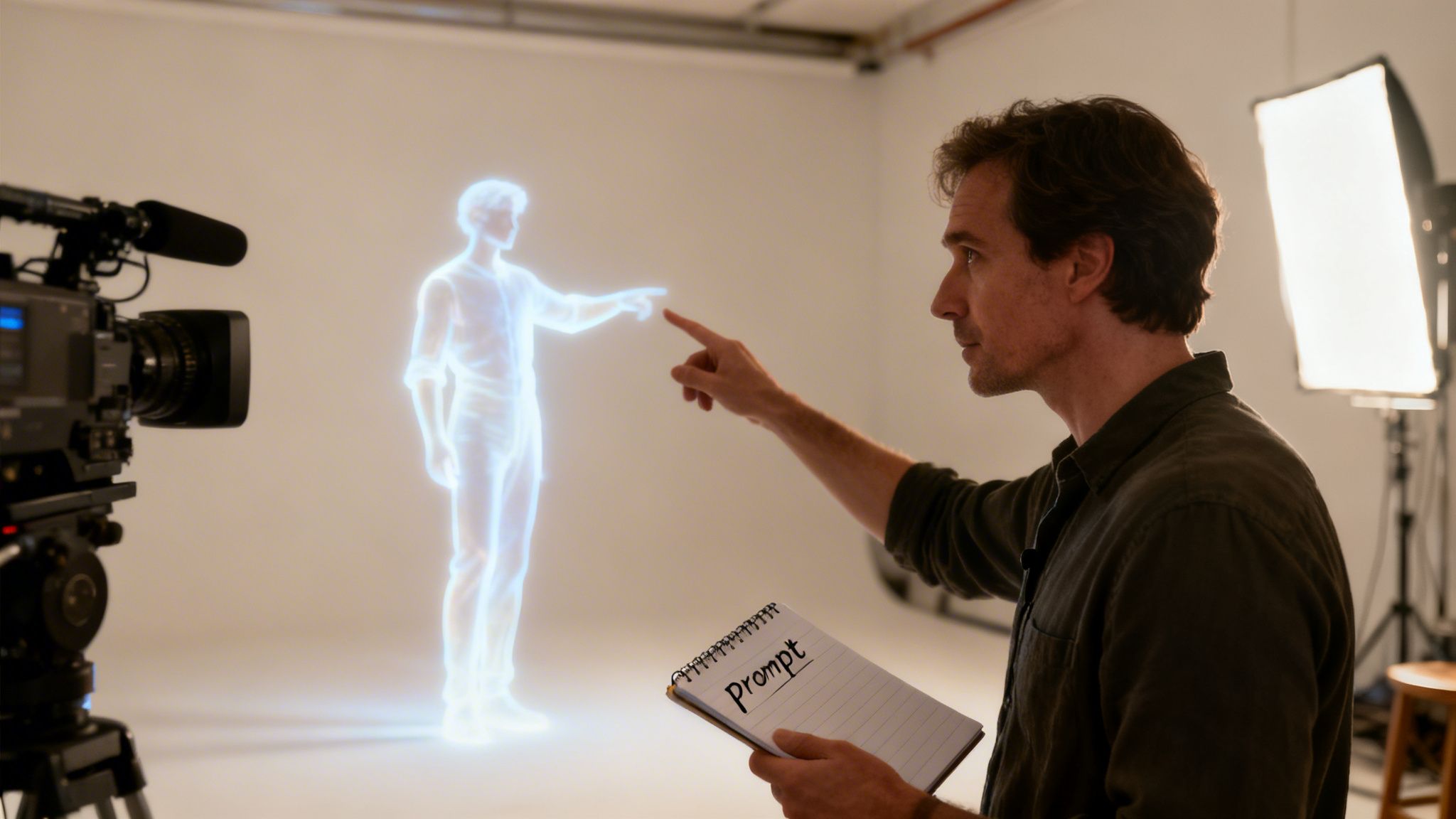
Let’s use an analogy. Imagine you're a film director, and the AI is your lead actor.
If you mumble, “Just act sad,” you’ll get a flat, uninspired performance. But what if you give specific, emotional direction? “You just lost your house keys. It’s starting to rain, and you’re more frustrated than sad, but you're trying to play it cool.” Now that is a scene with depth.
That’s what prompt engineering is. It’s the art of giving the AI clear, detailed, and context-rich instructions so it can deliver a brilliant performance every single time. Instead of just accepting whatever the AI spits out first, you learn how to refine your requests to control the lighting, the mood, the camera angles—everything.
To help simplify this, here is a quick overview of what prompt engineering involves for a content creator.
Prompt Engineering at a Glance
| Aspect | Simple Explanation |
|---|---|
| Instruction | Your specific request or command to the AI. |
| Context | Background information that helps the AI understand your goal. |
| Persona | Asking the AI to "act as" an expert (e.g., a filmmaker, a historian). |
| Iteration | The process of testing and refining your prompts to get better results. |
This table breaks down the core pieces. It’s not just about asking; it’s about providing the right details and being willing to tweak your approach.
The Art of Conversation with AI
A lot of people think prompt engineering is some kind of coding or requires a technical background. Not at all. It’s much more about mastering a new kind of conversation. It's a blend of creativity, a little bit of logic, and a willingness to experiment.
You’re not just typing questions into a box. You're learning to structure your vision in a way the AI can understand and execute. It’s the bridge between what you’re imagining and what the machine creates.
When you learn to communicate your ideas this clearly, you unlock a new level of partnership with AI. This is what separates the pros from the amateurs in the world of AI-generated video.
And it’s a skill that's in high demand. After ChatGPT arrived in 2022, the world woke up to the power of good prompting. Since 2023, LinkedIn posts for roles involving prompt engineering have shot up by 434%. More importantly, internal studies show that a structured prompting process can improve the quality of an AI’s output by up to 76%. You can explore more data on the rise of prompt engineering to see just how big this has become.
Why It Matters for Video Creators
For anyone creating videos with a tool like Aicut, getting good at prompt engineering is a game-changer. It’s how you take back creative control.
Suddenly, you can:
- Define Your Visual Style: Tell the AI you want "a low-angle shot, golden hour lighting, with a shallow depth of field, inspired by Wes Anderson’s color palette."
- Control Character Emotion and Action: Go beyond "a happy person" and ask for "a woman in her 20s, smiling with relief after narrowly catching a train."
- Generate Niche-Specific Content: Easily create videos in popular formats, whether it's a POV-style vlog, a UGC-style product review, or a narrated Reddit story.
- Work Smarter, Not Harder: Stop wasting time with endless trial-and-error. Great prompts get you closer to the perfect shot on the first or second try.
Ultimately, this is about making your content yours. It’s how you teach the AI your unique style so it can help you build a successful faceless channel or produce the next viral hit—without your videos ever looking generic.
Why Mastering Prompts Is a Creator Superpower
So, you get the basic idea of prompt engineering. But the real question is: why should any of this actually matter to you?
It’s simple. For a creator, getting good at this is like gaining a superpower. It's the one skill that gives you an almost unfair advantage when you're trying to stand out online.
For starters, it’s all about efficiency—on a scale that can feel like a cheat code. Imagine cranking out a full week's worth of high-quality, engaging videos in a single afternoon. With the right prompts, this isn't a pipe dream; it's a real, repeatable workflow. Your content strategy stops being a constant grind and becomes a smooth, creative process.
Take Ultimate Creative Control
Let's be honest: vague prompts give you generic, forgettable AI content that looks like everyone else's. Mastering prompt engineering is how you take back the steering wheel. You become the director, not just a passenger hoping the AI takes you somewhere interesting.
This control lets you call the shots on all the little details that make your content yours. With powerful AI models like Sora 2 and Veo 3.1 available through platforms like Aicut, your ability to give crystal-clear instructions is everything.
You can specify things like:
- Cinematic Details: Instead of just "a video of a car," you can command a "dramatic low-angle shot of a vintage car, filmed with a cinematic look inspired by noir films" under "soft, diffused morning light."
- Character Nuances: Go way beyond "a happy person." Ask for "a young woman with a look of quiet, triumphant satisfaction right after finishing a difficult task."
- Emotional Tone: Set the mood perfectly by asking for "an atmosphere of suspense and mystery, with long shadows and a muted color palette."
This is how you ensure the AI doesn't just make a video; it makes your video, one that perfectly matches what you see in your head.
From Simple Idea to Viral Content
Let's put this into a real-world scenario. Say you have a great idea for a faceless history channel, but you don't have the time or budget for custom animations or endless stock footage searches.
A basic prompt like, "video about the Roman Empire," will spit out a generic montage you've seen a hundred times. It's boring.
But watch what happens when you engineer a better prompt: "Create a 60-second vertical video for TikTok. Act as a history expert telling a little-known story. Use a fast-paced, jump-cut editing style. Start with a hook: 'This Roman Emperor was stranger than you think.' Generate cinematic B-roll of ancient Roman ruins, bustling forums, and marble statues. Keep the tone mysterious with suspenseful orchestral music."
That prompt isn't just asking for a video; it's a complete creative brief. It dictates the format, persona, style, hook, visuals, and audio. The result is content that’s practically built for virality on platforms like TikTok and Reels.
This same logic applies directly to e-commerce. Instead of one bland product video, you could use a structured prompt to generate ten different UGC-style ad variations from a single idea. You can test different hooks, AI avatars, and calls to action to see what actually drives sales—all without a single expensive video shoot. Recognizing how prompts work is also the first step toward boosting your online footprint with methods like Prompt Engineering for Brand Visibility.
At the end of the day, mastering prompts isn't just a techy skill. It's a direct lever you can pull to increase your content output, boost your quality, and grow your channel's revenue. It gives you the power to scale your creativity and turn ideas into a steady stream of high-performing content faster than ever before.
Fundamental Prompting Techniques for Viral Videos
Okay, so you get why prompting is a creator's superpower. Now, let's get into the how. Great prompting isn't about throwing random words at the AI and hoping for the best. It's a skill built on a few core techniques that give you predictable, high-quality results.
Think of these as your director's toolkit. Each one is a different way to communicate your vision to the AI, making sure you get the exact scene, script, or shot list you have in your head. Let's break down the essentials.
Zero-Shot and Few-Shot Prompting
One of the first things to understand is the difference between Zero-Shot and Few-Shot prompting. It might sound a bit technical, but the idea is actually very simple.
Zero-Shot Prompting is when you give the AI a direct command with no examples. You’re basically trusting the AI to figure out what you want based on its massive training data.
- Example: "Create a 30-second video about the benefits of drinking water."
This is the most common way people start, but it often gives you something pretty generic. It's like telling an actor to "be funny" without giving them any context—you might get lucky, but you probably won't.
Few-Shot Prompting, on the other hand, is where you start to take real creative control. You give the AI a few examples to show it the specific style, format, or vibe you're after.
A Zero-Shot prompt is asking for "a funny cat video." A Few-Shot prompt is showing the AI three viral cat videos and saying, "Now make one just like these, but with a dog."
For video creators, this is a game-changer. You can show the AI examples of a TikTok trend you want to hop on, a competitor's ad you want to emulate, or even your own best-performing videos to keep your content consistent.
The Power of Chain-of-Thought Prompting
When your video idea is more complex, you need a way to help the AI "think" it through. That’s where Chain-of-Thought (CoT) prompting comes in.
Instead of demanding the final video script all at once, you guide the AI by asking it to break the problem down into steps and "think out loud." This forces the model to follow a logical path, which almost always gives you a more structured and coherent result.
For example, instead of a vague request, you could prompt it like this:
- First, define the target audience for a video about sustainable fashion.
- Next, come up with three catchy hooks for this specific audience.
- Then, using the best hook, write a 60-second video script that includes cues for B-roll footage.
- Finally, suggest a trending audio track that would fit the video's theme.
This step-by-step process acts as a roadmap for the AI. It prevents it from getting lost and helps it deliver a complete, well-thought-out video concept.
This is how you go from just a user to a true creator, gaining control over your output.
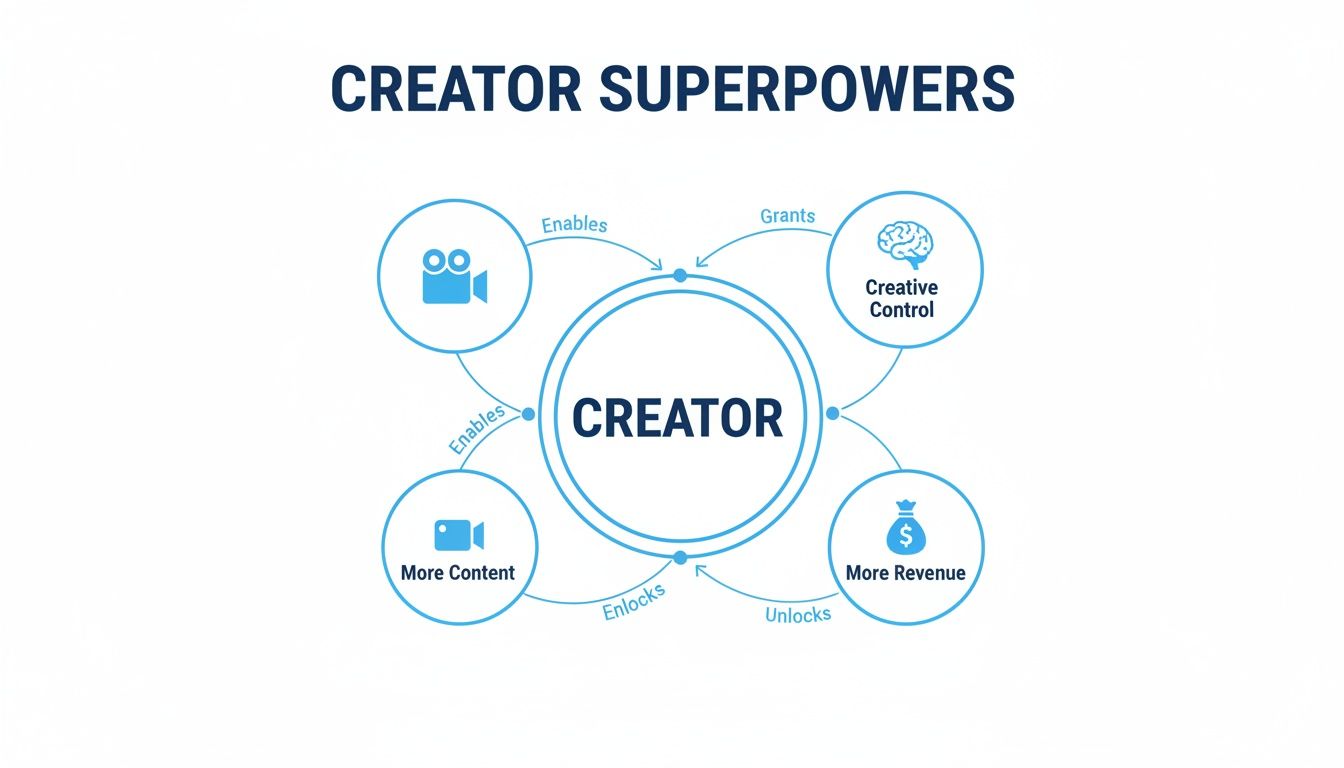
As you can see, mastering these techniques gives you more creative control, helps you produce more content, and ultimately, opens up more ways to grow your business.
Using Structured Prompt Patterns
Beyond these core techniques, there are also "patterns"—think of them as reusable templates for getting great results every time. Two of the most effective patterns for video creators are the Persona Pattern and the Recipe Pattern.
1. The Persona Pattern
This is a fun one. You simply tell the AI to "act as" a specific expert or character. By giving the AI a persona, you provide it with a tone of voice, a specific viewpoint, and a base of knowledge to work from. The results are instantly more interesting.
- Generic Prompt: "Explain World War II."
- Persona Prompt: "Act as a sarcastic but brilliant history professor. Create a short, engaging video script explaining a surprising fact about World War II for a Gen Z audience."
2. The Recipe Pattern
The Recipe Pattern gives the AI a clear, structured formula to follow. You break your request into distinct ingredients like "Role," "Task," "Format," and "Constraints." This is perfect for creating consistent content for platforms like TikTok or YouTube Shorts.
Here's what a Recipe Pattern prompt might look like in Aicut:
- Role: You're a social media manager for a popular skincare brand.
- Task: Create a script for a UGC-style video ad.
- Topic: The benefits of our new vitamin C serum.
- Format: 30-second vertical video. Start with a hook that highlights a common skin problem, show the product being used, and close with a strong call to action.
- Tone: Authentic, relatable, and trustworthy.
By combining these methods—Zero-Shot for quick ideas, Few-Shot for style matching, Chain-of-Thought for complex projects, and Patterns for structured output—you can direct the AI with precision. To get even better results, check out our deep dive on how to master text prompts for AI video generation.
Alright, enough with the theory. Let's get our hands dirty and start creating.
This is where the real magic of prompt engineering comes into play. I'm going to share some of my go-to prompt templates that are tailor-made for the kinds of videos that actually go viral. Think of these as proven recipes you can copy, paste, and tweak for your own projects.
These are built to work perfectly with AI video generators like Aicut. For each one, I’ll give you the complete prompt and then walk you through why it works so you can start customizing them like a pro.
The Authentic POV Video Template
Point-of-view (POV) videos are huge on TikTok and Reels because they pull the viewer right into the action. They feel personal and immediate. This template is all about nailing that first-person perspective with photorealistic details.
The Prompt Template:
Role: You are a cinematic video creator specializing in immersive, first-person storytelling.
Task: Generate a 15-second POV video clip. The scene should feel authentic and unscripted, as if filmed on a smartphone.
Scene Description: A person is walking through a crowded, vibrant night market in Tokyo. They are holding a half-eaten stick of dango. The camera view is from their perspective, looking slightly down at their hands and the food, then panning up to show the glowing lanterns, steam rising from food stalls, and the blur of people walking by.
Visual Style:
- Shot Type: First-person POV, handheld feel with subtle, natural camera shake.
- Lighting: Warm, vibrant neon lights from signs and paper lanterns, creating strong highlights and deep shadows.
- Color Palette: Saturated neons (pinks, blues, oranges) against a dark background.
- Focus: Keep the dango in the foreground in sharp focus initially, then rack focus to the background scenery.
Constraints: No visible faces of the main character. The clip must be a seamless loop.
What Makes This Prompt So Effective?
Telling the AI to act like a "cinematic video creator" immediately sets the bar for quality. From there, the prompt provides a clear recipe, breaking down the task, scene, and style. This leaves very little room for the AI to misinterpret what you want.
But the real secret sauce is the specific, sensory details. Things like "steam rising from food stalls," "glowing lanterns," and a "half-eaten stick of dango" make the scene feel real. The specific camera instructions, like "panning up" and "subtle camera shake," are what truly sell the POV illusion.
The UGC Style Product Ad Template
User-generated content (UGC) is the ultimate form of social proof because it feels genuine. This prompt helps you create that same believable testimonial vibe using AI avatars, so you don't have to hire actors. It's a fantastic example of how smart prompting can directly boost your e-commerce game.
The Prompt Template:
Role: You are a direct-to-consumer marketing expert creating a UGC-style ad for a social media campaign.
Task: Generate a 25-second vertical video featuring an AI avatar that looks like a real customer.
Avatar: A woman in her late 20s with a friendly, trustworthy expression. She is in a naturally lit, slightly messy bedroom to look authentic.
Script and Action: The avatar holds up a bottle of "Glow Up" vitamin C serum to the camera. She speaks directly to the viewer with a genuine, excited tone.
- (0-3s) Hook: She says, "I was so tired of my skin looking dull, but then I found this."
- (4-15s) Demo: She applies a small amount of the serum to her face, smiling. B-roll of the serum's texture and a before/after graphic appears.
- (16-25s) Call to Action: She says, "My skin has never felt this bright. Seriously, you have to try it. Link in bio!"
Visual Style: Shot on a smartphone, slight background blur, warm and inviting color grading. The editing should have quick cuts to maintain high energy.
What Makes This Prompt So Effective?
This prompt works beautifully because it provides a mini-script with exact timings. It essentially walks the AI through the narrative arc of a great social media ad: a strong hook, a quick demo, and a clear call to action. Little details like asking for a "friendly" avatar in a "slightly messy bedroom" are key to achieving that authentic UGC look.
With this structure, you can crank out tons of ad variations just by swapping out the hook or changing the avatar's description. And this structured approach isn't just for social media; you can use a high-converting video sales letter template as a guide to see how these same principles apply to longer, more persuasive video content.
The Engaging Reddit Story Narration Template
Faceless YouTube channels that narrate viral Reddit threads are incredibly popular. The biggest time-sink is usually finding B-roll and visualizing the story. This prompt automates all of that heavy lifting.
The Prompt Template:
Role: You are a video essayist creating content for a YouTube channel that narrates compelling online stories.
Task: Create a 90-second video based on a Reddit story about a funny workplace misunderstanding. The narration audio will be provided separately. Your job is to generate all the visuals.
Visual Structure:
- Intro (0-10s): Animated Reddit interface showing the post title and subreddit.
- Story Part 1 (11-40s): Generate abstract, animated visuals representing an office environment—stylized cubicles, keyboards, and coffee cups. The mood should be light and humorous.
- Story Climax (41-70s): Generate a key scene: a cartoon-style animation of a person accidentally sending a funny meme to the entire company instead of a single coworker. Show exaggerated facial expressions of shock and laughter.
- Conclusion (71-90s): Show animated Reddit comments scrolling up the screen, reacting to the story.
Visual Style: 2D flat animation with a simple color palette. Use dynamic text overlays to highlight key funny phrases from the story. Maintain a fast-paced editing style to match a spoken narration.
What Makes This Prompt So Effective?
The power of this prompt is its detailed Visual Structure, complete with timestamps. It’s basically a storyboard that tells the AI exactly what to show and when, ensuring the visuals line up perfectly with the story's key moments. By asking for "abstract, animated visuals" and "cartoon-style animation," you're steering the AI toward creating fun, engaging graphics instead of it trying—and probably failing—to make a photorealistic office scene.
If a channel like this sounds like your kind of project, our guide on how to create compelling AI videos has even more strategies for automating your workflow. These templates give you a massive head start, so you can spend your time finding great stories instead of fighting with video editing software.
How to Test and Refine Your Prompts Like a Pro
Let's be honest: your first prompt is almost never the one you end up using. The real skill in getting great AI video doesn't come from a single perfect prompt, but from the process of testing and tweaking. This is where a decent clip becomes the exact shot you had in your head.
Think of yourself as a sculptor. Your first prompt gives you a rough block of marble—it has the basic shape, but the masterpiece is still locked inside. You reveal it by chipping away, smoothing the edges, and adding those fine details. Every little adjustment gets you closer to what you’re trying to create.
Analyzing and Improving Your Output
Your first step is to just look at what the AI gave you. Really look at it. How does it stack up against what you originally pictured? Ask yourself some pointed questions. Is the lighting off? Is the character's expression a little flat? Is the whole thing moving too slowly?
Once you spot the problems, you can start tightening up your prompt. This usually means adding more specific details or telling the AI what not to do. If the video feels a bit generic, you need to give the AI more to work with.
Here are a few ways I do this all the time:
- Get Hyper-Specific: Don't just say "a city street." Try something like, "a rain-slicked cobblestone street in Paris at dusk, with warm light spilling from cafe windows." See the difference?
- Set Some Ground Rules: To keep unwanted stuff out, you can add constraints. For example, "The scene should not include any modern cars."
- Use Negative Prompts: Most AI tools let you specify what you want to avoid. A negative prompt like "no logos, no text, no blurry footage" can instantly clean up your results.
This process of layering in more detail is the key to getting the AI to see what you see. For a deeper dive, check out our guide on how to generate AI video from text using these exact principles.
A Simple A/B Testing Framework
When you're stuck between two ideas for a prompt, A/B testing is your best friend. It’s just a fancy way of saying you try two slightly different prompts to see which one performs better. It's a simple, methodical way to figure out what the AI really responds to.
For example, imagine you’re making a product video. You could test two prompts:
- Prompt A: "Create a video of a person happily using our product."
- Prompt B: "Act as a UGC creator. Film a selfie-style video showing an authentic reaction of delight while unboxing our product for the first time."
By putting the two videos side-by-side, you'll immediately see that Prompt B, with its specific role-play and clear action, gives you a much more believable and engaging clip. This one simple test teaches you a lesson you can apply to all your future prompts.
Leveraging Prompt Libraries
Nobody has time to write every prompt from scratch. That's why prompt libraries are a lifesaver. Think of them as your personal swipe file of proven, professionally crafted prompts that just work.
Platforms like Aicut have these libraries built right in, full of templates for all the trending video formats you see online. They help you in 2 major ways:
- Speed: You can grab a battle-tested prompt and get a great result in seconds. It completely cuts out the guesswork.
- Learning: By looking at how these expert prompts are put together, you can reverse-engineer what makes them so effective and use those tricks in your own custom prompts.
Instead of staring at a blank screen, you’re starting with a winning formula. It not only makes your content creation faster but also makes you a smarter, more effective creator with every video you make.
Frequently Asked Questions About Prompt Engineering
Still have a few questions floating around about prompt engineering? You're not alone. It's a new skill, and it's totally normal to wonder how it all works. Let's clear up some of the most common questions creators ask so you can get started with total confidence.
Do I Need to Be a Coder to Learn Prompt Engineering?
Not a chance. This is a common misconception, but prompt engineering is all about communication, not code. Think of yourself as a film director, not a software developer. Your job is to clearly explain your creative vision.
If you can write a detailed brief for a human editor, you already have the most important skill. You’re just guiding the AI with descriptive words, context, and examples—all in plain English.
Platforms like Aicut are designed specifically for creators, not programmers. The interface is intuitive, and we've packed it with templates to make powerful AI video creation easy for everyone, no matter your technical background.
This focus on creative direction means anyone can pick it up. It’s about translating the idea in your head into words the AI can understand.
How Does This Help Me Go Viral on TikTok or YouTube?
Going viral is often a game of speed and relevance. Nailing prompt engineering gives you a huge upper hand on both fronts. When a new trend hits, you don't have to spend days trying to edit a video to match it. Instead, you can write a detailed prompt and generate a video in that style in minutes.
For example, you could tell the AI to create a "fast-paced, jump-cut style video about a crazy historical fact, with suspenseful music and text overlays." That single sentence gives you a video that's perfectly structured for the algorithms on TikTok and YouTube Shorts.
This lets you test different hooks, formats, and ideas incredibly fast. The more you can publish and learn from, the better your odds of striking gold and hitting that viral jackpot.
Will AI Make Prompt Engineering Obsolete?
It’s far more likely to evolve than to disappear. As AI models get smarter and better at understanding us, the skill will shift. It'll be less about basic instructions and more about being a "context engineer" or "AI director." Your real value won't be just asking the AI to do something, but giving it the unique perspective, brand voice, and creative guardrails it needs to make something truly original.
Think of it like this: soon, everyone will have access to powerful AI tools. The internet will be flooded with generic, cookie-cutter content. Your ability to guide the AI to create something with a distinct personality will be what makes you stand out.
Mastering this skill will always be valuable. It’s how you’ll ensure your content cuts through the AI noise, keeping your brand unique and your audience hooked.
The role just becomes more strategic, focusing on the high-level creative vision that only a human can provide.
Where Can I Find Good Video Prompt Examples?
Honestly, the best place to start is right inside the tool you're using. We've built a library of trending video prompts directly into Aicut. Our team is constantly updating and fine-tuning them, so they're battle-tested and ready to go.
Beyond that, the creator community is your best friend. Our Discord server is a goldmine where thousands of creators share their winning prompts, break down viral formats, and brainstorm new ideas together. It's a living library of what's working right now.
Jumping into communities like this helps you:
- See real-world prompts that are actually getting results.
- Ask questions and get feedback from people who've been there.
- Keep a pulse on new techniques and video trends.
Between the built-in tools and the community knowledge, you have everything you need to start crafting amazing prompts from day one.
Ready to stop wrestling with AI and start directing it? With Aicut, you get access to viral video templates, powerful AI models, and a community of creators to help you master prompt engineering and grow your channel faster than ever. Start creating with Aicut today!