Ever seen a photo that talks? That’s the magic of Lip Sync AI. In simple terms, this technology takes a static image, like a professional headshot or a cartoon avatar, and an audio track, and then it automatically makes the mouth on the picture move in perfect time with the words.
It’s like having a digital puppeteer who can make any picture speak, turning a still photo into a dynamic, talking character for your videos. All without needing a camera or complex animation software.
What Is Lip Sync AI and How Does It Work?
Think about creating a video with a talking character. Traditionally, you’d need to film someone, hire a voice actor, or spend countless hours learning animation. Lip sync AI completely sidesteps that entire process.
At its heart, the technology acts as a translator between sound and visuals. It listens to the audio you provide, breaks it down into individual sounds (phonemes), and then maps those sounds to the correct mouth shapes (visemes). It generates the corresponding mouth movements on your chosen image, syncing everything up seamlessly.
This isn't just a small shortcut; it's a total game-changer for creators. What used to take days of tedious work or a significant budget can now be done in just a few minutes. It opens up video creation to anyone with a good idea, not just those with deep pockets or technical skills.
A New Era for Digital Content
You don't have to look far to see the impact. The market for this kind of technology is booming, growing from just over a billion dollars to a projected $5.76 billion in the next ten years. That's a compound annual growth rate of 17.8%, which tells you just how much creators and businesses want these kinds of automated video tools.
Lip sync AI is a key part of the bigger world of synthetic media. To get a feel for the broader landscape, it’s worth exploring the variety of AI Video Generator tools available today, each offering different ways to create content automatically.
Creator Workflow: Manual Animation vs Lip Sync AI
To really grasp how much this simplifies things for the average creator, let's compare the old way of doing things with the new AI-powered approach. The table below breaks down the practical differences.
| Aspect | Manual Animation | Lip Sync AI |
|---|---|---|
| Time Investment | 10-20 hours per minute | 2-5 minutes per minute |
| Required Skills | Advanced animation, rigging | Basic computer skills |
| Cost | High (software, labor) | Low (affordable subscription) |
| Flexibility | Difficult to revise | Easy to change audio/image |
As you can see, the shift is dramatic. Lip sync AI drastically cuts down on the time, cost, and technical expertise needed, making video production far more accessible and flexible.
How AI Teaches a Picture to Talk
Ever wondered how a static picture can suddenly start talking like something out of a movie? The process behind lip-sync AI isn't magic, but it is a clever combination of sound analysis and visual wizardry. It all starts with the audio you give it—whether it’s a clip of your own voice or a file generated from text.
The AI doesn't just hear the words; it breaks them down into the smallest units of sound. These are called phonemes, and they're the basic building blocks of any spoken language. Think of the "b" sound in "ball" or the "sh" sound in "shoe"—every word is just a string of these tiny sounds.
From Sound to Sight: The Viseme Connection
Once the AI has a list of phonemes from your audio, the real fun begins. It moves on to a critical step called speech-to-viseme mapping. A viseme is the visual partner to a phoneme; it's the distinct mouth shape we make to create a certain sound.
For instance, to make a "p" or "b" sound, you have to press your lips together. To say "oh," your mouth forms a circle. The AI has a massive internal dictionary that acts as a translator, matching every single phoneme to the correct viseme, or mouth shape.
This mapping is the secret sauce of lip-sync AI. It's what makes sure that when your audio says "hello," the animated mouth doesn't make an "eee" shape, which would shatter the illusion in a heartbeat.
This concept map breaks down how the AI takes two separate things—a still image and an audio file—and merges them into a single, convincing talking video.
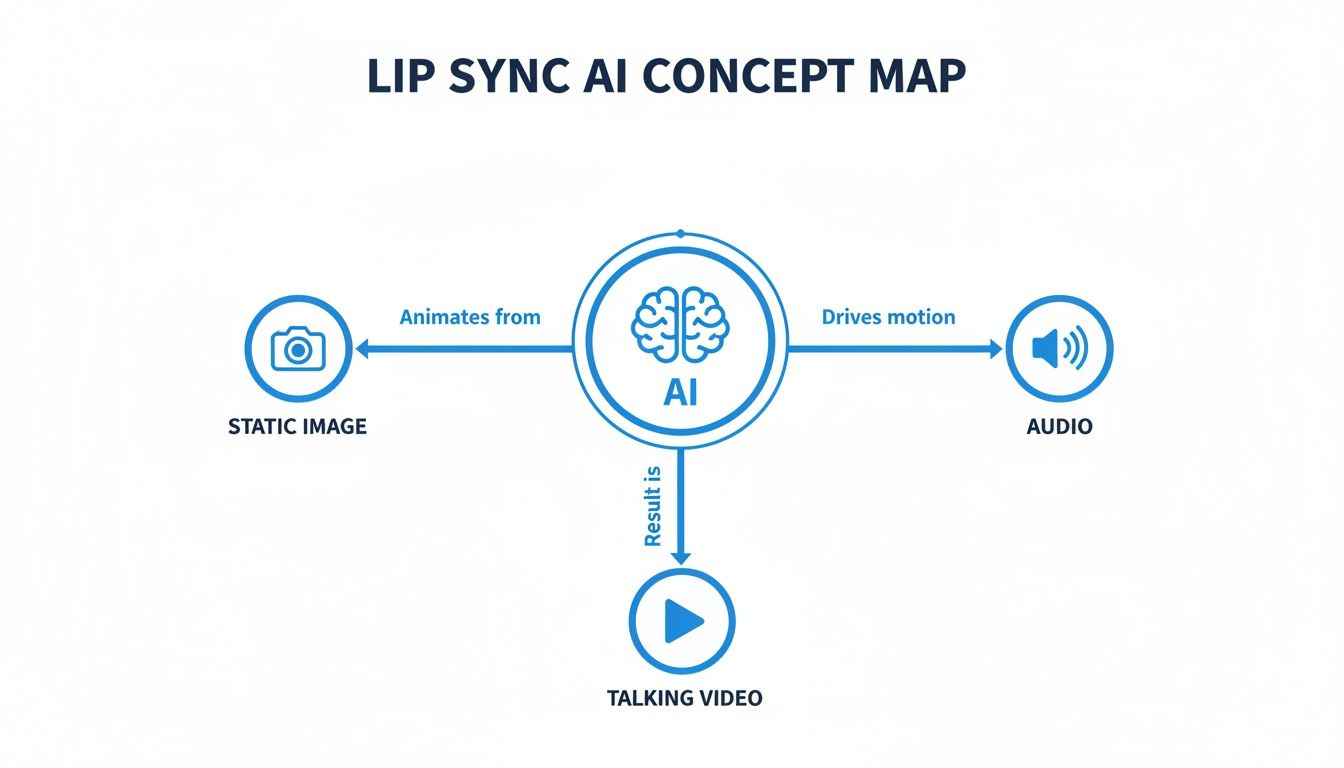
As you can see, the AI is the engine in the middle, processing both the visual and sound data to create the final animated video.
Generating Lifelike Animation with Neural Networks
With the correct sequence of mouth shapes all lined up, the last step is to bring the face to life. This is where sophisticated AI models like neural networks take over. These models have been trained on countless hours of video of real people talking, so they have a deep understanding of how human faces move.
They essentially act like digital puppeteers, generating the animation frame by frame. But the best systems do more than just move the lips. They add in all the little details that make a face feel real—subtle blinks, small head tilts, and even the occasional eyebrow raise.
This is worlds away from old-school, rigid animation. It’s a sophisticated recreation of human expression. If you're curious about how this tech applies elsewhere, you can learn more about turning any image into a moving character in our guide to the best AI picture animator tools. The final output is a fluid video where the character's timing and emotion feel genuinely believable.
How to Create Viral Content with Lip Sync AI
Knowing how the technology works is one thing, but actually using it to grow an audience is where the magic really happens. Creators are getting seriously creative with lip sync AI, pumping out content that grabs attention and builds huge followings—often without ever showing their own face.
Let's break down three powerful ways you can use this tech to make a splash on YouTube, TikTok, and Instagram.
Run a Faceless YouTube Channel
One of the coolest and most popular uses for lip sync AI is creating "faceless" channels. The idea is simple: instead of filming yourself, you take a static image—it could be a historical figure, a cartoon, or an AI avatar—and make it "speak" with a killer voiceover.
This approach works wonders for channels built around storytelling. Think about it:
- History Channels: Imagine making a portrait of Albert Einstein narrate his own discoveries.
- True Crime: You could use a shadowy, anonymous avatar to walk viewers through the chilling details of a cold case.
- Educational Content: A friendly, animated character can break down complicated subjects in a way that’s easy for anyone to understand.
By taking yourself out of the equation, you can pour all your energy into crafting amazing stories and scripts, letting you produce top-notch videos way more consistently.
Produce Authentic UGC-Style Testimonials
For anyone running a brand or an e-commerce store, user-generated content (UGC) is pure gold. It feels real, and it builds the kind of trust that gets people to buy. The only problem? Getting a steady flow of great testimonial videos is a huge headache—it's expensive and takes forever.
That’s where lip sync AI comes in. You can generate incredibly realistic, UGC-style product reviews and testimonials using AI avatars. This means you can create dozens of ad variations in minutes, not weeks, and for a tiny fraction of the cost.
Picture having a whole crew of different "customers" ready to share glowing reviews, all generated from a script you wrote. This gives you total control over your marketing message while keeping that genuine vibe that people connect with. For more inspiration on this, check out our guide on how to create a viral AI video.
Make Engaging POV Videos
Short-form video platforms like TikTok and Reels are all about first-person, point-of-view (POV) content. Lip sync AI makes it ridiculously easy to get in on this trend, again, without ever having to show your face.
You can design a unique avatar to be your online personality. This character can then star in all sorts of popular video formats, like:
- Sharing quick tips or life hacks.
- Telling funny stories or cracking jokes.
- Reacting to trending sounds or current events.
This strategy lets you build a personal connection with your audience while keeping your privacy intact. Your avatar becomes your brand, helping you grow a loyal community around your content. The time savings are huge, too; AI lip-sync is already changing the game for digital animation by cutting down tedious manual correction work from hours to just minutes. It also opens the door to producing content in multiple languages without ever needing to refilm. You can read more about how AI speeds up production on soundverse.ai.
Your First Lip Sync AI Video Step by Step
Alright, enough with the theory. Let's actually make something.
Creating your first lip-sync AI video is a lot simpler than you might think, especially when you're using a tool like Aicut that's built for creators. I'm going to walk you through the exact steps to get your first AI character talking. The whole process is designed to be quick and easy, getting you a great-looking video without the headache.
Step 1: Pick Your Character
First things first, you need a face for your video. This is the fun part where you decide on the "who." You've got two great options here:
- Upload your own photo: Got a picture of yourself, a custom-drawn character, or a royalty-free stock photo you have the rights to? Perfect. Just upload it directly.
- Use a pre-made avatar: If you don't have an image ready, no problem. Aicut has a whole library of AI-generated avatars ready to go. You can pick one that fits your vibe and start immediately.
Step 2: Give Your Character a Voice
Once you have your character, it's time to give them something to say. The audio is the engine of the whole animation—it's what tells the AI how to move the character's mouth. Just like with the visuals, you have a few ways to do this:
- Record audio on the spot: You can record your own voice right inside the tool. This is great for adding a personal, authentic touch.
- Upload an audio file: Already have a voiceover recorded? Or maybe a podcast clip or sound bite? Just upload the file.
- Use an AI voice generator: This is a game-changer for creating faceless content fast. Simply type out your script, and a high-quality AI voice will narrate it for you.
This is what the Aicut interface looks like. It’s clean and simple, letting you pair your chosen character with your audio source in just a couple of clicks.
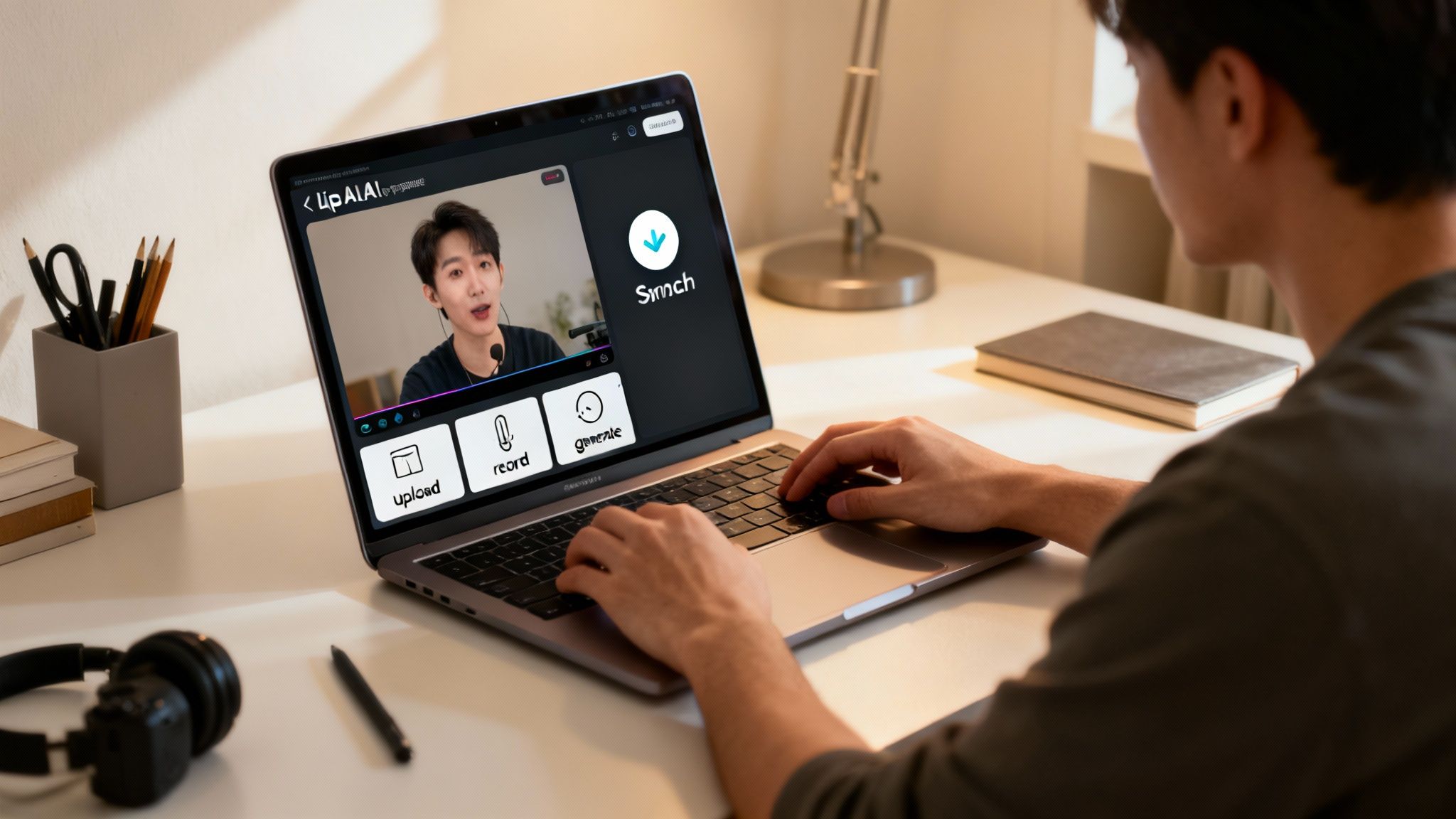
The platform lays out these key pieces—the character and the audio—so you can build your video’s foundation before the AI works its magic.
Step 3: Generate and Polish Your Video
Now for the magic moment. With your image and audio locked in, you just hit the "generate" button. The AI kicks in, analyzes every sound in your audio track, and then animates the mouth on your character to match it perfectly.
This is what makes lip-sync AI so powerful for creators. A single click automates what used to be hours of tedious, frame-by-frame animation work. You get a fully synced video in minutes, not days.
Once the AI is done, you can add the finishing touches. Maybe you want to add captions for social media, drop in some background music, or include other visual elements to make it pop.
When you're happy with how it looks, just export the video. It’s ready to be shared on YouTube, TikTok, Instagram, or wherever your audience is.
If you’re new to this space, it can be useful to understand the full capabilities of an AI Video Generator to see what other creative tools are out there. For a deeper dive, check out our guide on https://www.aicut.pro/blog/how-to-create-ai-videos.
Pro Tips for Making Your AI Videos Look Real
Anyone can make a basic lip sync AI video. But making one that looks genuinely real? That takes a little more care. The small details you focus on before you even click "generate" are what separate a decent video from one that truly fools the eye and keeps your audience hooked.
Think of it like cooking. A professional chef and a home cook might start with the same ingredients, but the final dish is worlds apart. The magic is in the prep work. With lip sync AI, your ingredients are your source image and your audio file. Getting those right is the foundation for everything that follows.
Start with High-Quality Ingredients
The old computer science motto "garbage in, garbage out" has never been more true. A blurry, poorly lit photo will always produce a muddy, unconvincing animation. To give yourself a fighting chance, you need to start with the best source materials you can find.
Your visual and audio inputs are everything:
- Choose a Clear, Front-Facing Image: The AI needs a clear view of the face, especially the mouth and jaw. Use a high-resolution photo where the person is looking straight ahead. Steer clear of pictures with heavy shadows or where the head is turned at a sharp angle.
- Ensure Crisp, Clean Audio: Any background noise, echo, or muffled words will throw the AI off, resulting in weird mouth movements. Record in a quiet room using a good microphone. If you're using an AI voice, pick a high-quality one that sounds natural.
A clean audio track is just as important as a sharp image. The AI listens to the distinct sounds (phonemes) in your recording to decide which mouth shapes (visemes) to create. Better audio leads to more precise and believable lip-syncing.
Match the Emotion and Environment
One of the biggest giveaways of an AI video is a mismatch between the audio and the visual. If your script is full of excitement but your character looks deadpan and serious, the whole thing feels off. It’s an instant deal-breaker for the viewer.
To sell the illusion, you need everything to feel consistent.
- Align Voice Tone with Facial Expression: Pick a source image that actually matches the vibe of your script. If the narration is serious, use a photo with a neutral or thoughtful expression. For an upbeat or funny script, a smiling face is the obvious choice.
- Add Subtle Background Elements: A talking head on a plain white background can look sterile and fake. Simply adding a slightly blurred background image or some subtle motion graphics can bring the scene to life and make it feel more dynamic.
- Use Captions for Polish: Adding captions doesn't just make your video more accessible; it gives it a professional touch. It helps guide the viewer's eye and reinforces your message, which is crucial on platforms where people often watch with the sound off.
Using Lip Sync AI Ethically and Legally
The creative potential of lip sync AI is genuinely exciting, but with that power comes a responsibility to use it right. As these tools become a standard part of the creator toolkit, knowing the ethical and legal lines is non-negotiable.
The biggest ethical rule of thumb is transparency. Let’s be honest, you're not always legally required to disclose AI use, but doing so builds incredible trust with your audience. A simple hashtag like #AIGenerated or a quick note in your description can make all the difference. It prevents viewers from feeling tricked and keeps your relationship with them strong.
This simple act of honesty draws a clear line in the sand between creative work and harmful deepfakes.
Navigating Legal Boundaries
When it comes to the law, things are much more black and white. You absolutely, positively must have the rights to any face you animate. You can’t just grab a photo of a celebrity, a politician, or even a stranger from social media and make them talk. That’s a fast track to serious legal problems.
To keep yourself and your projects safe, stick to these sources for your on-screen talent:
- Your own photos or images you’ve paid someone to create for you.
- Royalty-free stock images from sites where the license clearly allows for this kind of use.
- AI-generated faces, which are completely new and don't belong to any real person.
It all boils down to intent. Are you being creative or deceptive? Making an original character for your YouTube channel is a fantastic use of the tech. But creating a fake video of a real person saying something they never did? That’s a deepfake, and it’s a big problem.
By staying on the right side of these rules, you’re not just protecting yourself from legal headaches. You’re also helping build a more positive and responsible community around AI creativity. It keeps the focus where it should be—on telling great stories and pushing creative boundaries, not on spreading misinformation.
Common Questions About Lip Sync AI
Jumping into any new tech always brings up a few questions. For creators thinking about using lip sync AI, most of the curiosity boils down to quality, language support, and picking the right tool for the job.
Let's clear up the most common questions so you can get started with confidence.
Just How Realistic Can Lip Sync AI Look?
Honestly, it can be incredibly realistic. The final quality really depends on two things: the power of the AI model and the quality of the files you feed it. The best tools today don't just listen for sounds; they analyze the audio for emotion and subtle cues, which translates into far more natural and precise mouth movements.
For the most convincing results, always start with a high-resolution, front-facing image and a crystal-clear audio track. Think of it as "good in, good out." While older tech sometimes had that uncanny, robotic feel, today's top-tier AI can produce content that looks completely at home on social media feeds and in digital ads.
Can I Make Videos in Different Languages?
Absolutely. This is actually one of the biggest game-changers. The tech works by mapping sounds (phonemes) to mouth shapes (visemes), and that process works the same no matter what language is being spoken.
This means you can drop in an audio track in Spanish, Japanese, or German, and the AI will animate your character’s lips to match it perfectly. It's a massive shortcut for creators wanting to reach a global audience without the huge expense and headache of reshooting videos for every single country.
The ability to sync any language to any character face opens up a world of possibilities for localization. You can create a single visual asset and adapt it for countless markets, dramatically expanding your content's reach.
What Is the Best AI Tool for Lip Syncing?
The "best" tool really comes down to what you're trying to accomplish. Some platforms are hyper-focused on one thing, like dubbing, while others are built to handle the entire creative workflow.
If you’re a creator building a faceless channel or trying to pump out viral content for YouTube and TikTok, an all-in-one platform is almost always the better bet. You get lip-syncing, AI voice generation, trendy templates, and even scheduling tools all under one roof. It’s the difference between having a single screwdriver and having a complete toolkit for building your channel efficiently.
Ready to bring your characters to life? Aicut provides a complete suite of tools to help you create, automate, and grow your faceless channel with stunning lip sync AI videos. Start creating for free today at aicut.pro.