
The average brand now manages 4.5 social media profiles at once, and nearly 61% of users manage at least three accounts, according to SocialBee's analysis of 12,291 users. For short-form creators and agencies, that shift changes the job completely. Multi account management isn't an occasional workaround for a busy campaign. It's the operating system behind faceless channels, client portfolios, regional pages, and platform-specific content.
Manual login switching breaks first. Then naming conventions drift, scheduled posts miss their windows, analytics scatter across separate dashboards, and one compromised password puts several identities at risk. A reliable system separates account access, standardizes production, automates publishing, and gives the operator one clear view of what's happening.
Why Multi Account Management Is Now the Default
Social publishing used to revolve around one primary channel. A creator made a post, uploaded it to a single profile, and checked performance in one place. That model no longer matches how audiences discover short-form video. A creator may run several niche pages, while an agency may manage different accounts for each client, platform, language, or content format.
The scale is visible in current account-management behavior. SocialBee's analysis found that 17% of users manage seven or more accounts, while 6.4% manage 11 or more at the same time. The same report says 44.5% of all social media posts in 2025 were published on Facebook, which shows that multi-platform activity still tends to concentrate around major networks even while teams operate across several profiles.
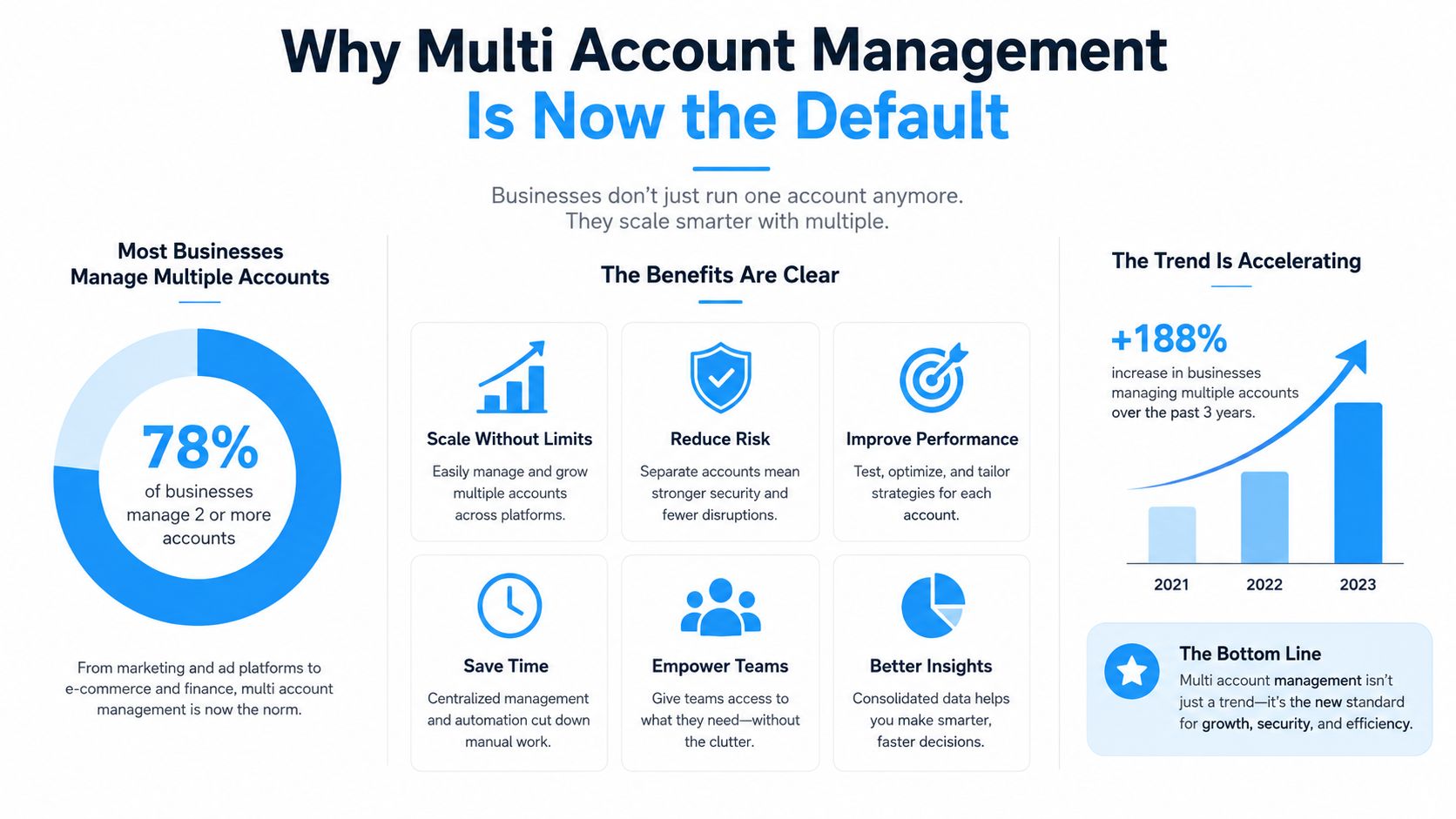
The historical direction is just as important as the current snapshot. GWI reported that internet users averaged 5.54 social media accounts globally and actively used 2.82 platforms on average, as summarized by Sprinklr's overview of managing multiple social media accounts. People's online identities had already spread across platforms, audiences, and communities. Brands and creators followed that fragmentation because each profile can serve a distinct purpose.
The workflow is the same at different scales
Running three TikTok pages and running a large client portfolio look different on an organizational chart, but the operational problems are similar. Every account needs controlled access, a content queue, publishing rules, performance tracking, and a clear owner.
The mistake is treating each account as an independent mission. That forces operators to remember too much and repeat too many actions. A command-center approach is more dependable. Content gets prepared centrally, adapted to each channel, approved through a consistent process, and dispatched without constant login switching.
For a practical operating framework, multi-account management for marketers is useful because it treats account coordination as a repeatable business process rather than a collection of isolated posting tasks. At scale, the advantage doesn't come from opening more tabs. It comes from building a system that makes the correct action easier than the risky shortcut.
Core Components of a Multi Account System
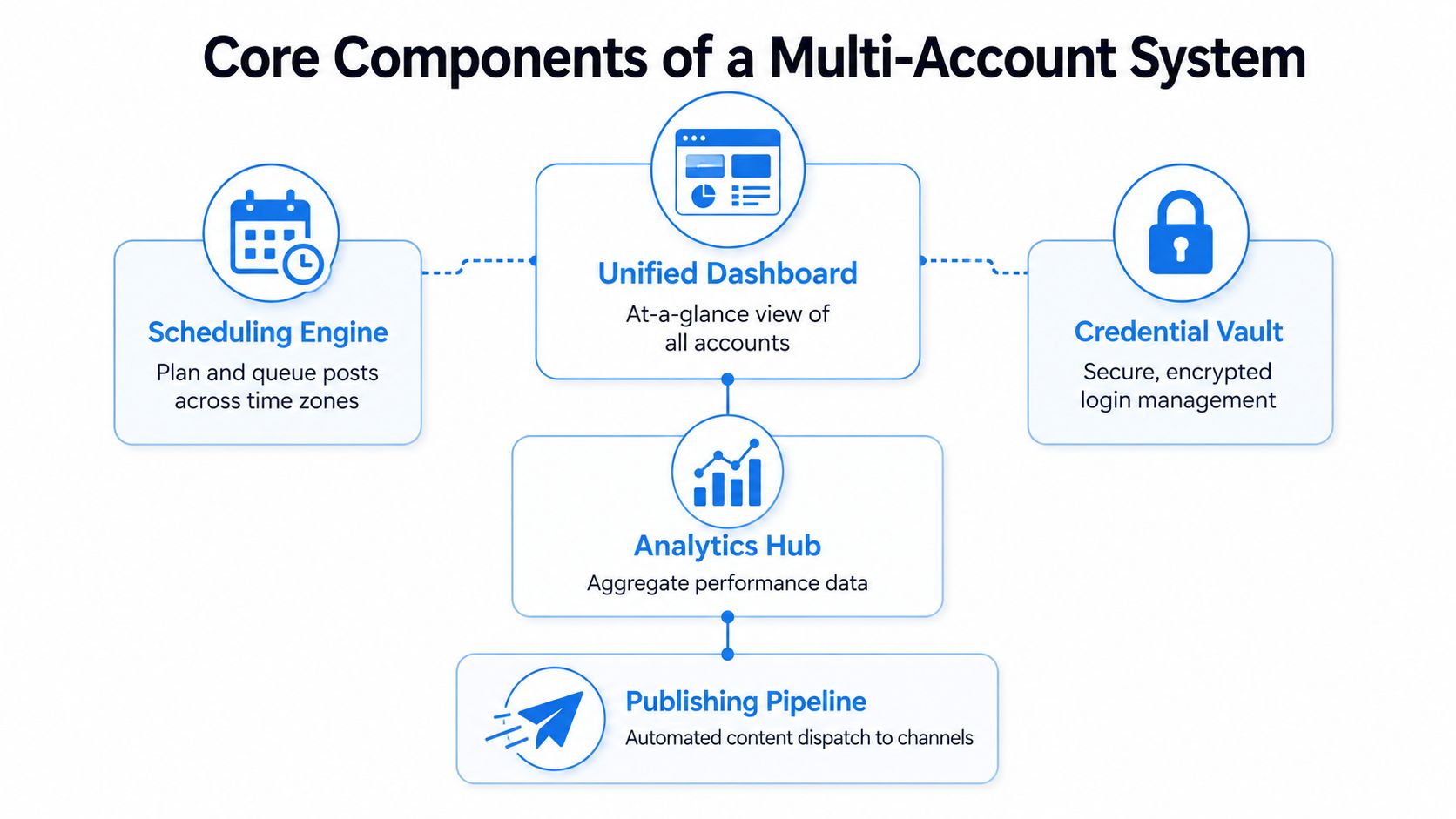
A dependable system has five connected parts. Leave one out and the rest become less useful. A dashboard without secure credentials still leaves access unmanaged. Scheduling without analytics creates a calendar that can't learn. Publishing without approval controls increases the chance of sending the wrong video to the wrong client.
Start with the command center
A unified dashboard should show account status, queued content, publishing errors, and performance signals without requiring separate logins. It doesn't need to display every metric at once. It needs to answer operational questions quickly: what's scheduled, what failed, which account needs approval, and which channel is gaining or losing momentum.
The scheduling engine turns a content plan into an executable queue. It should support platform-specific captions, media requirements, time zones, approval states, and account-level publishing rules. Short-form video teams often create one core idea and several edits. The scheduler must make those variations visible instead of hiding them inside a generic cross-posting action.
Protect access and connect the data
A credential vault stores account access securely and limits who can use it. Shared spreadsheets and chat messages fail because they make credentials easy to copy, difficult to audit, and hard to revoke when a contractor leaves.
An analytics hub brings views, watch behavior, engagement, audience growth, and conversion signals into a comparable structure. The goal isn't to flatten every platform into one identical score. It's to identify patterns while respecting the different ways TikTok, YouTube, and Instagram report performance.
The final layer is the publishing pipeline. It moves approved assets from the content library to the selected accounts, records what was sent, and surfaces errors for correction. Operators who want to think beyond social profiles can also use the Surnex guide to site scalability for a broader view of centralized management across multiple digital properties.
Practical rule: Choose the workflow first, then choose the tool. A long feature list won't repair unclear ownership, weak approvals, or scattered account data.
Common Challenges When Scaling Multiple Accounts
A solo creator running faceless channels often discovers the first failure through a simple mistake. One video gets uploaded to the wrong profile because several browser tabs look identical. The creator fixes the caption, but the larger problem remains. Without account labels, isolated sessions, and a publishing checklist, the next error is only a matter of time.
Agencies see the same issue with higher stakes. A client's product announcement may be approved for Instagram but not for TikTok. If the team uses a single bulk action without channel-level review, a draft can reach the wrong audience or appear before the client is ready.
Where the friction appears
Session conflicts happen when multiple accounts share a browser environment, stored cookies, or unclear user profiles. The operator loses track of which identity is active, and platform verification can interrupt work at the worst possible moment.
Brand inconsistency develops when creators reuse templates without account-specific rules. A faceless finance page, a gaming page, and a beauty client may all use short-form video, but their hooks, visual language, disclaimers, and calls to action shouldn't be interchangeable.
Content fatigue follows when one format gets copied too closely. Prompt cloning and templates can accelerate production, but they need variation in opening lines, pacing, characters, backgrounds, and voice. Otherwise, several accounts begin publishing content that feels like the same page wearing different clothes.
Analytics fragmentation makes weak decisions look reasonable. One account appears healthy because views are rising, while another is losing retention. If the operator checks each platform separately, cross-account patterns stay hidden.
Why enforcement risk increases
Platform enforcement becomes more difficult to manage when account activity looks coordinated in an unnatural way. Sudden changes, repeated actions, inconsistent access signals, and careless automation can create verification problems or restrictions. The answer isn't to automate every action blindly. Experienced teams automate predictable publishing while keeping account access, approvals, and exceptions under control.
The most durable fix is separation of responsibilities. A content producer shouldn't need unrestricted access to every client account. An editor should work from approved assets. A manager should review the queue and exceptions. That structure reduces both human error and the blast radius of a compromised login.
Security and Isolation Best Practices
Security in multi account management has two separate goals. The first is preventing platforms from confusing accounts that should remain distinct. The second is preventing attackers from moving from one compromised credential to several others.
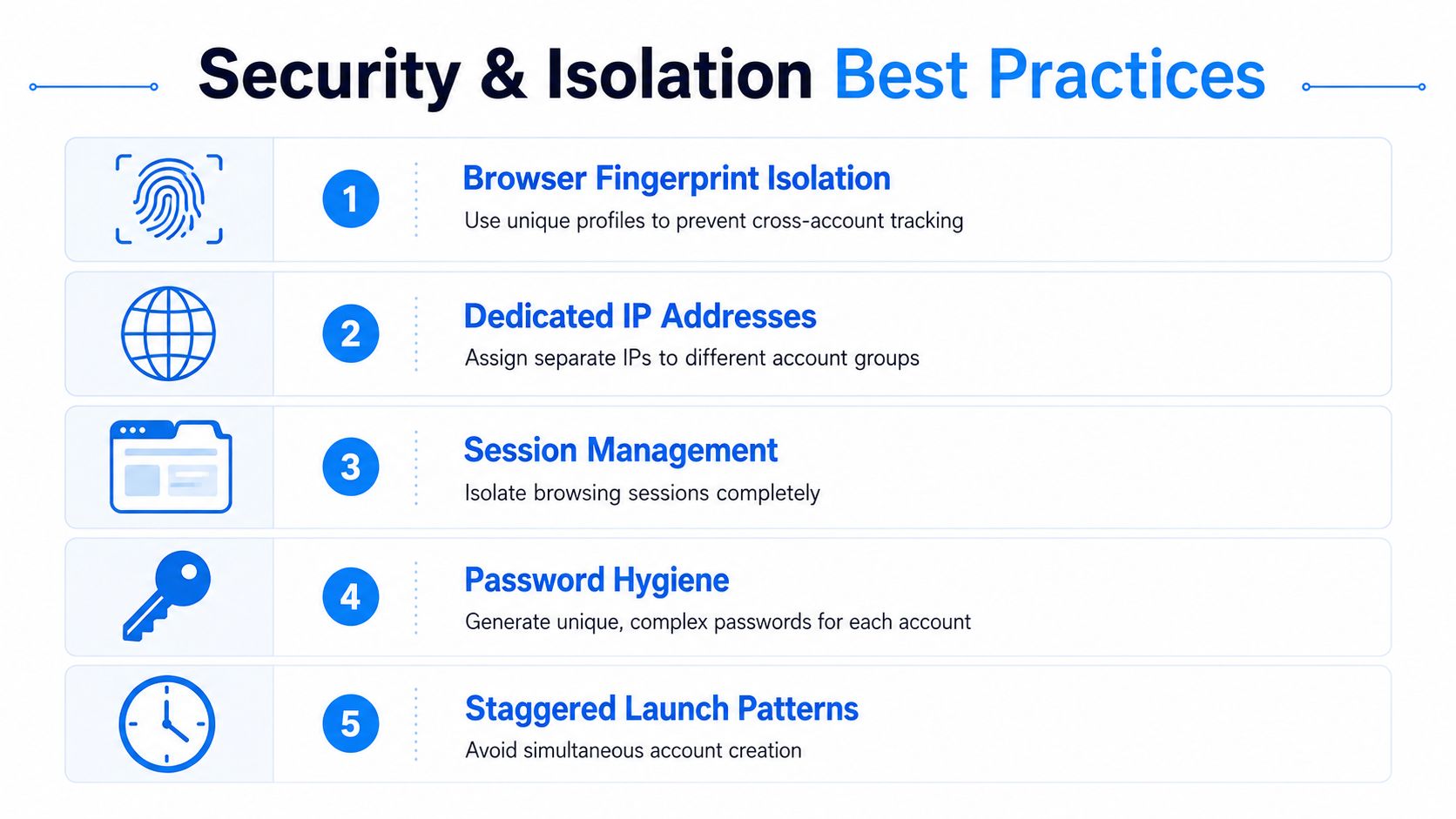
Start by giving each account, or each clearly defined account group, its own browser profile and session data. Operational guidance recommends separating browser fingerprints, IP addresses, and session data for independent account execution environments, as described in multi-account social media tool guidance from Conbersa. Shared cookies and identical browser signals make accounts easier to associate, while isolated profiles make access patterns easier to control.
Build isolation into daily access
Use dedicated IP assignments for account groups when your operating model requires them, and keep the location consistent with the account's target market. Guidance for ad-driven operations recommends matching a dedicated residential IP to the account's target country or market. Inconsistent geographic and device signals can lead to automated reviews or verification requests, especially when combined with abrupt account changes.
New account activity should also ramp gradually. Operational recommendations include opening only 3 to 5 accounts at a time, leaving 5 to 10 minute gaps between launches, and warming sessions with 2 to 5 minutes of organic activity before posting or messaging, according to Conbersa's account-management guidance. These practices reduce the appearance of a synchronized burst and give the operator time to catch a wrong profile before an action is taken.
For advertising accounts, avoid sudden budget jumps. Technical guidance from Thordata's account-safety recommendations describes starting new ad accounts at approximately $5 to $10 per day and increasing spend over 7 to 14 days. Treat that as an operational pattern, not a guarantee. Platform review systems can still react to payment, creative, identity, and account-history signals.
Treat credentials as separate identities
Never reuse passwords across creator pages, client accounts, email addresses, or ad managers. Security Magazine reports that 78% of people use the same password across multiple accounts, while 52% reuse it on at least three accounts in another 2025 report discussed in the same coverage: password reuse and multi-account risk. A unique generated password for every account prevents one credential-stuffing event from opening the entire portfolio.
Use a password manager, enable multifactor authentication wherever the platform supports it, and record recovery ownership clearly. Remove former team members promptly. Log access changes, keep backup codes controlled, and don't store credentials in content briefs or production spreadsheets.
Automation Workflows for Consistent Publishing
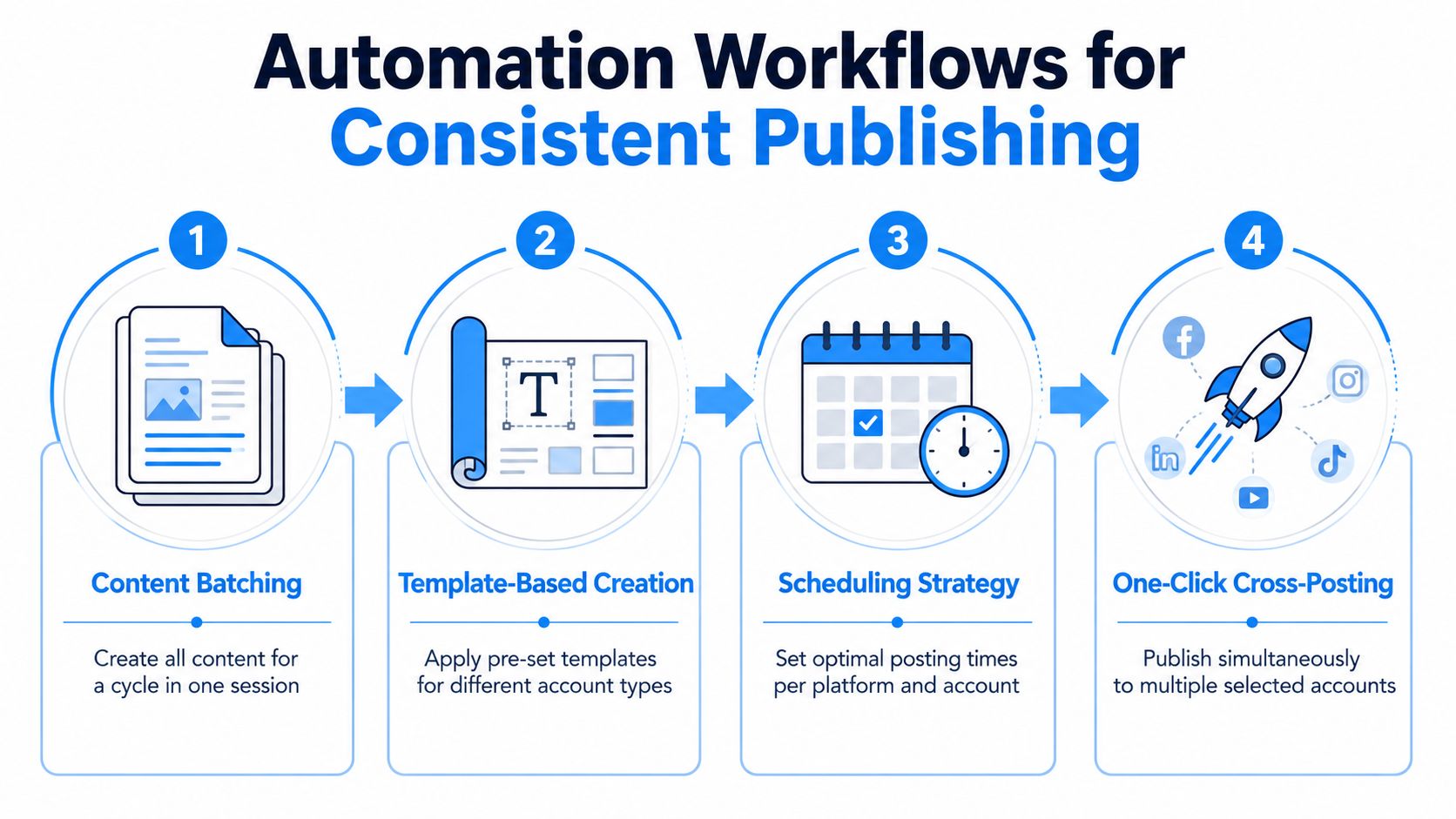
Automation works best when it removes repetition without removing judgment. The reliable pattern is to batch creative work, adapt approved formats, schedule channel-specific versions, and send content through a controlled publishing queue.
Start with a content batch. Define the ideas, target audience, hook style, visual format, voice, and call to action before producing the videos. For an agency, the brief should also include client restrictions, required disclosures, prohibited claims, and approval status. That information belongs beside the asset, not in someone's memory.
Use templates without flattening every account
Templates are valuable when they preserve the structure of a successful format while allowing controlled variation. Create separate templates for faceless explainers, UGC-style product clips, story-driven videos, and character-led pages. Lock the elements that must remain consistent, such as brand colors, logo placement, voice style, and disclaimers. Leave hooks, examples, characters, and visual settings editable.
Prompt cloning can speed up adaptation when a format performs well. Clone the underlying prompt structure, then change the subject, setting, character, and audience angle for each account. Character swapping and background changes are useful when a team wants to keep a recognizable visual grammar without producing identical videos.
Schedule by account, not just by platform
A single cross-posting time rarely fits every profile. Build queues around each account's audience behavior, content format, and campaign goal. Then create approval gates for sensitive posts, paid creatives, and client work.
Automation should handle dispatch. People should still own the brief, the approval, and the exception.
A practical sequence is:
- Batch ideas: Prepare a cycle of related concepts in one production session.
- Generate variations: Apply account-specific templates and adapt prompts.
- Review assets: Check brand fit, claims, captions, subtitles, and destinations.
- Schedule and monitor: Publish through selected accounts, then inspect failures and early signals.
Creators comparing platforms should compare social media automation platforms against this workflow rather than judging tools by the number of integrations alone. For a direct publishing walkthrough, see how to automate social media posts.
The following video can help operators visualize a repeatable automated publishing process.
Choosing the Right Tools and Integrations
The right stack depends on account volume, production complexity, approval requirements, and the number of people touching the workflow. A solo creator may need fast generation, simple scheduling, and a clean account switcher. An agency needs permissions, client workspaces, audit history, reusable templates, and reporting that separates each brand.
Don't confuse platform coverage with operational fit. A tool may connect to every major network but still force manual caption edits, weak approval controls, or disconnected analytics. For short-form video, inspect the path from idea to published asset. If the team has to download, rename, re-upload, and manually confirm each version, the integration isn't doing enough.
| Feature Category | Essential for Solo Creators | Essential for Agencies |
|---|---|---|
| Unified dashboard | Account status, queues, and basic performance in one view | Workspaces, permissions, client separation, and exception tracking |
| Video creation | Fast templates, voiceovers, resizing, and prompt reuse | Brand-specific templates, reusable production standards, and review stages |
| Scheduling | Account-level queues and platform-aware publishing | Approval workflows, campaign calendars, and role-based publishing |
| Analytics | Views, engagement, retention signals, and audience trends | Cross-client reporting, export options, comparisons, and account-level ownership |
| Integrations | Direct connections to chosen channels | Connections between creation, publishing, storage, reporting, and collaboration tools |
| Security | Password manager, multifactor authentication, and isolated sessions | Credential vault, access logs, revocation process, and controlled team permissions |
Match the stack to the operator
Creators should prioritize low-friction production. If a tool takes longer to configure than it saves during publishing, it won't survive daily use. Agencies should prioritize governance before novelty. A flashy AI feature has limited value if the team can't verify which version was approved or identify who published it.
Platform APIs and native limitations also matter. Check whether the tool supports the media formats, captions, thumbnails, music rules, account types, and publishing actions your channels require. Then test a small workflow with real assets before migrating the entire portfolio.
For a broader agency-focused evaluation, social media management tools for agencies provides a useful comparison framework. The best integration is the one that removes a repeated handoff while preserving account-level control.
Setting Up Aicut for Multi Account Operations
Aicut fits into a multi account workflow as a combined video-production and publishing layer. Its stated workflow allows users to connect TikTok, YouTube, and Instagram accounts, generate videos, schedule campaigns, and publish from a unified dashboard. That structure is useful when the same operator manages several faceless channels or produces recurring creative for clients.
Begin by connecting the accounts you're authorized to manage. Name each connection by brand, niche, platform, and market so the publishing destination is obvious. Keep those connections separate from the content brief. A video can be suitable for several channels, but the caption, aspect ratio, title, hashtags, and call to action may need platform-specific treatment.
Create a repeatable campaign
Set up an automated video campaign around a defined content format. For a faceless channel, that might mean a consistent narration style, recurring visual structure, and a queue of topic prompts. For an e-commerce client, it could mean UGC-style influencer clips with product-specific scripts, backgrounds, and calls to action.
Aicut's AI templates support formats such as Cheating Fruits, AI Skeleton Stories, Motion Control, and AI Influencers. Prompt cloning can reverse-engineer a source format so the team can adapt its prompt structure, while character swapping and background changes allow variations without a reshoot. Built-in voiceovers, scheduling, and one-click posting connect production to distribution.
Review before dispatch
Use the dashboard to confirm the selected accounts, inspect the generated videos, and verify the publishing schedule. Track views across connected channels from the same operating surface, but keep decisions account-specific. A format that suits a YouTube Short may need a different opening or caption before it reaches TikTok or Instagram.
For a more detailed product workflow, see how Aicut automates video creation and posting. The important operating principle is simple. Generate centrally, adapt deliberately, approve clearly, and publish only to the accounts selected for that campaign.
KPIs and Metrics That Actually Matter
A multi-account operation needs more than a total view count. Aggregate data is useful only when it helps you decide what to produce, where to publish it, and which accounts deserve more attention.
Start with content efficiency. Track how many approved videos each account receives, how often the publishing queue is completed, and where production stalls. Content velocity is an operational metric, not a vanity metric. If an account has a strong concept pipeline but repeatedly misses publication because exports or approvals take too long, the bottleneck is visible before performance declines.
Next, compare quality signals at the account level:
- Retention: Identify where viewers stop watching and compare that pattern across similar formats.
- Engagement quality: Separate meaningful comments, saves, shares, and profile actions from passive exposure.
- Audience growth: Review whether each account attracts the intended audience rather than just accumulating followers.
- Conversion behavior: Track clicks, leads, product actions, or other defined outcomes when the account has a commercial goal.
- Cross-account patterns: Look for hooks, characters, topics, and pacing choices that perform consistently across related channels.
Set a baseline for each account using its own history and objective. A client acquisition page, an entertainment page, and a test channel shouldn't share one universal success threshold. Use a unified dashboard to spot patterns, then inspect the original platform analytics before changing the creative strategy.
Review the portfolio on a fixed cadence. Promote formats that repeatedly produce useful signals, revise those with weak retention or poor audience fit, and pause accounts that consume production capacity without a clear purpose. Multi account management becomes profitable when reporting leads to allocation decisions, not when it merely produces a larger spreadsheet.
Aicut helps creators and agencies generate short-form videos, organize connected TikTok, YouTube, and Instagram accounts, schedule campaigns, and publish from one dashboard. Visit Aicut to build a more controlled multi account workflow for faceless channels, UGC-style creative, or client publishing operations.