
You approve a video, schedule it, and move on. An hour later, someone on your team notices the captions are wrong in the first five seconds. The voiceover says one thing, the on-screen text says another, and the thumbnail uses an old logo. Nothing is catastrophic. But it still hurts. You either pull the post and lose momentum, or leave it up and look sloppy.
The same pattern shows up outside content. A small product defect slips through packing. An ecommerce listing goes live with the wrong variant image. An AI-generated clip renders with a strange hand shape in one scene and nobody catches it before publishing. These aren't dramatic failures. They're the kind that erode time, trust, and margin.
Teams often don't have a quality problem because they don't care. They have one because manual review doesn't scale. People get tired. They skim. They assume someone else checked it. Even audience feedback becomes hard to process once volume grows. If you're trying to spot recurring issues in your content, this guide on the best way to analyze YouTube comments is useful because it shows why manual review breaks down once response volume gets large.
From Manual Errors to Automated Excellence
A solo creator can get away with manual checking for a while. Open the export, watch it once, skim captions, confirm the title, publish. That works when you're posting occasionally and every asset lives in your head.
Then output increases.
A brand starts publishing daily short-form clips across TikTok, YouTube Shorts, and Instagram Reels. A freelancer manages multiple client accounts. A faceless channel uses AI to generate scripts, voiceovers, images, hooks, and edits at speed. The process gets faster, but quality becomes less predictable.
Where small misses turn expensive
One missed check often creates a chain reaction:
- A caption error makes the content feel rushed, even if the idea is strong.
- A visual glitch lowers watchability because viewers don't trust what they're seeing.
- A wrong product detail creates support tickets, refunds, or angry comments.
- An inconsistent brand element makes the account look fragmented instead of professional.
Manual review also creates a hidden management tax. People spend time on repetitive checks instead of doing work that improves performance, like testing new hooks, refining storytelling, or reviewing audience patterns.
Bad quality control rarely looks dramatic at first. It usually looks like rework.
In creative work, that rework shows up everywhere. Re-exporting a video because one scene uses the wrong background. Rewriting a description because a compliance line was omitted. Rebuilding a batch because your prompt produced inconsistent visuals across episodes.
Why this keeps happening
The root issue isn't effort. It's consistency under volume.
Humans are good at judgment. We're not good at checking the same details, in the same order, with the same attention, across dozens or hundreds of outputs. That's where quality control automation starts to matter. It turns quality from a last-minute scramble into a repeatable system.
What Exactly Is Quality Control Automation
Quality control automation is the use of software, rules, sensors, and AI to check whether work meets a standard without relying only on manual review.
The easiest way to think about it is this. It's like hiring a digital inspection team that never gets bored and always uses the same checklist. In a factory, that team might inspect parts. In a content workflow, it might inspect subtitles, scene timing, aspect ratio, branding, audio levels, metadata, and publishing settings.
A simple analogy that makes it click
Manual QC is like having one person at the end of an assembly line glance at every tenth item.
Automated QC is like placing smart checkpoints all along the line so every item gets checked, every time, against the same rules.
That difference matters. Manual checks tend to be selective and inconsistent. Automated checks are systematic. They can flag the same issue on the first item and the five-hundredth item without getting tired.
What it includes in practice
Automation doesn't have to mean robots and giant production systems. In most businesses, it starts with straightforward checks such as:
- File validation: Is the video in the correct format, duration, and resolution?
- Content verification: Do captions match the approved script?
- Brand checks: Are the latest logo, font, colors, and product names used?
- Workflow triggers: If a file fails review, does it get routed back automatically?
- Publishing checks: Are title, hashtags, links, and schedule fields complete?
A creator might use automation to reject clips that exceed a platform's time limit. An agency might use it to catch missing disclaimers before client delivery. An ecommerce brand might use it to compare approved product copy against the final ad creative.
Practical rule: If your team checks the same thing the same way more than a few times a week, it's a candidate for automation.
What automation is not
Many managers encounter a common hurdle: they hear "automation" and assume it means replacing people.
Usually, it means the opposite. Good quality control automation removes repetitive checking so people can spend more time on judgment, diagnosis, and improvement. In industrial settings, automated quality control systems can improve inspection reliability, capture large volumes of data at high throughput, reduce bottlenecks caused by human error, and free qualified employees to focus on higher-value analysis while helping teams detect defects faster and reduce major quality costs, according to Creaform's explanation of automated quality control systems.
That same principle applies to creators and marketers. Let software handle the repeatable checks. Let people handle the creative calls.
Key Business Benefits of Automated QC
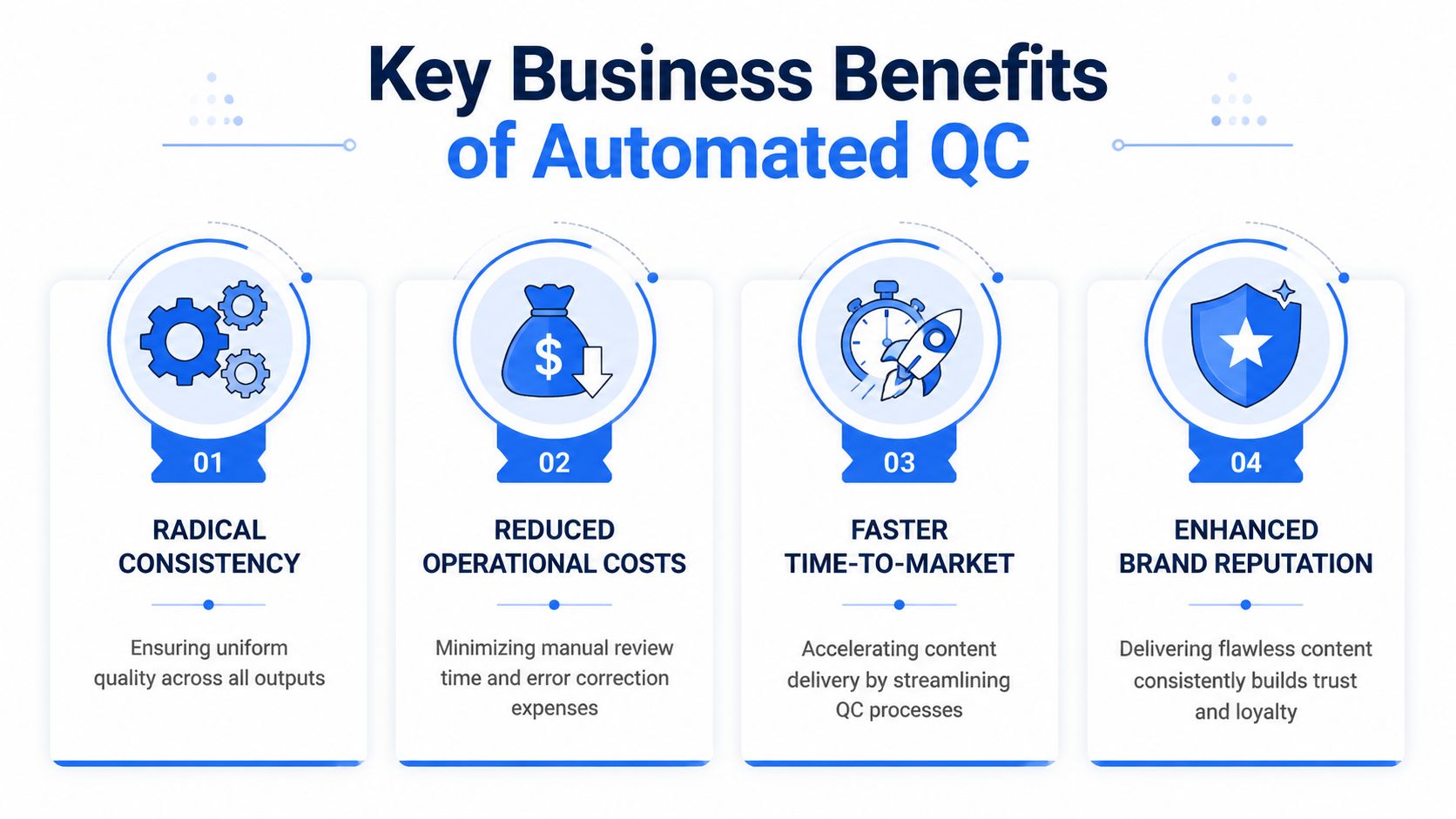
The business case for quality control automation isn't really about novelty. It's about protecting output while increasing speed.
Consistency builds trust
When every video, product, or campaign passes through the same standards, your audience gets a steadier experience. They may never say, "Great job maintaining formatting consistency," but they absolutely notice when things feel off.
For brands, consistency becomes part of the product. For creators, it affects whether the account feels polished or random. Automated QC helps keep the small details aligned even when output grows.
Catching mistakes earlier reduces cost
The cheapest error to fix is the one you catch before it goes live.
If your process identifies a broken caption file, mismatched scene order, or missing CTA before publishing, the fix is usually small. If the same issue gets discovered after launch, the cost expands. You spend time re-editing, re-uploading, answering comments, replacing links, or calming a client.
A manual process often finds problems late because review happens near the end. Automated QC can check at multiple stages, so the team doesn't keep building on top of a flawed asset.
Speed improves when fewer files bounce back
Some managers worry that more QC means slower output. In reality, bad QC is what slows output.
A strong automated system reduces the back-and-forth that drags production down. Files don't keep returning to editors because the naming is wrong, the export preset changed, or required fields are missing. The workflow becomes smoother because fewer basic issues survive to the final round.
Better data leads to better decisions
One of the most overlooked benefits is visibility.
When you automate checks, you also create a record of what failed, where it failed, and how often it failed. That turns quality from a vague complaint into something you can manage. You can spot patterns like repeated subtitle drift, recurring asset mismatches, or uploads failing on the same platform settings.
A short comparison makes the shift easier to see:
| Process style | What usually happens |
|---|---|
| Manual QC | Errors are found inconsistently, often late, and usually through rework |
| Automated QC | Errors are checked the same way every time and flagged closer to the source |
Reputation gets protected quietly
A polished operation doesn't just come from better ideas. It comes from fewer avoidable mistakes.
Whether you're shipping physical products or publishing AI-generated shorts, quality control automation helps you protect the thing people remember most. Reliability. If viewers know your content looks clean, sounds right, and feels intentional, they're more likely to trust the next piece too.
The Technologies That Power Modern QC
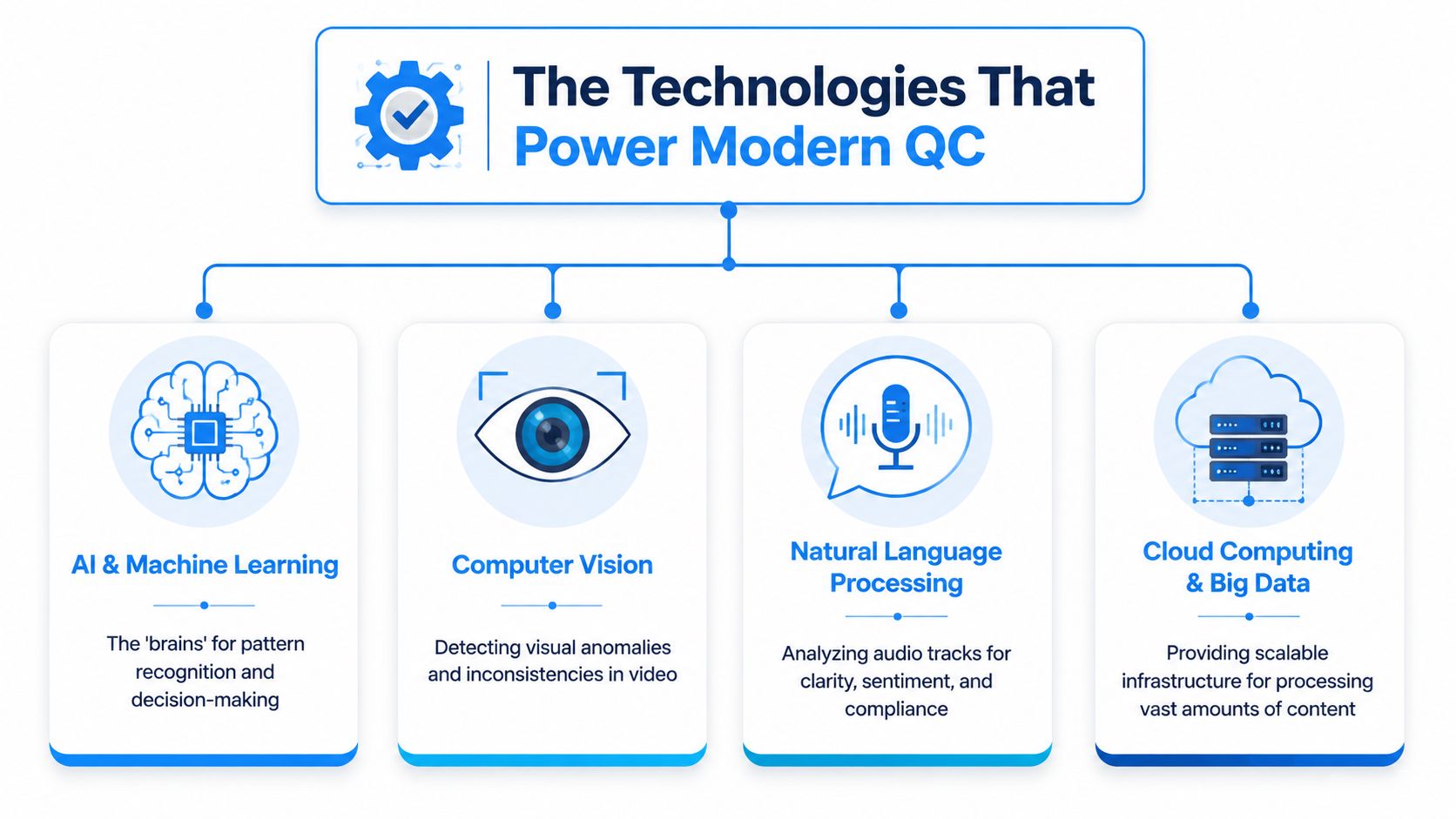
Quality control automation sounds abstract until you separate it into the systems that perform the work. Most modern QC setups combine a few different technologies, each handling a different job.
AI and machine learning as the decision layer
AI and machine learning are the pattern-recognition layer. They don't just check whether a box is filled. They look for signals that something is unusual.
In manufacturing, that might mean identifying a defect pattern. In content, it might mean spotting subtitle timing drift, voiceover mismatch, duplicate scenes, or unexpected visual artifacts. The system learns what "normal" looks like and flags deviations worth reviewing.
Often, people confuse automation with rigid rules. Rule-based systems are useful, but AI becomes valuable when the problem isn't binary. It helps when quality depends on patterns, context, or subtle inconsistency.
Computer vision as the visual inspector
Computer vision gives software eyes.
If your phone can recognize a face in a photo, you've already used a simple version of it. In QC, computer vision checks what's visible on screen. That could be label placement on packaging, frame composition in an ad, scene continuity in a video, or whether an AI-generated image includes strange anatomy or warped objects.
For video teams, this is one of the most practical layers. It can inspect thumbnails, brand overlays, text placement, and frame-level defects much faster than a person scrubbing through every second manually.
Language and cloud systems in content workflows
Content teams also rely heavily on systems that inspect language and process large media files at scale.
- Natural language processing: Helps analyze scripts, captions, descriptions, and spoken content for clarity, policy issues, missing keywords, or mismatch between approved copy and final output.
- Cloud computing and big data: Give teams the infrastructure to process lots of files, store version history, and run automated checks without depending on one local machine.
If your operation handles streaming, delivery quality matters too. Understanding how adaptive bitrate streaming works helps clarify why a video that looks fine in export may still create a poor viewing experience across different devices and connection conditions.
For teams building AI-heavy content pipelines, this overview of AI content creation tools is a helpful reference point because it shows how multiple creation systems fit into one workflow.
Good QC technology doesn't work as a single tool. It works as a stack.
How they fit together
A modern system might work like this:
- An AI model detects that a generated clip looks different from the rest of the series.
- Computer vision identifies the visual issue in specific frames.
- Language processing checks whether on-screen text matches the script.
- Cloud systems log the failure, notify the editor, and route the asset back for correction.
That combination is why modern quality control automation feels so much more useful than an old-fashioned checklist. It's not one feature. It's a coordinated inspection process.
An Actionable Roadmap for Implementation
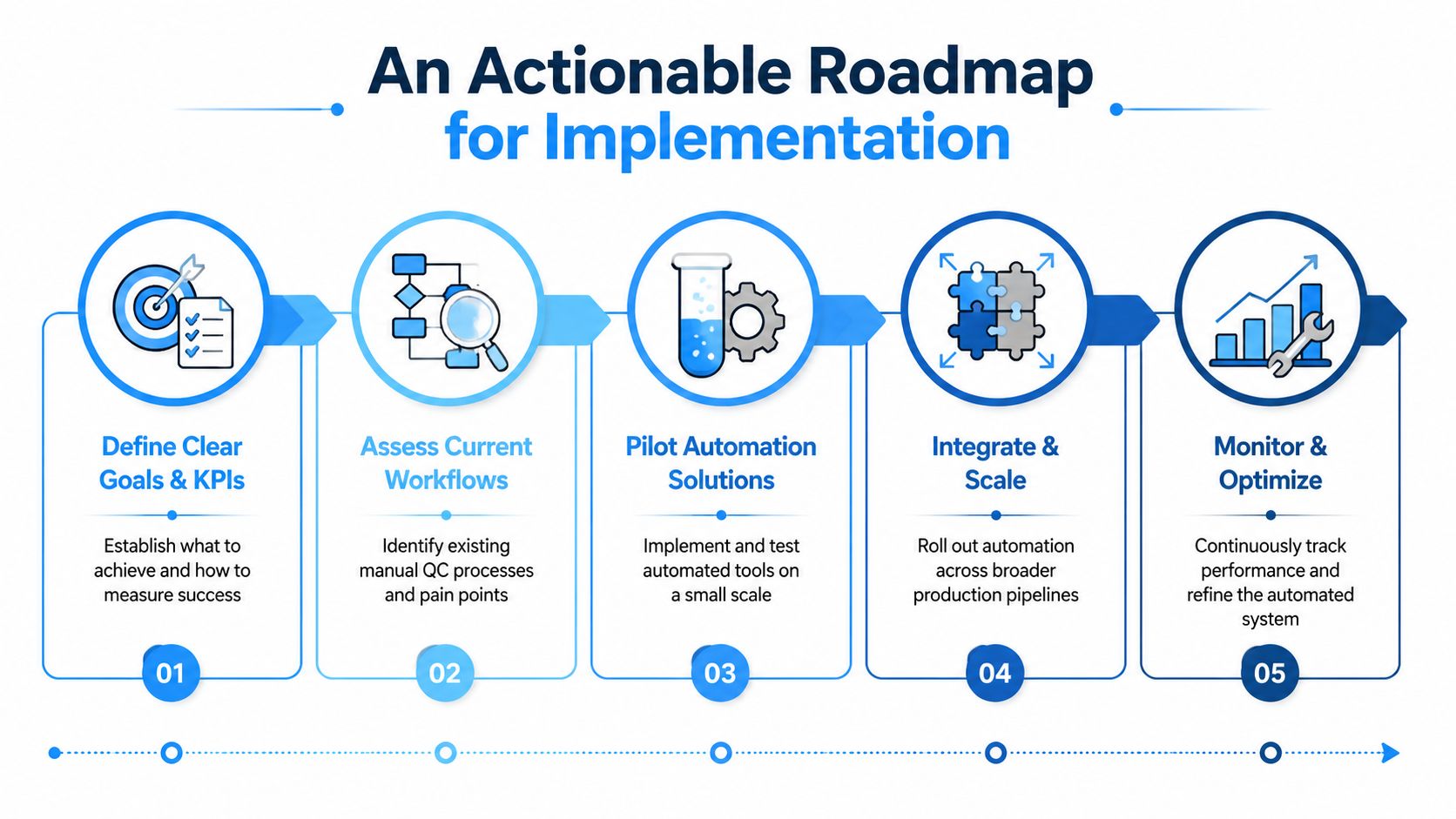
Organizations often fail with quality control automation because they try to automate everything at once. That's a mistake. The best implementations start narrow, prove value, and expand from there.
Start with one quality problem
Pick the issue that creates the most rework. Not the most interesting issue. The most expensive or annoying one.
For a creator, that might be caption errors. For a social team, it might be broken publishing metadata. For an ecommerce brand, it could be mismatched assets between approved ad copy and final exports.
A useful first-pass filter looks like this:
- Frequent: It happens often enough to matter.
- Repeatable: The check follows a clear rule.
- Costly when missed: It creates rework, confusion, or visible mistakes.
- Easy to validate: You can tell whether the automation caught it correctly.
Define success before choosing tools
Don't start with software. Start with a decision.
Ask what "better" means in your context. Fewer failed uploads? Fewer client revisions? Faster approval cycles? More reliable brand consistency across channels?
Then decide what you'll track. If you skip this, you'll end up with automation that feels busy but doesn't solve a business problem.
If you can't describe the failed check in one sentence, you're not ready to automate it.
Run a pilot before expanding
Build a small trial around one workflow. Keep the scope tight. One team, one content type, one set of checks.
For example, you could automate review for short-form videos only. The system checks duration, subtitle presence, approved logo version, and required description fields before scheduling. That's enough to learn where the automation works and where it still needs human review.
A practical implementation path often looks like this:
- Map the current workflow so you know where quality checks already happen.
- Choose one checkpoint where automation can prevent obvious failures.
- Test on a limited batch rather than your full operation.
- Review false positives and misses with the people who do the work.
- Refine the rules before scaling to more asset types.
Keep explainability in mind
This matters more than many teams expect.
If your system uses AI to classify defects or flag content, people need to understand why it made the decision. That becomes especially important in regulated environments. One source notes that 78% of manufacturers in regulated sectors cite "black box" AI decisions as a major barrier to adoption, and it argues that explainable AI helps provide audit-ready reasons for defect classifications, which matters for standards and accountability in environments affected by ISO 27001 and EU GDPR expectations, as discussed in this piece on explainable AI in automated quality control.
Even if you're not in a regulated sector, the lesson still applies. Teams trust systems they can interpret. If an automated check fails a video, your editor should know what triggered the failure.
Scale only after the workflow settles
Once the pilot is stable, add adjacent checks. Don't pile on every possible rule in week one.
A creator who automates subtitle validation can later add thumbnail review, intro hook compliance, naming conventions, and publishing checks. A brand that starts with ad asset validation can later automate approval routing and final metadata verification.
If you're planning AI-heavy publishing at scale, this guide on how to automate AI video gives a useful picture of where automation fits across creation and distribution, not just inside editing.
The big idea is simple. Build confidence first. Expand second.
QC Automation in AI Video Production
AI video production creates a new kind of quality problem. You can produce more content faster, but you also create more chances for subtle errors to slip through. A scene may look good at a glance and still contain timing drift, style inconsistency, broken captions, or visual oddities that hurt retention.
A manual review process struggles here because AI outputs often fail in small, irregular ways. One clip has a strange transition. Another has a mismatched background. A third has text that runs too long for the scene. None of these issues are hard to spot individually. They become hard when you're publishing repeatedly across channels.
What automated QC looks like for creators
In an AI video workflow, quality control automation can sit at several points:
- Before generation: Check that prompts, reference assets, brand terms, and scene requirements are complete.
- After generation: Scan output for formatting issues, subtitle mismatch, duration limits, or visual anomalies.
- Before publishing: Verify titles, hashtags, descriptions, account selection, and schedule windows.
This is especially useful for faceless channels and ad teams producing in batches. If you're generating multiple clips from similar templates, consistent automated checks can keep the whole batch on-brand without forcing someone to review every frame manually.
Practical use cases that matter
A creator making story-based shorts might use automated QC to confirm:
| Check | Why it matters |
|---|---|
| Voiceover sync | Prevents scenes from feeling off or confusing |
| Asset validation | Ensures generated images match the theme and style |
| Platform length rules | Avoids publishing clips that don't fit channel requirements |
| Caption review | Catches spelling, timing, or missing subtitle issues |
| Metadata checks | Stops publishing mistakes before they go live |
Another strong use case is template governance. If your team uses recurring formats like product demos, AI influencers, or serialized visual stories, automation can confirm that every episode includes required elements and avoids outdated assets.
Later in the workflow, a final quality pass can also improve the polish of the actual media. If you're exploring ways to sharpen exports, stabilize visuals, or improve perceived clarity, this breakdown of an AI video quality enhancer is a useful companion topic because media quality and QC are closely linked.
Here's a practical example of the broader workflow in motion:
The fastest AI content teams aren't just generating faster. They're rejecting bad output earlier.
Where people get confused
Many creators assume QC automation is only for post-production. It isn't.
The biggest gains often happen upstream. If you validate inputs before generation, you reduce downstream cleanup. If you enforce publishing rules before scheduling, you prevent public mistakes. Quality isn't one final inspection. It's a chain of smaller checks that protect the finished video.
Your Next Step in Quality Automation
Quality control automation isn't just for factories, labs, or enterprise production floors anymore. If you publish content, manage brand assets, ship products, or run repeatable workflows, you already have quality checks. A key question is whether those checks depend too much on memory and manual effort.
The strongest reason to automate QC is simple. It protects output while freeing people to do better work. You catch mistakes earlier, reduce rework, and keep quality stable as volume grows. That matters whether you're reviewing parts on a line or AI shorts in a content calendar.
Start with one repetitive check that keeps causing trouble. Maybe it's caption accuracy. Maybe it's export settings. Maybe it's product image validation or publishing metadata. Pick one. Define the rule. Test a small automation around it.
Don't aim for a perfect system on day one. Aim for one less preventable mistake this week.
If you're creating short-form content at scale, Aicut is built for that reality. It helps creators and brands generate, edit, schedule, and automate faceless videos faster, so you can spend less time wrestling with repetitive production steps and more time improving the ideas that drive channel growth.